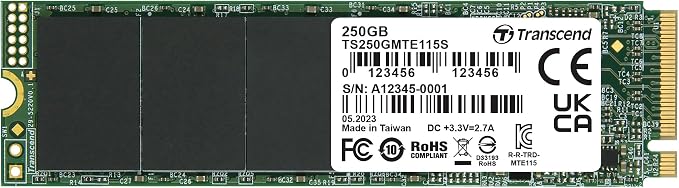
SPEED PREVAILS Introducing the WD Black NVMe SSD the driving force behind everything you do. Featuring the innovative Western Digital NVMe SSD storage architecture, it s where blazing speed, top tier performance, and Western Digital 3D NAND technology combine. With up to 600TBW and 1.75M hours MTTF, the WD Black NVMe SSD is the virtually invincible SSD you can rely on.
SPEED PREVAILS Introducing the WD Black NVMe SSD the driving force behind everything you do. Featuring the innovative Western Digital NVMe SSD storage architecture, it s where blazing speed, top tier performance, and Western Digital 3D NAND technology combine. With up to 600TBW and 1.75M hours MTTF, the WD Black NVMe SSD is the virtually invincible SSD you can rely on.
in 3 offers
The lowest price for Wd - Black 250Gb High-Performance Nvme Pcie Gen3 (Wds250G2X0C) right now is $89.00 at www.i-tech.com.au, compared across 3 retailers.
The all-time low was $79.00 on 30 May 2023 — today's price is 13% above the lowest ever. That's a little above the best price we've seen.
Prices last updated 18 Sept 2026.
Wd - Black 250Gb High-Performance Nvme Pcie Gen3 (Wds250G2X0C)
SPEED PREVAILS Introducing the WD Black NVMe SSD the driving force behind everything you do. Featuring the innovative Western Digital NVMe SSD storage architecture, it s where blazing speed, top tier performance, and Western Digital 3D NAND technology combine. With up to 600TBW and 1.75M hours MTTF, the WD Black NVMe SSD is the virtually invincible SSD you can rely on.
SPEED PREVAILS Introducing the WD Black NVMe SSD the driving force behind everything you do. Featuring the innovative Western Digital NVMe SSD storage architecture, it s where blazing speed, top tier performance, and Western Digital 3D NAND technology combine. With up to 600TBW and 1.75M hours MTTF, the WD Black NVMe SSD is the virtually invincible SSD you can rely on.
Last updated at 18/09/2026 04:26:37
Western Digital Black Sn750 250Gb Nvme M.2 (2280) SSD Wds250G3X0C
Save $10 for orders over $500
Western Digital Black 250 Gigabyte NVMe M.2 Solid State Drive
Western Digital Black WDS250G2X0C 250GB PCIe Solid State Drive
originally posted on neweggbusiness.com
The new WD Black 500 G NVMe SSD is most certainly the winner. I wish I had more drives available to test it against. But it is certainly the winner. To be fair, when you get to these speeds the experience is pretty much the same. I mean using the computer in day to day tasks you can’t tell the difference between the old and new WD black drives unless you do a lot of transferring files or the like. Office documents don’t spring open twice as fast and watching Youtube videos don’t magically go twice as fast. So what you have here is an SSD that’s as fast as a Samsung 960 Pro that’s cheaper. I actually cannot find any fault with this drive. WD has a super-fast NVMe drive that’s cheaper than Samsung’s best. Saving some money is always a good thing. You can bet I’m going ... MoreThe new WD Black 500 G NVMe SSD is most certainly the winner. I wish I had more drives available to test it against. But it is certainly the winner. To be fair, when you get to these speeds the experience is pretty much the same. I mean using the computer in day to day tasks you can’t tell the difference between the old and new WD black drives unless you do a lot of transferring files or the like. Office documents don’t spring open twice as fast and watching Youtube videos don’t magically go twice as fast. So what you have here is an SSD that’s as fast as a Samsung 960 Pro that’s cheaper. I actually cannot find any fault with this drive. WD has a super-fast NVMe drive that’s cheaper than Samsung’s best. Saving some money is always a good thing. You can bet I’m going to put this SSD into my new production machine.
originally posted on newegg.com
Newegg first gave me a WD Blue M.2 2280 drive. That drive I scored low because it's cost difference from the black was very little and it only supported SATA protocol. So when I got a chance to review the black, I was happy to be able to up the score simply by it being a true NVMe drive. Perceived performance during normal use was simply that it was a fast SSD. Loading Windows, booting, launching applications and launching games all felt great. I didn't have any weird compatibility issues and nothing to suggest WD drives were inferior in any way to the competition. However, there is competition and when you start looking closer, I don't know why this drive gets the nod. Take a 970 Evo and see that it's cost is similar, it's performance is similar and know that that ... MoreNewegg first gave me a WD Blue M.2 2280 drive. That drive I scored low because it's cost difference from the black was very little and it only supported SATA protocol. So when I got a chance to review the black, I was happy to be able to up the score simply by it being a true NVMe drive. Perceived performance during normal use was simply that it was a fast SSD. Loading Windows, booting, launching applications and launching games all felt great. I didn't have any weird compatibility issues and nothing to suggest WD drives were inferior in any way to the competition. However, there is competition and when you start looking closer, I don't know why this drive gets the nod. Take a 970 Evo and see that it's cost is similar, it's performance is similar and know that that is probably the best drive to compare to then. I prefer the Evo software (unless you don't like running any that is) and I think the quality of the controller is going to be better on the Evo. In the end this isn't a bad drive in any way. If you buy it don't feel like you are giving up anything. Its good. Its fast. It was stable and compatible. It's simple.
originally posted on neweggbusiness.com
Definitely recommend this product if you're looking to get into M2 SSD or upgrade an older unit. This thing is fast. I see some people docking points for 4K sector performance. This is *not* a 4K sector device, it is 512 bytes as clearly indicated in Linux. My Samsung 840 is also 512 bytes. I used dd in Linux to migrate my 840 drive. Here are the speeds from that migration: Disk /dev/nvme0n1: 465.8 GiB, 500107862016 bytes, 976773168 sectors Units: sectors of 1 * 512 = 512 bytes Sector size (logical/physical): 512 bytes / 512 bytes I/O size (minimum/optimal): 512 bytes / 512 bytes Disk /dev/sdf: 111.8 GiB, 120034123776 bytes, 234441648 sectors Units: sectors of 1 * 512 = 512 bytes Sector size (logical/physical): 512 bytes / 512 bytes I/O size (minimum/optimal): 512 ... MoreDefinitely recommend this product if you're looking to get into M2 SSD or upgrade an older unit. This thing is fast. I see some people docking points for 4K sector performance. This is *not* a 4K sector device, it is 512 bytes as clearly indicated in Linux. My Samsung 840 is also 512 bytes. I used dd in Linux to migrate my 840 drive. Here are the speeds from that migration: Disk /dev/nvme0n1: 465.8 GiB, 500107862016 bytes, 976773168 sectors Units: sectors of 1 * 512 = 512 bytes Sector size (logical/physical): 512 bytes / 512 bytes I/O size (minimum/optimal): 512 bytes / 512 bytes Disk /dev/sdf: 111.8 GiB, 120034123776 bytes, 234441648 sectors Units: sectors of 1 * 512 = 512 bytes Sector size (logical/physical): 512 bytes / 512 bytes I/O size (minimum/optimal): 512 bytes / 512 bytes Toshiba 4TB 4K drive for comparison: Disk /dev/sdg: 3.7 TiB, 4000787030016 bytes, 7814037168 sectors Units: sectors of 1 * 512 = 512 bytes Sector size (logical/physical): 512 bytes / 4096 bytes I/O size (minimum/optimal): 4096 bytes / 4096 bytes dd < /dev/sdf > /dev/nvme0n1 blocksize=512b* 120034123776 bytes (120 GB, 112 GiB) copied, 222.485 s, 540 MB/s dd < /dev/nvme0n1 > /dev/null blocksize=512b* 500107862016 bytes (500 GB, 466 GiB) copied, 245.054 s, 2.0 GB/s *correct flag for dd to represent blocksize is interpreted by the review filter as an abbreviation for a profanity.
| General | |
| Device Type | Solid state drive - internal |
| Capacity | 250 GB |
| Form Factor | M.2 2280 |
| Interface | PCIe 3.0 x4 (NVMe) |
Western Digital Black Sn750 250Gb Nvme M.2 (2280) SSD Wds250G3X0C
Save $10 for orders over $500
Western Digital Black 250 Gigabyte NVMe M.2 Solid State Drive
Western Digital Black WDS250G2X0C 250GB PCIe Solid State Drive
The new WD Black 500 G NVMe SSD is most certainly the winner. I wish I had more drives available to test it against. But it is certainly the winner. To be fair, when you get to these speeds the experience is pretty much the same. I mean using the computer in day to day tasks you can’t tell the difference between the old and new WD black drives unless you do a lot of transferring files or the like. Office documents don’t spring open twice as fast and watching Youtube videos don’t magically go twice as fast. So what you have here is an SSD that’s as fast as a Samsung 960 Pro that’s cheaper. I actually cannot find any fault with this drive. WD has a super-fast NVMe drive that’s cheaper than Samsung’s best. Saving some money is always a good thing. You can bet I’m going ... MoreThe new WD Black 500 G NVMe SSD is most certainly the winner. I wish I had more drives available to test it against. But it is certainly the winner. To be fair, when you get to these speeds the experience is pretty much the same. I mean using the computer in day to day tasks you can’t tell the difference between the old and new WD black drives unless you do a lot of transferring files or the like. Office documents don’t spring open twice as fast and watching Youtube videos don’t magically go twice as fast. So what you have here is an SSD that’s as fast as a Samsung 960 Pro that’s cheaper. I actually cannot find any fault with this drive. WD has a super-fast NVMe drive that’s cheaper than Samsung’s best. Saving some money is always a good thing. You can bet I’m going to put this SSD into my new production machine.
Newegg first gave me a WD Blue M.2 2280 drive. That drive I scored low because it's cost difference from the black was very little and it only supported SATA protocol. So when I got a chance to review the black, I was happy to be able to up the score simply by it being a true NVMe drive. Perceived performance during normal use was simply that it was a fast SSD. Loading Windows, booting, launching applications and launching games all felt great. I didn't have any weird compatibility issues and nothing to suggest WD drives were inferior in any way to the competition. However, there is competition and when you start looking closer, I don't know why this drive gets the nod. Take a 970 Evo and see that it's cost is similar, it's performance is similar and know that that ... MoreNewegg first gave me a WD Blue M.2 2280 drive. That drive I scored low because it's cost difference from the black was very little and it only supported SATA protocol. So when I got a chance to review the black, I was happy to be able to up the score simply by it being a true NVMe drive. Perceived performance during normal use was simply that it was a fast SSD. Loading Windows, booting, launching applications and launching games all felt great. I didn't have any weird compatibility issues and nothing to suggest WD drives were inferior in any way to the competition. However, there is competition and when you start looking closer, I don't know why this drive gets the nod. Take a 970 Evo and see that it's cost is similar, it's performance is similar and know that that is probably the best drive to compare to then. I prefer the Evo software (unless you don't like running any that is) and I think the quality of the controller is going to be better on the Evo. In the end this isn't a bad drive in any way. If you buy it don't feel like you are giving up anything. Its good. Its fast. It was stable and compatible. It's simple.
Definitely recommend this product if you're looking to get into M2 SSD or upgrade an older unit. This thing is fast. I see some people docking points for 4K sector performance. This is *not* a 4K sector device, it is 512 bytes as clearly indicated in Linux. My Samsung 840 is also 512 bytes. I used dd in Linux to migrate my 840 drive. Here are the speeds from that migration: Disk /dev/nvme0n1: 465.8 GiB, 500107862016 bytes, 976773168 sectors Units: sectors of 1 * 512 = 512 bytes Sector size (logical/physical): 512 bytes / 512 bytes I/O size (minimum/optimal): 512 bytes / 512 bytes Disk /dev/sdf: 111.8 GiB, 120034123776 bytes, 234441648 sectors Units: sectors of 1 * 512 = 512 bytes Sector size (logical/physical): 512 bytes / 512 bytes I/O size (minimum/optimal): 512 ... MoreDefinitely recommend this product if you're looking to get into M2 SSD or upgrade an older unit. This thing is fast. I see some people docking points for 4K sector performance. This is *not* a 4K sector device, it is 512 bytes as clearly indicated in Linux. My Samsung 840 is also 512 bytes. I used dd in Linux to migrate my 840 drive. Here are the speeds from that migration: Disk /dev/nvme0n1: 465.8 GiB, 500107862016 bytes, 976773168 sectors Units: sectors of 1 * 512 = 512 bytes Sector size (logical/physical): 512 bytes / 512 bytes I/O size (minimum/optimal): 512 bytes / 512 bytes Disk /dev/sdf: 111.8 GiB, 120034123776 bytes, 234441648 sectors Units: sectors of 1 * 512 = 512 bytes Sector size (logical/physical): 512 bytes / 512 bytes I/O size (minimum/optimal): 512 bytes / 512 bytes Toshiba 4TB 4K drive for comparison: Disk /dev/sdg: 3.7 TiB, 4000787030016 bytes, 7814037168 sectors Units: sectors of 1 * 512 = 512 bytes Sector size (logical/physical): 512 bytes / 4096 bytes I/O size (minimum/optimal): 4096 bytes / 4096 bytes dd < /dev/sdf > /dev/nvme0n1 blocksize=512b* 120034123776 bytes (120 GB, 112 GiB) copied, 222.485 s, 540 MB/s dd < /dev/nvme0n1 > /dev/null blocksize=512b* 500107862016 bytes (500 GB, 466 GiB) copied, 245.054 s, 2.0 GB/s *correct flag for dd to represent blocksize is interpreted by the review filter as an abbreviation for a profanity.
CrystalDiskMark WD Black NVMe: Read 3414MB/s, Write 2543MB/s For Comparison Samsung 850 Pro (512GB): Read 553MB/s, Write 502MB/s Samsung 850 Evo (1TB): Read 555MB/s, Write 508MB/s Samsung 860 Evo 256GB (sata) : Read 542 MB/s, Write 509 MB/s WD Red 10TB: Read 207MB/s, Write 120MB/s I initially bought the Samsung 950Pro but it was an international version so I could not register it for warranty, so it was returned. I ended up choosing the WD black instead partially because of this experience and because at the time WD had a temporary drop in price. After reading some reviews I decided that it had plenty of performance for me. I am using this SSD for the OS in a Media center PC (Intel NUC). Reliability is more important than speed in this case. I have had the WD Black ... MoreCrystalDiskMark WD Black NVMe: Read 3414MB/s, Write 2543MB/s For Comparison Samsung 850 Pro (512GB): Read 553MB/s, Write 502MB/s Samsung 850 Evo (1TB): Read 555MB/s, Write 508MB/s Samsung 860 Evo 256GB (sata) : Read 542 MB/s, Write 509 MB/s WD Red 10TB: Read 207MB/s, Write 120MB/s I initially bought the Samsung 950Pro but it was an international version so I could not register it for warranty, so it was returned. I ended up choosing the WD black instead partially because of this experience and because at the time WD had a temporary drop in price. After reading some reviews I decided that it had plenty of performance for me. I am using this SSD for the OS in a Media center PC (Intel NUC). Reliability is more important than speed in this case. I have had the WD Black for about 6 months now without any problems.
• This product is highly recommended. As a replacement for my main drive on my gaming PC, it added even better performance over my SSD drive that is noticeable. • Packaging is minimal and is recyclable • Installation was a snap. I installed with a PCIe adapter into my desktop PC in an available PCIe slot. Windows recognized the drive immediately. Formatted in less than one minute. • Cost when compared to SATA based SSD is competitive and comparable. At the time of this writing, this unit is $199 and Samsung 860 EVO (500GV) is $128 on Newegg. The price difference is made up in the performance. • Performance is off the charts. Comparison provided is between this review unit (first number, denoted with “WD”) and my existing Silicon Power 500GB SSD (second number, ... More• This product is highly recommended. As a replacement for my main drive on my gaming PC, it added even better performance over my SSD drive that is noticeable. • Packaging is minimal and is recyclable • Installation was a snap. I installed with a PCIe adapter into my desktop PC in an available PCIe slot. Windows recognized the drive immediately. Formatted in less than one minute. • Cost when compared to SATA based SSD is competitive and comparable. At the time of this writing, this unit is $199 and Samsung 860 EVO (500GV) is $128 on Newegg. The price difference is made up in the performance. • Performance is off the charts. Comparison provided is between this review unit (first number, denoted with “WD”) and my existing Silicon Power 500GB SSD (second number, denoted with “SP’) via SATA connection. Sequential Read (Q= 32,T= 1) : 1704.615 MB/s(WD) 238.465 MB/s (SP) Sequential Write (Q= 32,T= 1) : 1546.219 MB/s(WD) 225.129 MB/s (SP) Random Read 4KiB (Q= 8,T= 8) : 688.622 MB/s [ 168120.6 IOPS] (WP) 28.147 MB/s [ 6871.8 IOPS] (SP) Random Write 4KiB (Q= 8,T= 8) : 410.315 MB/s [ 100174.6 IOPS] (WP) 64.544 MB/s [ 15757.8 IOPS] Random Read 4KiB (Q= 32,T= 1) : 133.928 MB/s [ 32697.3 IOPS] (WP) 28.079 MB/s [ 6855.2 IOPS] Random Write 4KiB (Q= 32,T= 1) : 77.464 MB/s [ 18912.1 IOPS] (WP) 50.575 MB/s [ 12347.4 IOPS] Random Read 4KiB (Q= 1,T= 1) : 36.924 MB/s [ 9014.6 IOPS] (WP) 22.478 MB/s [ 5487.8 IOPS] Random Write 4KiB (Q= 1,T= 1) : 63.077 MB/s [ 15399.7 IOPS] (WP) 35.144 MB/s [ 8580.1 IOPS] (SP)
Asrock X399 Phantom Gaming 6 MB, 1920x Threadripper CPU, Hyperx Memory 3000mhz 64gbs, Corsair 1000i PS, and Gigabyte Windforce RTX 2070. No lag in this either.. Doing everything at once. Streaming, Gaming, Stream Sniping, Video Editing, does it all at one time no problems. For the DIY's and Low end enthusiast. Maybe not for pulling in and out of the M.2 slots over and over. I'm not going to be anyways. Be gentle I know this socket needs a certain caressing more you pull it out or put in the worse your contact or connectivity will be over a short time due to industry standards. This will run you in to Lower sequential reads and writes weather via MB or just card performance period.
Overall, I think this is a great drive, but if you can manage the extra expense I would recommend the 500GB version for the improved write speed if nothing else. If you don't care for the extra write speed, the 250GB model is pretty darn good too. Make sure you have reviewed the motherboards manual for compatibility and resource availability. If you are running multiple GPUs, you will want to know how the motherboard will handle the PCIe lanes as many times the secondary PCI express slot for GPUs will share PIC express lanes with the M.2 slot. In other cases, the second M.2 slot may be limited on PCI express version or available lanes. CrystalDiskMark 6.0.0 x64 - 250GB model (Read/Write): Sequential - 3121.6 / 1608.3 MB/s 4KiB Q8T8 - 638.5 / 555.4 MB/s 4KiB Q32T1 - ... MoreOverall, I think this is a great drive, but if you can manage the extra expense I would recommend the 500GB version for the improved write speed if nothing else. If you don't care for the extra write speed, the 250GB model is pretty darn good too. Make sure you have reviewed the motherboards manual for compatibility and resource availability. If you are running multiple GPUs, you will want to know how the motherboard will handle the PCIe lanes as many times the secondary PCI express slot for GPUs will share PIC express lanes with the M.2 slot. In other cases, the second M.2 slot may be limited on PCI express version or available lanes. CrystalDiskMark 6.0.0 x64 - 250GB model (Read/Write): Sequential - 3121.6 / 1608.3 MB/s 4KiB Q8T8 - 638.5 / 555.4 MB/s 4KiB Q32T1 - 637.5 / 483.4 MB/s 4KiB Q1T1 - 49.7 / 174.2 MB/s Sequential speeds are more descriptive of large file copies or any time consecutive data is read or written. The 4KiB readings are more descriptive of dealing with many small files. Test hardware: Windows 10.0.14393 (Standard NVM Express Controller driver v10.0.14393.0) Ryzen 5 2600X Asus ROG STRIX X470-X (BIOS 4011 - AGESA 1.0.0.2a + SMU 43.18) G.Skill TridentZ DDR4-3200 (Running at 3400MHz)
I didn’t do my homework properly when planning my build around this M.2 Card. I originally thought that all M.2 cards were the same – but they are not. They come in several different pin configurations so you need to make sure that your motherboard/computer can specifically support a M.2 SSD. If you goof up and this SSD doesn’t ‘fit’ you’re not out of luck. I was able to ‘convert’ this SSD to a standard SATA interface using the StarTechM.2 to SATA III converter Kit (9SIA24G5ZE3147) and move forward. It was a ‘messy’ build but it worked out. Performance was very good. I don’t believe in the theoretical ‘number based’ benchmarks but I will confirm that real-world speed was better than the EVO 850’s I have been using in my builds in the past. I will definitely build ... MoreI didn’t do my homework properly when planning my build around this M.2 Card. I originally thought that all M.2 cards were the same – but they are not. They come in several different pin configurations so you need to make sure that your motherboard/computer can specifically support a M.2 SSD. If you goof up and this SSD doesn’t ‘fit’ you’re not out of luck. I was able to ‘convert’ this SSD to a standard SATA interface using the StarTechM.2 to SATA III converter Kit (9SIA24G5ZE3147) and move forward. It was a ‘messy’ build but it worked out. Performance was very good. I don’t believe in the theoretical ‘number based’ benchmarks but I will confirm that real-world speed was better than the EVO 850’s I have been using in my builds in the past. I will definitely build around these drives when I get the opportunity!
I really like M.2 as a form factor. It takes up very little space on the motherboard, but drive sizes have been limited. This drive answers the size question very well. It is also blazingly fast. It makes it a great boot drive for a gaming system, graphics station or lots of heavy photography or video editing. Honestly, any system that will get it work will feel faster. This is not a Lamborghini, but it is a muscle car that is going to take you there fast. So, who should buy this drive, well most people would benefit from it. You need the large M.2 size 2280 and a M.2 socket on your motherboard. Finally, it should be a newer piece of hardware. Some older hardware may work, but not all. What I see then is a new build, with Windows 10. Look at this as the work horse ... MoreI really like M.2 as a form factor. It takes up very little space on the motherboard, but drive sizes have been limited. This drive answers the size question very well. It is also blazingly fast. It makes it a great boot drive for a gaming system, graphics station or lots of heavy photography or video editing. Honestly, any system that will get it work will feel faster. This is not a Lamborghini, but it is a muscle car that is going to take you there fast. So, who should buy this drive, well most people would benefit from it. You need the large M.2 size 2280 and a M.2 socket on your motherboard. Finally, it should be a newer piece of hardware. Some older hardware may work, but not all. What I see then is a new build, with Windows 10. Look at this as the work horse drive then. It can handle boot-up and a lot of storage. I would not try to store a professional photographer’s library on it; it just won’t happen. But to work with the photos and later move them elsewhere, it is a great choice. I was able to transfer a 250GB of data in about 3 minutes with operating system overhead compared to an early M.2 drive at 6 Gb/s, which told over 10 minutes with the operating system overhead. This is a my music library. The bottle neck may have been on the other side or operating system. The results are still great.
Swapped an Intel 760P 256GB for the WD_Black 500GB which it didn't go smoothly the first try, I tried to clone the Intel into a 2.5" SSD but ACRONIS (the standalone version) said that ONE of the drives failed to start.....so I tried 4 times and no luck. Then I tried both NVMe drives and the same message, at this point I thought that NVMe to NVMe clone wasn't possible. I even use Intel's own Data Migration software which is the same as ACRONIS and it didn't recognize the Intel 760p series NVMe drive but it did recognize the WD Black. At this point (after trying 8 times probably) I'm exhausted and puzzled as to why it can't be cloned because of this "drive failed to start error. I went to WD site to download their version of Acronis and no luck the site gave me an ... MoreSwapped an Intel 760P 256GB for the WD_Black 500GB which it didn't go smoothly the first try, I tried to clone the Intel into a 2.5" SSD but ACRONIS (the standalone version) said that ONE of the drives failed to start.....so I tried 4 times and no luck. Then I tried both NVMe drives and the same message, at this point I thought that NVMe to NVMe clone wasn't possible. I even use Intel's own Data Migration software which is the same as ACRONIS and it didn't recognize the Intel 760p series NVMe drive but it did recognize the WD Black. At this point (after trying 8 times probably) I'm exhausted and puzzled as to why it can't be cloned because of this "drive failed to start error. I went to WD site to download their version of Acronis and no luck the site gave me an error, it was down at the time but it should work now/today. Finally, I remember that I had a copy of the WD Acronis edition in my flash drive, so! I installed it and w/o any hopes I gave it an ONE last try. Well, it worked, the WD ACronis own edition worked finally, I was able to clone the Intel 760p into the WD Black NVMe. My guess is the newer version of ACRONIS the culprit of the issues that may arrive if one were to clone the WDB NVMe. Although the version of Acronis that I used from WD seemed to be an older version compared to the newer I used, I believe it said 2016 version, I couldn't tell you what version they currently have in their site because it's down. My 256GB Intel was fast but I've always wanted a Western Digital and this 1.3GBs faster at writing, so I'm definitely much happy getting this drive and I can keep the 760P as back up.
| General | |
| Device Type | Solid state drive - internal |
| Capacity | 250 GB |
| Form Factor | M.2 2280 |
| Interface | PCIe 3.0 x4 (NVMe) |