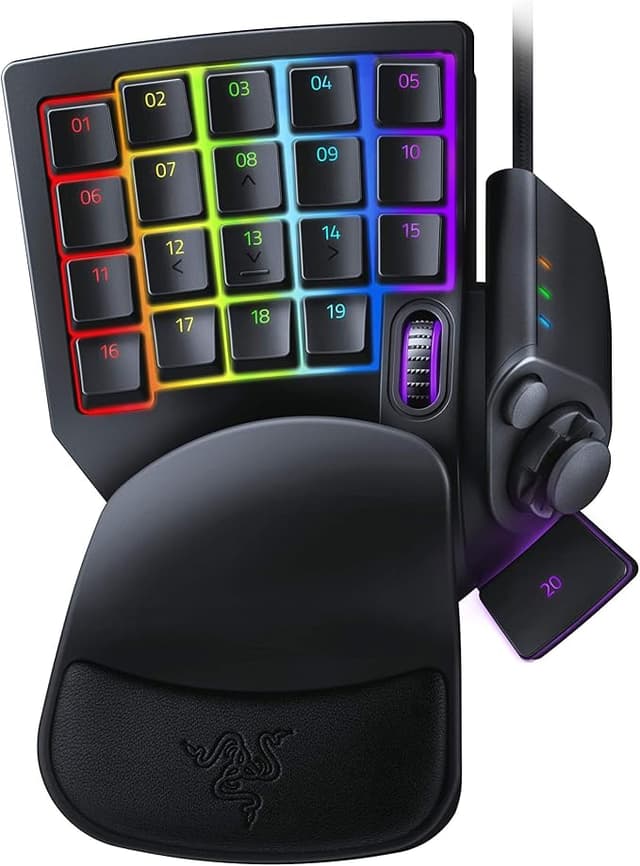
Razer Tartarus Pro - Analog Optical Gaming Keypad
Infinite Commands Take hold of your game with the Razer Tartarus Pro—a gaming keypad that will never let victory escape your grasp. From its measured, nuanced inputs to its 32 programmable keys, experience a level of control and customization made for the most demanding of MMO gamers. Razer Analog Optical Switch While most gaming keypads and keyboards register a singular input when pressing a key, the Razer Tartarus Pro is fitted with Razer Analog Optical Switches which can register scaling levels of input in the same motion depending on how far you press. This allows for a more measured and nuanced form of control. For example, a half press will cause your character to walk, while a full press will get them to run. This type of control is similar to how you might move your character using analog thumbsticks on a controller. Adjustable Actuation Whether you prefer light taps or full, deliberate keystrokes that bottom out, tweak the gaming keypad’s actuation to be as hair-trigger sensitive or as solid and deliberate as you want. Dual-Function Keys As a direct benefit of having scaled inputs from Razer Analog Optical Switches, you can now bind two functions to each key—one that triggers on a partial keystroke, and another on a full keystroke. 32 Programmable Keys Never run out of room for your macros or keybinds, and add a new dimension to your PC gaming with an 8-way directional thumbpad that can be assigned for navigation or even more commands. Unlimited Macro Length and 8 Quick-Toggle Profiles Make your skill rotations and gameplay more efficient with the freedom to devise advanced macros, and prepare the perfect setup for any boss encounter with a collection of stored profiles—8 of which can be toggled on the fly using a button on the side of the gaming keypad.
Infinite Commands Take hold of your game with the Razer Tartarus Pro—a gaming keypad that will never let victory escape your grasp. From its measured, nuanced inputs to its 32 programmable keys, experience a level of control and customization made for the most demanding of MMO gamers. Razer Analog Optical Switch While most gaming keypads and keyboards register a singular input when pressing a key, the Razer Tartarus Pro is fitted with Razer Analog Optical Switches which can register scaling levels of input in the same motion depending on how far you press. This allows for a more measured and nuanced form of control. For example, a half press will cause your character to walk, while a full press will get them to run. This type of control is similar to how you might move your character using analog thumbsticks on a controller. Adjustable Actuation Whether you prefer light taps or full, deliberate keystrokes that bottom out, tweak the gaming keypad’s actuation to be as hair-trigger sensitive or as solid and deliberate as you want. Dual-Function Keys As a direct benefit of having scaled inputs from Razer Analog Optical Switches, you can now bind two functions to each key—one that triggers on a partial keystroke, and another on a full keystroke. 32 Programmable Keys Never run out of room for your macros or keybinds, and add a new dimension to your PC gaming with an 8-way directional thumbpad that can be assigned for navigation or even more commands. Unlimited Macro Length and 8 Quick-Toggle Profiles Make your skill rotations and gameplay more efficient with the freedom to devise advanced macros, and prepare the perfect setup for any boss encounter with a collection of stored profiles—8 of which can be toggled on the fly using a button on the side of the gaming keypad.
Infinite Commands Take hold of your game with the Razer Tartarus Pro—a gaming keypad that will never let victory escape your grasp. From its measured, nuanced inputs to its 32 programmable keys, experience a level of control and customization made for the most demanding of MMO gamers. Razer Analog Optical Switch While most gaming keypads and keyboards register a singular input when pressing a key, the Razer Tartarus Pro is fitted with Razer Analog Optical Switches which can register scaling levels of input in the same motion depending on how far you press. This allows for a more measured and nuanced form of control. For example, a half press will cause your character to walk, while a full press will get them to run. This type of control is similar to how you might move your character using analog thumbsticks on a controller. Adjustable Actuation Whether you prefer light taps or full, deliberate keystrokes that bottom out, tweak the gaming keypad’s actuation to be as hair-trigger sensitive or as solid and deliberate as you want. Dual-Function Keys As a direct benefit of having scaled inputs from Razer Analog Optical Switches, you can now bind two functions to each key—one that triggers on a partial keystroke, and another on a full keystroke. 32 Programmable Keys Never run out of room for your macros or keybinds, and add a new dimension to your PC gaming with an 8-way directional thumbpad that can be assigned for navigation or even more commands. Unlimited Macro Length and 8 Quick-Toggle Profiles Make your skill rotations and gameplay more efficient with the freedom to devise advanced macros, and prepare the perfect setup for any boss encounter with a collection of stored profiles—8 of which can be toggled on the fly using a button on the side of the gaming keypad.
Infinite Commands Take hold of your game with the Razer Tartarus Pro—a gaming keypad that will never let victory escape your grasp. From its measured, nuanced inputs to its 32 programmable keys, experience a level of control and customization made for the most demanding of MMO gamers. Razer Analog Optical Switch While most gaming keypads and keyboards register a singular input when pressing a key, the Razer Tartarus Pro is fitted with Razer Analog Optical Switches which can register scaling levels of input in the same motion depending on how far you press. This allows for a more measured and nuanced form of control. For example, a half press will cause your character to walk, while a full press will get them to run. This type of control is similar to how you might move your character using analog thumbsticks on a controller. Adjustable Actuation Whether you prefer light taps or full, deliberate keystrokes that bottom out, tweak the gaming keypad’s actuation to be as hair-trigger sensitive or as solid and deliberate as you want. Dual-Function Keys As a direct benefit of having scaled inputs from Razer Analog Optical Switches, you can now bind two functions to each key—one that triggers on a partial keystroke, and another on a full keystroke. 32 Programmable Keys Never run out of room for your macros or keybinds, and add a new dimension to your PC gaming with an 8-way directional thumbpad that can be assigned for navigation or even more commands. Unlimited Macro Length and 8 Quick-Toggle Profiles Make your skill rotations and gameplay more efficient with the freedom to devise advanced macros, and prepare the perfect setup for any boss encounter with a collection of stored profiles—8 of which can be toggled on the fly using a button on the side of the gaming keypad.
in 12 offers
The lowest price for Razer Tartarus Pro - Analog Optical Gaming Keypad right now is $169.00 at Scorptec, compared across 11 retailers.
The all-time low was $69.00 on 7 Mar 2026 — today's price is 145% above the lowest ever. It has been notably cheaper before — worth setting a price alert.
Prices last updated 24 Oct 2026.
Last updated at 24/10/2026 11:48:17
Razer Tartarus Pro Chroma Optical Gaming Keypad
Delivery $12
Razer Tartarus Pro - USB Macro Gamepad (Analog Optical Switch)
Delivery between 27 Oct – 5 Nov $15.90
Razer RZ07-03110100 Tartarus Pro Analog Optical gaming Keypad
Delivery between 28 Oct – 2 Nov $14.50
RZ07-03110100-R3M1 Razer Tartarus Pro - Analog Optical Gaming Keypad - Frml Pkg
Delivery $15
Razer Tartarus Pro Gaming Keypad: Analog-Optical Key Switches - 32 Programmable Keys - Customizable RGB Lighting - Programmable Macros
Free delivery
Razer Tartarus Pro | RZ07-03110100-R3M1
Free delivery
Razer Tartarus Pro - Gaming Keypad - Gamepad with analogue-optical buttons and rapid-fire mode (32 programmable buttons, customisable trigger point, 8
Free delivery between 3–6 Nov
Razer Tartarus Pro Numeric Gaming Keyboard Black Spanish QWERTY
Delivery $23.99
Razer Tartarus Pro Gaming Keypad Black Brand New Never Used
Delivery between 28 Oct – 1 Nov $41
Razer Tartarus Pro Wired Analog Optical Gaming Keypad For Computer/Laptop BK
Free delivery between 28–31 Oct
originally posted on pbtech.co.nz
Great for shootersComplete customisabilityComfyCan switch between different hotkey setups, i only use one so i use that button for push to talk.Don't use the joystick thingOnly downside is it's keys are numbered, would like the WASD letter
originally posted on pbtech.co.nz
Great Game padWorks well and is mostly comfortable however a little more adjustment for rest size-angle would be nice as the thumb gets a bit uncomfortable after a bit.software easy to use and fast to set up.has definitely made gaming easier
originally posted on scan.co.uk
Having used a Logitech G13 for many years I decided an upgrade was in order. I have a Steel series Mech keyboard for my main so decided Mech was the way to go. Did as much research as I could and decided the Tarturus Pro was the best option. Packaging was adequate. Product feels robust enough. Keys feel great. Took a little while for feel of the key layout to become second nature. But is now comfortable for lengthy MMO sessions.Software isn't the best. A little unintuitive. But nothing that 30 mins of playing with wont sort.However. There is a problem that I did not come across during my research. It seems Keys have a habit of sticking. Not physically, But in game. Quite often whilst running along in my favourite MMOI will release the the key and my Toon will ... MoreHaving used a Logitech G13 for many years I decided an upgrade was in order. I have a Steel series Mech keyboard for my main so decided Mech was the way to go. Did as much research as I could and decided the Tarturus Pro was the best option. Packaging was adequate. Product feels robust enough. Keys feel great. Took a little while for feel of the key layout to become second nature. But is now comfortable for lengthy MMO sessions.Software isn't the best. A little unintuitive. But nothing that 30 mins of playing with wont sort.However. There is a problem that I did not come across during my research. It seems Keys have a habit of sticking. Not physically, But in game. Quite often whilst running along in my favourite MMOI will release the the key and my Toon will just keep on going. A few presses of the offending key then sorts this. Having now experienced this, I find it is a common complaint of these keypads. But for what is quite an expensive product, I feel this is a Major failing.I'm hoping its a software/Firmware issue that can, Will be fixed. As there isn't many options out there for decent MMO keypads. Logitech seem to have ignored this product category. As well as Steel series.I will put up with it as it occurs maybe once every hour or so of play time. So not the end of the world. But if you were a Competitive FPS player, It will probably happen far more often. In which case, Find an alternative. Until this problem is fixed.
| Compatible OS | Windows |
| Compatible Systems | PC |
| VR Controller? | No |
| Connectivity Type | Wired |
| Connector Type | USB |
Razer Tartarus Pro Chroma Optical Gaming Keypad
Delivery $12
Razer Tartarus Pro - USB Macro Gamepad (Analog Optical Switch)
Delivery between 27 Oct – 5 Nov $15.90
Razer RZ07-03110100 Tartarus Pro Analog Optical gaming Keypad
Delivery between 28 Oct – 2 Nov $14.50
RZ07-03110100-R3M1 Razer Tartarus Pro - Analog Optical Gaming Keypad - Frml Pkg
Delivery $15
Razer Tartarus Pro Gaming Keypad: Analog-Optical Key Switches - 32 Programmable Keys - Customizable RGB Lighting - Programmable Macros
Free delivery
Great for shootersComplete customisabilityComfyCan switch between different hotkey setups, i only use one so i use that button for push to talk.Don't use the joystick thingOnly downside is it's keys are numbered, would like the WASD letter
Great Game padWorks well and is mostly comfortable however a little more adjustment for rest size-angle would be nice as the thumb gets a bit uncomfortable after a bit.software easy to use and fast to set up.has definitely made gaming easier
Having used a Logitech G13 for many years I decided an upgrade was in order. I have a Steel series Mech keyboard for my main so decided Mech was the way to go. Did as much research as I could and decided the Tarturus Pro was the best option. Packaging was adequate. Product feels robust enough. Keys feel great. Took a little while for feel of the key layout to become second nature. But is now comfortable for lengthy MMO sessions.Software isn't the best. A little unintuitive. But nothing that 30 mins of playing with wont sort.However. There is a problem that I did not come across during my research. It seems Keys have a habit of sticking. Not physically, But in game. Quite often whilst running along in my favourite MMOI will release the the key and my Toon will ... MoreHaving used a Logitech G13 for many years I decided an upgrade was in order. I have a Steel series Mech keyboard for my main so decided Mech was the way to go. Did as much research as I could and decided the Tarturus Pro was the best option. Packaging was adequate. Product feels robust enough. Keys feel great. Took a little while for feel of the key layout to become second nature. But is now comfortable for lengthy MMO sessions.Software isn't the best. A little unintuitive. But nothing that 30 mins of playing with wont sort.However. There is a problem that I did not come across during my research. It seems Keys have a habit of sticking. Not physically, But in game. Quite often whilst running along in my favourite MMOI will release the the key and my Toon will just keep on going. A few presses of the offending key then sorts this. Having now experienced this, I find it is a common complaint of these keypads. But for what is quite an expensive product, I feel this is a Major failing.I'm hoping its a software/Firmware issue that can, Will be fixed. As there isn't many options out there for decent MMO keypads. Logitech seem to have ignored this product category. As well as Steel series.I will put up with it as it occurs maybe once every hour or so of play time. So not the end of the world. But if you were a Competitive FPS player, It will probably happen far more often. In which case, Find an alternative. Until this problem is fixed.
Tartarus Pro is very unique with optical/mechanical key switches and it’s ergonomics. It has a large curved hand rest but I took it off. The thumb buttons cause reaching for the top keys difficult with thumb stretched wide open. Finding the right price to buy was a disaster checking online Market Place sellers. I only shop online for BestBuy exclusive. Paid $179 opposed to $300. Including another local retailer’s online Market Place. Great deal of confidence in that mark up price?
I’ve been using an old Nostromo n52 for more years than I’d like to admit. Finally decided to upgrade to 2020 tech. Buttons are more responsive. Basically feels just like my keyboard. It’s slightly larger than the old n52, which is good for my hand size. It’s no where as adjustable as the orbweaver, which I bought and returned, however, I have no real complaints. The orbweaver required synapse 2 software, which meant I had to run 2 separate copies of synapse at the same time and meant I couldn’t sync the lighting. I found that annoying. Also, I wasn’t a fan of the thumb controller on the orbweaver, but then I’m very used to the n52/Tartarus thumb controller. Overall, it’s a good upgrade and looks good too.
Bought this to replace the Orbweaver.Pros - comfortable non-peeling wristpad; good positioning of keys and customisation options; attractive RGB lighting.Cons - Razer did not test this model before release as it has a problem with keys being stuck even when not pressed down. For example, when a key is mapped to WASD movement, there is the occasional occurence of the movement being stuck (continuously moving in a given direction) even when key is no longer depressed. Despite multiple driver updates, this is still occurring, so it may not be a software but hardware issue. Pressing the key again usually fixes the issue, but this is still a very inconvenient bug.
This is the only keyboard i have ever paid over $30 for. It is also the only keyboard where keys regularly stick. Every gaming session at least one key will stick. All keys do it sometimes. Maybe 1 in 100 pushes. I have returned this 3 times to get different ones to see if it was a one time thing. It wasn't. Every keyboard has had the same problem. If i didnt have a physical disability, I would throw this pile of poorly sourced parts away. Love the design, and if the keys were not trash i would love it. But alas, they used poor quality parts and still charge a premium. I will not buy another razer product again.
Membranes should have been clicky. Inconsistent with the high line razer productsAlso, the ergonomics stink! This was built for Andre the Giant with a 10 foot thumb.If razer were to make it a click membrane, and also adjust the ridiculous current positioning (mostly thumb) it would feel like a satisfactory gaming accessory.It just takes up space on my desk. I keep it there because the LED are in fact pretty bitchin'. That's it :)
Pro:Key switches are great not super loud and feel smooth.Cons:Has fewer keys then my old G13. The top-hat thumb control is real loose and it's not easy to find the key you want, as it picks the one next to it.Software:This is difficult to use.You can NOT drag keys from one location to another.The key map selector is right where you would expect a fire button, if it was a joy stick, above the top-hat.You have to open the software or use it's taskbar icon to change game profiles.While it does work, the Logitech G13 was a better device. With more keys and better software.
Everything about this keypad is great from the switches to the quality plastic this board does everything right. I don’t use this keypad as a main board I use it as a macro board and with razors synapse software you can bind every key to what ever you want. It’s great for rpg and creative games. An example is Right now I’m playing empyrion galactic survival and I use one key to start my spaceship which usually takes 4 steps to do now I can push one button.
| Compatible OS | Windows |
| Compatible Systems | PC |
| VR Controller? | No |
| Connectivity Type | Wired |
| Connector Type | USB |


