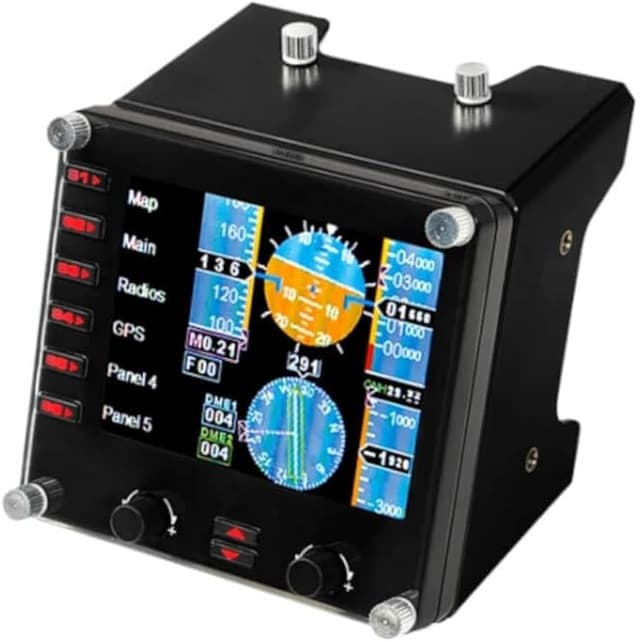
Logitech G Saitek Pro Flight Instrument Panel
Logitech G Flight Simulator Aircraft Instrument Panel - AU
Logitech G Flight Simulator Aircraft Instrument Panel - AU
Logitech G Flight Simulator Aircraft Instrument Panel - AU
Logitech G Flight Simulator Aircraft Instrument Panel - AU
in 23 offers
The lowest price for Logitech G Saitek Pro Flight Instrument Panel right now is $264.95 at Kmart, compared across 16 retailers.
The all-time low was $100.00 on 8 Nov 2024 — today's price is 165% above the lowest ever. It has been notably cheaper before — worth setting a price alert.
Prices last updated 20 Oct 2026.
Last updated at 20/10/2026 02:17:34
Logitech G Flight Instrument Panel - Black
Free delivery between Wed – Thu
Logitech G Flight Instrument Panel
Next-day delivery $6.14
Logitech G Flight Instrument Panel
Delivery $8.59
Logitech Flight Instrument Panel
Free delivery
Affiliate Disclosure: We may receive a small commission for purchases made through this link at no extra cost to you. This helps support our site. Thank you!
Logitech G Flight Instrument Panel
Delivery between 22–30 Oct $10
Logitech G Flight Instrument Panel
Delivery $9.89
Logitech G Flight Instrument Panel
Delivery $9.89
Logitech G Flight Instrument Panel
Delivery between Thu – Mon $10
Logitech G Flight Instrument Panel
Delivery $11.99
Logitech Saitek Pro Flight Gaming Control Panel - Cable - USB - PC
Delivery between 26–29 Oct $21.20
originally posted on https://www.mightyape.co.nz
David's review from 2009 is still very relevant. Computers have increased in speed and capacity since he wrote the review, so the hit on frame rate is not so severe now days. These gauges WILL run on X-Plane 10 as long as you go onto the X-Plane.org site and download some drivers, and if you are running Win8, make alterations to the registry (not as scary as it sounds and directions are easy to find on the site). I have 8 of these along with 4 panels running, and on FSX, they are great. On X-Plane, you have minor niggles with them always displaying different gauges once you start up, but once you change them back to your favourite configuration, you would not imagine using a flight sim without them. I have powered USB hubs to run them and I would suggest you do the ... MoreDavid's review from 2009 is still very relevant. Computers have increased in speed and capacity since he wrote the review, so the hit on frame rate is not so severe now days. These gauges WILL run on X-Plane 10 as long as you go onto the X-Plane.org site and download some drivers, and if you are running Win8, make alterations to the registry (not as scary as it sounds and directions are easy to find on the site). I have 8 of these along with 4 panels running, and on FSX, they are great. On X-Plane, you have minor niggles with them always displaying different gauges once you start up, but once you change them back to your favourite configuration, you would not imagine using a flight sim without them. I have powered USB hubs to run them and I would suggest you do the same. Once these are configured, you can take the panels off the screen and you are as close to the real thing as you will ever get. Well done Saitek.
originally posted on box.co.uk
Pros: Good looking , when working has a good view. well builtCons: Yes these should come out of the box ready to use unfortunately they don't spent two weeks looking for the correct drivers in the end I had to get SPAD at £80 od but work great now. The least they could do is include this with the units or tell customers about it.
originally posted on ebay.com
FIPs are great little instrument devices if you can get one at a reasonable price $90-$115. Too many people selling them at over priced amounts right now. Just damm scalpers! Dont fall for it. Buy from a reasonable person and make sure to get Spad.Next and FSX Times gauges and youll absolutely love your FIP.
| Compatible OS | Windows 8.1, Windows 10, Windows 7 |
| Compatible Systems | PC |
| VR Controller? | No |
| Connectivity Type | Wired |
| Connector Type | USB |
Logitech G Flight Instrument Panel - Black
Free delivery between Wed – Thu
Logitech G Flight Instrument Panel
Next-day delivery $6.14
Logitech G Flight Instrument Panel
Delivery $8.59
Logitech Flight Instrument Panel
Free delivery
Affiliate Disclosure: We may receive a small commission for purchases made through this link at no extra cost to you. This helps support our site. Thank you!
Logitech G Flight Instrument Panel
Delivery between 22–30 Oct $10
David's review from 2009 is still very relevant. Computers have increased in speed and capacity since he wrote the review, so the hit on frame rate is not so severe now days. These gauges WILL run on X-Plane 10 as long as you go onto the X-Plane.org site and download some drivers, and if you are running Win8, make alterations to the registry (not as scary as it sounds and directions are easy to find on the site). I have 8 of these along with 4 panels running, and on FSX, they are great. On X-Plane, you have minor niggles with them always displaying different gauges once you start up, but once you change them back to your favourite configuration, you would not imagine using a flight sim without them. I have powered USB hubs to run them and I would suggest you do the ... MoreDavid's review from 2009 is still very relevant. Computers have increased in speed and capacity since he wrote the review, so the hit on frame rate is not so severe now days. These gauges WILL run on X-Plane 10 as long as you go onto the X-Plane.org site and download some drivers, and if you are running Win8, make alterations to the registry (not as scary as it sounds and directions are easy to find on the site). I have 8 of these along with 4 panels running, and on FSX, they are great. On X-Plane, you have minor niggles with them always displaying different gauges once you start up, but once you change them back to your favourite configuration, you would not imagine using a flight sim without them. I have powered USB hubs to run them and I would suggest you do the same. Once these are configured, you can take the panels off the screen and you are as close to the real thing as you will ever get. Well done Saitek.
Pros: Good looking , when working has a good view. well builtCons: Yes these should come out of the box ready to use unfortunately they don't spent two weeks looking for the correct drivers in the end I had to get SPAD at £80 od but work great now. The least they could do is include this with the units or tell customers about it.
FIPs are great little instrument devices if you can get one at a reasonable price $90-$115. Too many people selling them at over priced amounts right now. Just damm scalpers! Dont fall for it. Buy from a reasonable person and make sure to get Spad.Next and FSX Times gauges and youll absolutely love your FIP.
I have 12 of them - eventually, I will have 13 total. With the help of spad.next the panels look great and function well. You will just have to plan on an additional $5 to $6 dollars to dramatically improve the graphics. The addition of these panels, along with the GNS530/430 (realsimgear) and Logitech yoke and TPR rudders have created a fairly realistic Cessna 172 cockpit that I can use for training.
These panels are very nicely designed but it is important to understand they are old technology and therefore some patience is required to get and keep them working properly. First, you need to have USB 2.0 hub(s) to connect them to your computer and preferably USB 2.0 ports in your computer. There are no other newer instruments on the market that I am aware of. Having said that they work well once up and running. Secondly, getting the drivers working is important. If you decide to invest in these I would suggest that you purchase a software package called SPAD.Next to run and program them.
The supplier was excellent the delivery was excellent. But the software and info support from logitech was not upto the same standard. It was only luck that I found a new update that allowed the unit to work. I want more units but I am not confident that they will work or that logitech will help.
I bought 6 of these so that I have all six primary flight instruments updating in real time.You can switch between the six instruments using the scroll keys. In practice you only need to do this at the start of your session (provided you have six displays).The Map, GPS, radio and other keys on the left side of each panel bring up the relevant instruments on the main computer screen. This is very useful when doing an instrument approach, as it allows you to access these instruments rapidly, then hide them just as quickly.My favourite feature is being able to adjust the heading bug on the HSI using the knob on the intrument panel, and then watching as the autopilot alters my course.It is also very helpful to be able to use the main computer monitor for a full ... MoreI bought 6 of these so that I have all six primary flight instruments updating in real time.You can switch between the six instruments using the scroll keys. In practice you only need to do this at the start of your session (provided you have six displays).The Map, GPS, radio and other keys on the left side of each panel bring up the relevant instruments on the main computer screen. This is very useful when doing an instrument approach, as it allows you to access these instruments rapidly, then hide them just as quickly.My favourite feature is being able to adjust the heading bug on the HSI using the knob on the intrument panel, and then watching as the autopilot alters my course.It is also very helpful to be able to use the main computer monitor for a full screen unobstructed view out of the cockpit window. This makes difficult landings much easier - you can keep an eye on your approach speed, vertical speed, altitude and heading while maintaing visual contact with the runway.A few minor niggles:the instruments cannot be individually scaled for different aircraft. This means that the ASI for your Cessna goes all the way up to 300 knots, meaning that you use only half the gauge, and therefore the scale is rather smaller than I would like. Conversely, in a fast jet you lose the use of ASI when travelling faster than 300 knots.The instruments also use quite a lot of the system resources, meaning that performance can be a bit slow at times. It is possible to network another computer which will allow the instruments to run off the slaved computer, improving performance, but I don't have a spare PC lying around.The LCD panel gets an imprint of the selected instrument burned onto it after a while. This is not a problem provided you always use the same display for the same instrument.These problems are minor compared with the great increase in realism and control which the instruments provide. I thoroughly recommend them. They do cost a bit, but the enjoyment which I am getting out of them is worth it.
Pros: These instruments are realistic and will enhance your fs cockpit. They connect faultlessly with fs after careful installation. It seems that they benefit from connecting with USB 2 rather than USB 3 ports and I use a powered USB 2 hub for my eight gauges.Cons: Not the friendliest installation and only after running Spad.neXt software was I able to achieve a reliable set up. Perhaps more experienced users will have better luck as it is worth while persevering with this excellent product.
Tried to use these with both MS Flight Sim and X-Plane. Installation of the drivers is difficult, you need to purchase additional plugins for the sim software in some cases.Our pc was a new build, and still haven’t managed to get the device drivers to install correctly.Still waiting for Logitech support to resolve.. it might be me, but I am sure the process could be easier or more efficient online help available. Seems to be a specialist product.. not for the general users.
Loved it when I finally found the correct driver. I run windows 10 64 bit and MSFA 2020. What an ordeal getting it to work! The newest drivers don't work. After searching and searching on the internet and forums, there was a link to install the original Win 8 driver. FINALLY it worked. Logitech should tell you this, but since this is such a low volume item, I doubt it is on the radar screen ( no pun intended) of anyone at Logitech support.
| Compatible OS | Windows 8.1, Windows 10, Windows 7 |
| Compatible Systems | PC |
| VR Controller? | No |
| Connectivity Type | Wired |
| Connector Type | USB |

