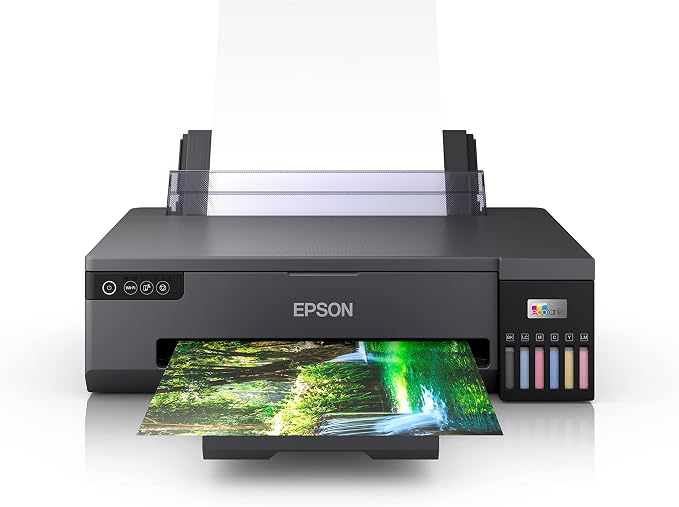
The Epson EcoTank ET-3800 Wireless Printer offers cartridge-free printing with easy-to-fill, supersized ink tanks. Print with or without wires from the convenience of your PC, laptop smartphone or tablet thanks to WiFi Direct 5.
The Epson EcoTank ET-3800 Wireless Printer offers cartridge-free printing with easy-to-fill, supersized ink tanks. Print with or without wires from the convenience of your PC, laptop smartphone or tablet thanks to WiFi Direct 5.
in 3 offers
The lowest price for Epson EcoTank ET-3800 Wireless MFC Printer right now is $583.95 at Amazon.com.au, compared across 3 retailers.
The all-time low was $185.00 on 27 Aug 2023 — today's price is 216% above the lowest ever. It has been notably cheaper before — worth setting a price alert.
Prices last updated 22 Oct 2026.
Epson EcoTank ET-3800 Wireless MFC Printer
The Epson EcoTank ET-3800 Wireless Printer offers cartridge-free printing with easy-to-fill, supersized ink tanks. Print with or without wires from the convenience of your PC, laptop smartphone or tablet thanks to WiFi Direct 5.
The Epson EcoTank ET-3800 Wireless Printer offers cartridge-free printing with easy-to-fill, supersized ink tanks. Print with or without wires from the convenience of your PC, laptop smartphone or tablet thanks to WiFi Direct 5.
Last updated at 22/10/2026 09:39:08
Epson Expression ET-3800 3-in-1 A4 Wireless Refillable Ink Tank Printer T502 Ink C11CJ62501
Delivery $24.95
Affiliate Disclosure: We may receive a small commission for purchases made through this link at no extra cost to you. This helps support our site. Thank you!
Epson Expression ET-3800 3-in-1 A4 Wireless Refillable Ink | OZ Toner
Delivery between 27–30 Oct $26.05
Epson Expression Ecotank Et-3800 A4 Wireless Refillable Ink Tank Mfc
Free delivery
Affiliate Disclosure: We may receive a small commission for purchases made through this link at no extra cost to you. This helps support our site. Thank you!
originally posted on epson.com.au
Have tried after-purchase CIS systems before. Relieved that Epson now provide this built in. Good price for features: scan, copy and most importantly duplex print. Set-up was little trouble. Only glitch was that was sent to US Epson site to download drivers - on this site ET-3800 doesn't exist. So, I tried Australian Epson site - here the ET-3800 does exist, and correct drivers are clear.
originally posted on epson.com.au
Was looking for a tank printer, looked at the range of Epson printers, and selected the ET-3800. Why, iPhone completed the setup, I can also print off the phone when I want. Filling the tanks was easy, the setup was a pest, the colours on test, were missing bits of lines, think it was slow in picking up ink for the first time. Turned the printer off, then on. Perfect. Been working ever since 100%. Its used as the default printer now, I have also a laser which was the default previously. PROS: quick single sheet printing, tanks that don’t empty like cartage’s, accessible from 3 PC’s in the home, the plus; double sided printing. Prints from the phone. CONS: noisy picking up paper from the paper container, slow in printing double sided.
originally posted on epson.com.au
I've only just set this printer up, it was relatively straight forward but it did take a while so ensure you have about an hour spare to do so. Hopefully this printer won't break in a hurry and I get several years of use out of it, how good (and rare) would that be?! The ink filling is pretty easy, you need to unscrew the lid before inserting into the tank filler. The instructions don't tell you this so I fiddled around for a bit before working it out, haha. Unfortunately the screen is not a touch screen like the previous printer that I had. I am looking forward to not having to replace ink cartridges and I am hoping this printer and I have a lovely relationship and it does as it's supposed to. Print, Scan, and copy without fuss, that's all I ask! Let's wait & see!
| Supported Functions | Color Output, Copy, Print, Scan |
| Paper Size | A4, A5 (148 x 210 mm), A6 (105 x 148 mm), ANSI A (Letter) (216 x 279 mm), B5 (176 x 250 mm) |
| Paper Type | Envelopes, Glossy photo paper, Matte paper, Plain paper |
| Auto Duplex Printing | Yes |
| Paper Tray Capacity | 250 sheets |

Epson Expression ET-3800 3-in-1 A4 Wireless Refillable Ink Tank Printer T502 Ink C11CJ62501
Delivery $24.95
Affiliate Disclosure: We may receive a small commission for purchases made through this link at no extra cost to you. This helps support our site. Thank you!
Epson Expression ET-3800 3-in-1 A4 Wireless Refillable Ink | OZ Toner
Delivery between 27–30 Oct $26.05
Epson Expression Ecotank Et-3800 A4 Wireless Refillable Ink Tank Mfc
Free delivery
Affiliate Disclosure: We may receive a small commission for purchases made through this link at no extra cost to you. This helps support our site. Thank you!
Have tried after-purchase CIS systems before. Relieved that Epson now provide this built in. Good price for features: scan, copy and most importantly duplex print. Set-up was little trouble. Only glitch was that was sent to US Epson site to download drivers - on this site ET-3800 doesn't exist. So, I tried Australian Epson site - here the ET-3800 does exist, and correct drivers are clear.
Was looking for a tank printer, looked at the range of Epson printers, and selected the ET-3800. Why, iPhone completed the setup, I can also print off the phone when I want. Filling the tanks was easy, the setup was a pest, the colours on test, were missing bits of lines, think it was slow in picking up ink for the first time. Turned the printer off, then on. Perfect. Been working ever since 100%. Its used as the default printer now, I have also a laser which was the default previously. PROS: quick single sheet printing, tanks that don’t empty like cartage’s, accessible from 3 PC’s in the home, the plus; double sided printing. Prints from the phone. CONS: noisy picking up paper from the paper container, slow in printing double sided.
I've only just set this printer up, it was relatively straight forward but it did take a while so ensure you have about an hour spare to do so. Hopefully this printer won't break in a hurry and I get several years of use out of it, how good (and rare) would that be?! The ink filling is pretty easy, you need to unscrew the lid before inserting into the tank filler. The instructions don't tell you this so I fiddled around for a bit before working it out, haha. Unfortunately the screen is not a touch screen like the previous printer that I had. I am looking forward to not having to replace ink cartridges and I am hoping this printer and I have a lovely relationship and it does as it's supposed to. Print, Scan, and copy without fuss, that's all I ask! Let's wait & see!
Printer required for home use, not a cheap printer ie >$500 and has not met any expectations. It's FREE to a good home! Speed so slow, hit print and wait and wait only to receive error. I am on 5G so no excuses. I am constantly having to reset my modem, then run the Epson connection checker. Also, the control panel is NOT a touch screen, you have to use arrow keys and click "OK". When (if) it does print, the quality is good but so SLOW. There are better options out there I would not recommend ET-3800.
Only bought this two weeks ago. It prints incredibly slow. You hear whirring sounds but nothing happens, and then it sometimes just decides not to print. The colours are off, I kept trying to print an orange picture but comes out as red. Black is also not very dark. Sometimes text sheets have white lines through the words. Connection issues with PC. you have to press the on button several times before it turns on and is a three step process to turn it off.
I found the product easy to install. Had a issue updating firmware but this was fixed by turning of printer and making sure the unit was showing Copy Scan Maintenance menu on printer screen. Updated easy after this process. As a whole it has been a good experience setting up the unit. Was easy setting up the print process and adding Ink to the unit. I have not yet tested the scanning process and printing process but if the operation of the unit as good as installation process then I will be very happy with the unit. If you carefully read instructions and follow procedsure you should not have any issues setting up.
This product is bought for my daughter. She is in Year 12, she need to print several sets of examination paper every day to prepare VCE. She is very satisfied with the printer. The printing speed is fast and quality is good same as on the advertisement. The function of double-sided print is really useful and saving paper.
I bought this last night and was up until 1am troubleshooting because it was not dispensing any ink and every page was coming out completely blank. Multiple cleans, read every guide and tech support manual that was available, re-reading set up instructions dozens of times. Nothing. Left it over night, no improvement 12 hours later (as instructed). Called support and was told to do another clean after doing at least a dozen (don’t forget this is a brand new printer) which saw no improvement. At this point the maintenance tank has used up half its life and we haven’t even owned it for 24 hours. Taking it back for a replacement.
I forgot to do my research on Product Specifications. I mistook auto document feed with automatic duplex (2 sided print). @#$% so I donated the ET2811 to Lismore flood victims and purchased ET3800. Yes it works. yes its wonderful and yes I'd recommend. I also love its lighweight construction. Loading ink hassle free, print is great. ps I'd also recommend ET2811 too.
first of all, thanks for the guide to set up the printer to my computer. it was so easy to set up because it shows detail thing with pictures. Also, it has amazing speed. Just few seconds when I print out some documents so don't need to wait too long. Ink bottle designed awesome so never spilt at all when I refill my ink. Quality of printing is the best. I really happy to buy this printer and would recommend to everyone. It's bit expensive but worth of it definately.
| Supported Functions | Color Output, Copy, Print, Scan |
| Paper Size | A4, A5 (148 x 210 mm), A6 (105 x 148 mm), ANSI A (Letter) (216 x 279 mm), B5 (176 x 250 mm) |
| Paper Type | Envelopes, Glossy photo paper, Matte paper, Plain paper |
| Auto Duplex Printing | Yes |
| Paper Tray Capacity | 250 sheets |