Last updated at 15/09/2026 04:36:11
Amazon eero Pro 6E mesh Wi-Fi system | 2.5 Gbps Ethernet | Coverage up to 560 m² | Connect 100+ devices | Ideal for streaming, working and gaming | 3-
Affiliate Disclosure: We may receive a small commission for purchases made through this link at no extra cost to you. This helps support our site. Thank you!
Amazon eero Pro 6 mesh Wi-Fi 6 system | Fast and reliable gigabit speeds | connect 75+ devices | Coverage up to 3,500 sq. ft. | 2-pack, 2020 release
Delivery between 16–28 Sept $27.68
Amazon eero Pro 6E mesh wifi system - Supports internet plans up to 2.5 Gbps, Coverage up to 6,000 sq. ft., Connect 100+ devices, 3-pack
Delivery between 21–24 Sept $29
originally posted on bestbuy.com
Is it a little pricey? Yes. Is it worth it? Also yes.Moving from Google Wifi, this is vastly stronger and better. I bought 3 plus an extra to match the existing 4 mesh nodes from Google Wifi that I had, but I probably could have avoided one of those and just tried three and come to buy another if I needed it. Also love that they work with older hardware. I have a spot that needs decent wifi but not great (smart garage door far from the other APs) and getting a cheaper model served that well. Setup is easy and I was able to do things like reserve IP addresses and poke holes in the NAT (with odd behavior but it works). My only complaint is not being able to set the internal NAT range, as it was stuck with 192.168.4.1/24 and I previously had 192.168.2.1/24 so I had ... MoreIs it a little pricey? Yes. Is it worth it? Also yes.Moving from Google Wifi, this is vastly stronger and better. I bought 3 plus an extra to match the existing 4 mesh nodes from Google Wifi that I had, but I probably could have avoided one of those and just tried three and come to buy another if I needed it. Also love that they work with older hardware. I have a spot that needs decent wifi but not great (smart garage door far from the other APs) and getting a cheaper model served that well. Setup is easy and I was able to do things like reserve IP addresses and poke holes in the NAT (with odd behavior but it works). My only complaint is not being able to set the internal NAT range, as it was stuck with 192.168.4.1/24 and I previously had 192.168.2.1/24 so I had to make a few small fixes to adjust, though it wasnt terrible.
originally posted on bestbuy.com
I bought the Pro 6 three pack and a Pro extender during a recent sale to replace four Google Wifi and a Nest Wifi point that had been having trouble keeping up with the new bandwidth requirements of 4K video and multiple people on Zoom at the same time.Why so much mesh? We live in a 1910 house that's tall (three stories) and skinny with old, thick plaster walls, including a kitchen with metal lathe plaster and tin paneling that sits like a giant Faraday cage in the middle of the first floor just waiting to block electromagnetic waves to the small addition in the back of the house where the kids play video games.So far, I'm happy with the eero Pro 6: setup was simple using the app, and connection speeds are generally five to ten times faster throughout the house ... MoreI bought the Pro 6 three pack and a Pro extender during a recent sale to replace four Google Wifi and a Nest Wifi point that had been having trouble keeping up with the new bandwidth requirements of 4K video and multiple people on Zoom at the same time.Why so much mesh? We live in a 1910 house that's tall (three stories) and skinny with old, thick plaster walls, including a kitchen with metal lathe plaster and tin paneling that sits like a giant Faraday cage in the middle of the first floor just waiting to block electromagnetic waves to the small addition in the back of the house where the kids play video games.So far, I'm happy with the eero Pro 6: setup was simple using the app, and connection speeds are generally five to ten times faster throughout the house for wireless devices that support newer protocols. The eero devices (other than the extender) are all wired via Cat6 to maximize performance. I didn't face the more serious inability to connect some 2.4GHz devices that some people have reported, though I did have to manually enter my SSID into my Kasa 2.4GHz wifi switches in order for them to see the network. My Racchio irrigation controller also found the network on its own, though I know some people have reported problems with that particular device.Coverage seems generally better than with the Google devices, thus my ability to go from five points to three plus an extender. Where I previously needed a Google point in my attic to get adequate coverage for my office, the eero on the floor below now provides four or five times better speed. (No more, "You're connection is causing problems" messages from our company video conferencing system, which is nice.)I have 1GB Verizon fiber, and the eero consistently reports max download and upload speeds between 760Mbps and 900Mbps. My newer devices (like my iPhone 12) peak at about about 370Mbps over wifi, which I find more than acceptable given that I have about 60 wifi devices on the network and another dozen or so wired. The Google system was clearly struggling to keep up at times, and my upload and download speeds regularly fell into the 30-50Mbps range.One thing that seemed to help the eero (and you network managers out there probably already knew this, but I just figured it out): In a couple locations, I have the eero connected via it's second port to a gigabit switch that's handling other wired devices (such as Hue and Eufy hubs). I found that overall network performance seemed to improve if I connected the wall port to the eero , and then the eero to the switch, rather than connecting the switch to the wall port, and then attaching the eero to the switch. I'm not sure exactly why this helps, but it definitely seemed to improve overall throughput.I'll update as I get more sophisticated in how I use the eero (reconnecting my NAS as a person cloud, for instance, and as I get more firmware updates), but so far, I'm pretty pleased. Hopefully writing this review hasn't jinxed me.
originally posted on bestbuy.com
What a difference, I have a two story house, and steady internet speeds all over my house without dead spots have been pretty much impossible until I found mesh system, first was Google WIFI, but speeds have been pretty poor, wired I get 500 down and 500 up, but wireless right next to the main router my speeds dropped half, 10 feet away dropped by 80%. Nest WIFI honestly I saw very little of improvement and 3 of them was not enough, so I had to pair my 3 previous Google WIFI routers, so in total 6 Mesh routers around the house in order not to have dead spots. While I was paying for 500/500, I was getting around 50 to 100, but with increasing devices in my house these routers started struggling and dropping as long as less than 1 in some spots, so here I am again ... MoreWhat a difference, I have a two story house, and steady internet speeds all over my house without dead spots have been pretty much impossible until I found mesh system, first was Google WIFI, but speeds have been pretty poor, wired I get 500 down and 500 up, but wireless right next to the main router my speeds dropped half, 10 feet away dropped by 80%. Nest WIFI honestly I saw very little of improvement and 3 of them was not enough, so I had to pair my 3 previous Google WIFI routers, so in total 6 Mesh routers around the house in order not to have dead spots. While I was paying for 500/500, I was getting around 50 to 100, but with increasing devices in my house these routers started struggling and dropping as long as less than 1 in some spots, so here I am again back to looking for solution that will give me great service all around my house, and for those of you who have been in the same shoes, you know how much of a headache that is, but finally something that works great. My house is over 3000 sq ft, and in the furthest part of my house I'm getting 180/230, but I do have one dead spot in my house, so I ordered another one to make it 4 pack. My current set up is 1 main router on the first floor which is biggest square footage, and 2 routers on second floor, but with fourth one I should be golden. For those of you who think maybe increasing data speeds is the solution, unfortunately it is not, I used to have Gigabit internet speeds, but I saw exact same results as with 500/500. Mesh system is the answer, and Eero Pro 6 is the solution to a headache that I have been dealing with for nearly 9 years after trying so many routers.
| Product dimensions | 13.89 x 13.89 x 5.26 cm; 675.85 Grams |
| Country of origin | Vietnam |

Amazon eero Pro 6E mesh Wi-Fi system | 2.5 Gbps Ethernet | Coverage up to 560 m² | Connect 100+ devices | Ideal for streaming, working and gaming | 3-
Affiliate Disclosure: We may receive a small commission for purchases made through this link at no extra cost to you. This helps support our site. Thank you!
Amazon eero Pro 6 mesh Wi-Fi 6 system | Fast and reliable gigabit speeds | connect 75+ devices | Coverage up to 3,500 sq. ft. | 2-pack, 2020 release
Delivery between 16–28 Sept $27.68
Amazon eero Pro 6E mesh wifi system - Supports internet plans up to 2.5 Gbps, Coverage up to 6,000 sq. ft., Connect 100+ devices, 3-pack
Delivery between 21–24 Sept $29
Is it a little pricey? Yes. Is it worth it? Also yes.Moving from Google Wifi, this is vastly stronger and better. I bought 3 plus an extra to match the existing 4 mesh nodes from Google Wifi that I had, but I probably could have avoided one of those and just tried three and come to buy another if I needed it. Also love that they work with older hardware. I have a spot that needs decent wifi but not great (smart garage door far from the other APs) and getting a cheaper model served that well. Setup is easy and I was able to do things like reserve IP addresses and poke holes in the NAT (with odd behavior but it works). My only complaint is not being able to set the internal NAT range, as it was stuck with 192.168.4.1/24 and I previously had 192.168.2.1/24 so I had ... MoreIs it a little pricey? Yes. Is it worth it? Also yes.Moving from Google Wifi, this is vastly stronger and better. I bought 3 plus an extra to match the existing 4 mesh nodes from Google Wifi that I had, but I probably could have avoided one of those and just tried three and come to buy another if I needed it. Also love that they work with older hardware. I have a spot that needs decent wifi but not great (smart garage door far from the other APs) and getting a cheaper model served that well. Setup is easy and I was able to do things like reserve IP addresses and poke holes in the NAT (with odd behavior but it works). My only complaint is not being able to set the internal NAT range, as it was stuck with 192.168.4.1/24 and I previously had 192.168.2.1/24 so I had to make a few small fixes to adjust, though it wasnt terrible.
I bought the Pro 6 three pack and a Pro extender during a recent sale to replace four Google Wifi and a Nest Wifi point that had been having trouble keeping up with the new bandwidth requirements of 4K video and multiple people on Zoom at the same time.Why so much mesh? We live in a 1910 house that's tall (three stories) and skinny with old, thick plaster walls, including a kitchen with metal lathe plaster and tin paneling that sits like a giant Faraday cage in the middle of the first floor just waiting to block electromagnetic waves to the small addition in the back of the house where the kids play video games.So far, I'm happy with the eero Pro 6: setup was simple using the app, and connection speeds are generally five to ten times faster throughout the house ... MoreI bought the Pro 6 three pack and a Pro extender during a recent sale to replace four Google Wifi and a Nest Wifi point that had been having trouble keeping up with the new bandwidth requirements of 4K video and multiple people on Zoom at the same time.Why so much mesh? We live in a 1910 house that's tall (three stories) and skinny with old, thick plaster walls, including a kitchen with metal lathe plaster and tin paneling that sits like a giant Faraday cage in the middle of the first floor just waiting to block electromagnetic waves to the small addition in the back of the house where the kids play video games.So far, I'm happy with the eero Pro 6: setup was simple using the app, and connection speeds are generally five to ten times faster throughout the house for wireless devices that support newer protocols. The eero devices (other than the extender) are all wired via Cat6 to maximize performance. I didn't face the more serious inability to connect some 2.4GHz devices that some people have reported, though I did have to manually enter my SSID into my Kasa 2.4GHz wifi switches in order for them to see the network. My Racchio irrigation controller also found the network on its own, though I know some people have reported problems with that particular device.Coverage seems generally better than with the Google devices, thus my ability to go from five points to three plus an extender. Where I previously needed a Google point in my attic to get adequate coverage for my office, the eero on the floor below now provides four or five times better speed. (No more, "You're connection is causing problems" messages from our company video conferencing system, which is nice.)I have 1GB Verizon fiber, and the eero consistently reports max download and upload speeds between 760Mbps and 900Mbps. My newer devices (like my iPhone 12) peak at about about 370Mbps over wifi, which I find more than acceptable given that I have about 60 wifi devices on the network and another dozen or so wired. The Google system was clearly struggling to keep up at times, and my upload and download speeds regularly fell into the 30-50Mbps range.One thing that seemed to help the eero (and you network managers out there probably already knew this, but I just figured it out): In a couple locations, I have the eero connected via it's second port to a gigabit switch that's handling other wired devices (such as Hue and Eufy hubs). I found that overall network performance seemed to improve if I connected the wall port to the eero , and then the eero to the switch, rather than connecting the switch to the wall port, and then attaching the eero to the switch. I'm not sure exactly why this helps, but it definitely seemed to improve overall throughput.I'll update as I get more sophisticated in how I use the eero (reconnecting my NAS as a person cloud, for instance, and as I get more firmware updates), but so far, I'm pretty pleased. Hopefully writing this review hasn't jinxed me.
What a difference, I have a two story house, and steady internet speeds all over my house without dead spots have been pretty much impossible until I found mesh system, first was Google WIFI, but speeds have been pretty poor, wired I get 500 down and 500 up, but wireless right next to the main router my speeds dropped half, 10 feet away dropped by 80%. Nest WIFI honestly I saw very little of improvement and 3 of them was not enough, so I had to pair my 3 previous Google WIFI routers, so in total 6 Mesh routers around the house in order not to have dead spots. While I was paying for 500/500, I was getting around 50 to 100, but with increasing devices in my house these routers started struggling and dropping as long as less than 1 in some spots, so here I am again ... MoreWhat a difference, I have a two story house, and steady internet speeds all over my house without dead spots have been pretty much impossible until I found mesh system, first was Google WIFI, but speeds have been pretty poor, wired I get 500 down and 500 up, but wireless right next to the main router my speeds dropped half, 10 feet away dropped by 80%. Nest WIFI honestly I saw very little of improvement and 3 of them was not enough, so I had to pair my 3 previous Google WIFI routers, so in total 6 Mesh routers around the house in order not to have dead spots. While I was paying for 500/500, I was getting around 50 to 100, but with increasing devices in my house these routers started struggling and dropping as long as less than 1 in some spots, so here I am again back to looking for solution that will give me great service all around my house, and for those of you who have been in the same shoes, you know how much of a headache that is, but finally something that works great. My house is over 3000 sq ft, and in the furthest part of my house I'm getting 180/230, but I do have one dead spot in my house, so I ordered another one to make it 4 pack. My current set up is 1 main router on the first floor which is biggest square footage, and 2 routers on second floor, but with fourth one I should be golden. For those of you who think maybe increasing data speeds is the solution, unfortunately it is not, I used to have Gigabit internet speeds, but I saw exact same results as with 500/500. Mesh system is the answer, and Eero Pro 6 is the solution to a headache that I have been dealing with for nearly 9 years after trying so many routers.
So I have century link fiber and my home came with two pro 6 routers for use as a mesh wifi system. I tested with just the stock century link router modem combo and got crazy speeds even with signal reduction in the farthest rooms. I switched over to the eero system by converting the century link router into a bridge to get rid of the lower signal strength. I immediately saw a drop in speed of about 20% through the whole house but signal strength was solid everywhere. The problems started only in the middle of the night as I'd wake up to the eero's routers disconnected and needing to be manually reset. This happened off and on and would mess with my connected water shutoff valve and ac system. We recently had a network outage and everyone in the neighborhood who ... MoreSo I have century link fiber and my home came with two pro 6 routers for use as a mesh wifi system. I tested with just the stock century link router modem combo and got crazy speeds even with signal reduction in the farthest rooms. I switched over to the eero system by converting the century link router into a bridge to get rid of the lower signal strength. I immediately saw a drop in speed of about 20% through the whole house but signal strength was solid everywhere. The problems started only in the middle of the night as I'd wake up to the eero's routers disconnected and needing to be manually reset. This happened off and on and would mess with my connected water shutoff valve and ac system. We recently had a network outage and everyone in the neighborhood who wasn't on the eero networks came back within the hour. Ours never came back and I ended up disconnecting the routers and factory reset the modem to get it off of bridge mode. Problems solved, the increase in signal strength was not worth the trade off is speed and network reliability.
Horrible experience with this mesh router system. I bought these to connect to my AT&T fiber gateway in IP Passthrough mode. Followed all of the instructions to set it up, disable the Wi-Fi radios on the gateway, etc. I got a solid signal around the house after placing each of the nodes. However, I was only getting about 1/3 of the speed I was getting when connected to the gateway. After trying multiple solutions, including testing speeds connected via a cable to one of the nodes, it became very apparent that this mesh router system could not throughout appropriate speeds. Reading online, it appears this is not an issue unique to me and not unique to IP Passthrough with an AT&T fiber gateway. Ended up buying a different router and am now getting the expected speed ... MoreHorrible experience with this mesh router system. I bought these to connect to my AT&T fiber gateway in IP Passthrough mode. Followed all of the instructions to set it up, disable the Wi-Fi radios on the gateway, etc. I got a solid signal around the house after placing each of the nodes. However, I was only getting about 1/3 of the speed I was getting when connected to the gateway. After trying multiple solutions, including testing speeds connected via a cable to one of the nodes, it became very apparent that this mesh router system could not throughout appropriate speeds. Reading online, it appears this is not an issue unique to me and not unique to IP Passthrough with an AT&T fiber gateway. Ended up buying a different router and am now getting the expected speed with a much larger coverage footprint than the gateway - which is what I was looking for all along. If you are looking solely for coverage and don’t care about speeds, these might be fine. But I would not recommend given that a less sophisticated router that probably gives the same speeds costs a lot less.
We needed a mesh system to drive doorbells and outdoor cameras for our security system. Our single Nighthawk router didn’t have the reach. This system almost provided the reach to all corners of our house. The installer said that we needed a fourth unit to complete the coverage. I asked if he had one in his van, and he did, so her processed a sale online. That made the system functional. I thought that the additional unit was a little pricey, but we needed it to make the system work. A week later I found a box in my garage, which was for a two unit set, with another unused unit in it. The necessity of buying a two pack was not discussed. A few days later I realized that the unit only has two Ethernet ports, one in from the modem, and one out to the camera ... MoreWe needed a mesh system to drive doorbells and outdoor cameras for our security system. Our single Nighthawk router didn’t have the reach. This system almost provided the reach to all corners of our house. The installer said that we needed a fourth unit to complete the coverage. I asked if he had one in his van, and he did, so her processed a sale online. That made the system functional. I thought that the additional unit was a little pricey, but we needed it to make the system work. A week later I found a box in my garage, which was for a two unit set, with another unused unit in it. The necessity of buying a two pack was not discussed. A few days later I realized that the unit only has two Ethernet ports, one in from the modem, and one out to the camera controller. I needed another port, so I had to relocate the camera controller. My Nighthawk router has six ports. We use the network to drive cameras and doorbells, iPhones, iPads, and computers, never more than three non-security devices at a time. From time to time, my system pauses, and it never did with the Nighthawk. My guess is that the 40 meg bandwidth I have is not enough to drive all these devices, but I’m not going to upgrade just yet. The system allows me to use outdoor cameras and doorbells, which I could not do before. It works. Am I all excited, not really.
I've owned this set for 2 months, so far not bad. I run mine along side the ring alarm with the built in erro. Setup was easy, I added a 10 port non managed switch for more hardline ports. I have about 80 devices connected. I like the way I can name each device as it connects and group them together. The only downside is, you can not disable open ports from the router AT ALL! Unlike other routers where you can disable ports 22, 443 and other outside older protocols, in no way can you do this from the erro routers.... If I had known that, I would have probably went with another brand. Reason being, I run a Synology Nas and I like to block off certain ports from hackers... Yes I can do it from the Nas software...but what about all of the other devices that can be ... MoreI've owned this set for 2 months, so far not bad. I run mine along side the ring alarm with the built in erro. Setup was easy, I added a 10 port non managed switch for more hardline ports. I have about 80 devices connected. I like the way I can name each device as it connects and group them together. The only downside is, you can not disable open ports from the router AT ALL! Unlike other routers where you can disable ports 22, 443 and other outside older protocols, in no way can you do this from the erro routers.... If I had known that, I would have probably went with another brand. Reason being, I run a Synology Nas and I like to block off certain ports from hackers... Yes I can do it from the Nas software...but what about all of the other devices that can be exploited through the router...like Amazon devices and cameras as such... so needless to say...this is a big negative for me.. if they don't add that feature soon... I'll be searching for the next best thing..
Replaced Linksys Velop Mesh system with the Eero Pro 6 Mesh system in 3,500 square foot home (3 floors). Replaced the modem at the same time with the Netgear Nighthawk 32 x 8 DOCSIS 3.1 Cable Modem (no port for phone). Downloaded the Eero app at Best Buy due to no internet access at home. Used cellular on my iPhone to access the Eero app. Setup the modem by using a laptop with ethernet cord. Was able to activate the modem with Xfinity using the ethernet/internet (eliminate call to Xfinity). The router took less than 30 minutes to connect/activate. The Eero system was less than 20 minutes to setup all 3 nodes. Wish I had replaced the Linksys Velop system years ago. The Linksys system worked fine but every time we had a power outage (Vermont) the connectivity for ... MoreReplaced Linksys Velop Mesh system with the Eero Pro 6 Mesh system in 3,500 square foot home (3 floors). Replaced the modem at the same time with the Netgear Nighthawk 32 x 8 DOCSIS 3.1 Cable Modem (no port for phone). Downloaded the Eero app at Best Buy due to no internet access at home. Used cellular on my iPhone to access the Eero app. Setup the modem by using a laptop with ethernet cord. Was able to activate the modem with Xfinity using the ethernet/internet (eliminate call to Xfinity). The router took less than 30 minutes to connect/activate. The Eero system was less than 20 minutes to setup all 3 nodes. Wish I had replaced the Linksys Velop system years ago. The Linksys system worked fine but every time we had a power outage (Vermont) the connectivity for restart often didn't work, requiring assistance from Linksys. Highly recommend the Eero system. You can view all connected devices (up to 75).
Easy setup process; Amazon member so not sure how that would effect a non-member during setup. Love the low key design fits in with everything. The App is super intuitive and detailed for the device. You do have to pay for advanced features/settings in the app but what comes with the free portion is more than enough for me and probably most users. only gripe would be the Ethernet port situation. Only has two on the main hub compared to 4+ on some other routers. The modem takes up one port so now you really only have one. Some this might be a concern if you hard wire a lot of things, luckily I use an Ethernet switch anyways that gives me more ports and even more control with port prioritizing etc. so not a big deal in my scenario. I run a pc and ps5 off the hard ... MoreEasy setup process; Amazon member so not sure how that would effect a non-member during setup. Love the low key design fits in with everything. The App is super intuitive and detailed for the device. You do have to pay for advanced features/settings in the app but what comes with the free portion is more than enough for me and probably most users. only gripe would be the Ethernet port situation. Only has two on the main hub compared to 4+ on some other routers. The modem takes up one port so now you really only have one. Some this might be a concern if you hard wire a lot of things, luckily I use an Ethernet switch anyways that gives me more ports and even more control with port prioritizing etc. so not a big deal in my scenario. I run a pc and ps5 off the hard connection with 800+ download.. zippy!! No problems with dropped connections/signal strength!
Pros:-- Excellent customer support! If you have any problem, they will stand by their product and walk you through the solution.-- Set up was really easy and fastest among all these routers.-- Nice app with intuitive design. Easy to use.-- Elaborated parental controls, security, add blocker, etc.-- Might subscribe for Eero Secure+ Which comes with several other apps like 1Password, Encrypt.me for which I currently pay separately.-- Fast speeds and reliable connectivity so far.-- Future-proofed With 6E and realized that my wife's Google Pixel 6 Pro is connected to the 6 GHz band and has speeds touching 1 Gbps.Cons:-- Have to pay for security and parental controls where some of the routers like ASUS come built-in.-- I had to restart some of my devices like ... MorePros:-- Excellent customer support! If you have any problem, they will stand by their product and walk you through the solution.-- Set up was really easy and fastest among all these routers.-- Nice app with intuitive design. Easy to use.-- Elaborated parental controls, security, add blocker, etc.-- Might subscribe for Eero Secure+ Which comes with several other apps like 1Password, Encrypt.me for which I currently pay separately.-- Fast speeds and reliable connectivity so far.-- Future-proofed With 6E and realized that my wife's Google Pixel 6 Pro is connected to the 6 GHz band and has speeds touching 1 Gbps.Cons:-- Have to pay for security and parental controls where some of the routers like ASUS come built-in.-- I had to restart some of my devices like Apple TV, and a couple of Windows PCs after switching to this router. They were using a 2.4 GHz band even though they support 5 GHz. But after the restart, they have been working just fine.
| Product dimensions | 13.89 x 13.89 x 5.26 cm; 675.85 Grams |
| Country of origin | Vietnam |
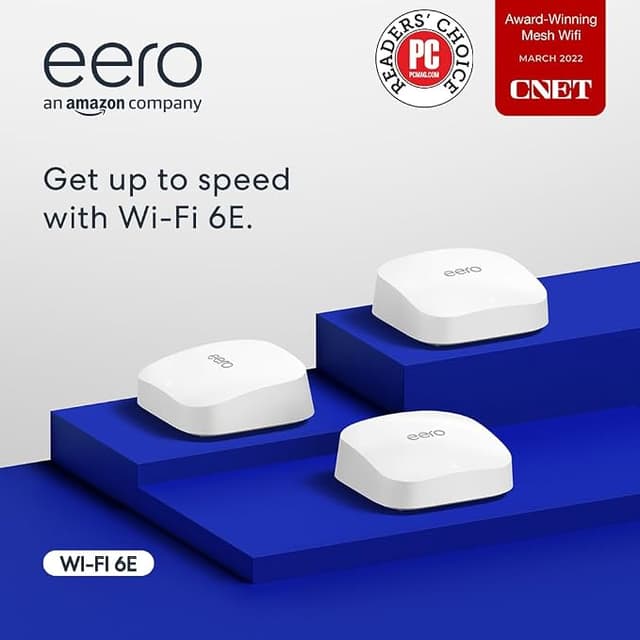

TheTrueMesh technology optimises your connection while the routers support up to 75 connected devices. It also comes with a built-in Zigbee smart home hub, so you're granted total control over your smart home ecosystem, eliminating the need for multiple smart home hubs.
TheTrueMesh technology optimises your connection while the routers support up to 75 connected devices. It also comes with a built-in Zigbee smart home hub, so you're granted total control over your smart home ecosystem, eliminating the need for multiple smart home hubs.
in 3 offers
The lowest price for Eero Pro 6 TrueMesh Wifi 6 Tri-Band System (3 Pack) right now is $799.99 at Amazon.com.au, compared across 3 retailers.
The all-time low was $106.59 on 9 Sept 2026 — today's price is 651% above the lowest ever. It has been notably cheaper before — worth setting a price alert.
Prices last updated 15 Sept 2026.
Eero Pro 6 TrueMesh Wifi 6 Tri-Band System (3 Pack)
TheTrueMesh technology optimises your connection while the routers support up to 75 connected devices. It also comes with a built-in Zigbee smart home hub, so you're granted total control over your smart home ecosystem, eliminating the need for multiple smart home hubs.
TheTrueMesh technology optimises your connection while the routers support up to 75 connected devices. It also comes with a built-in Zigbee smart home hub, so you're granted total control over your smart home ecosystem, eliminating the need for multiple smart home hubs.


