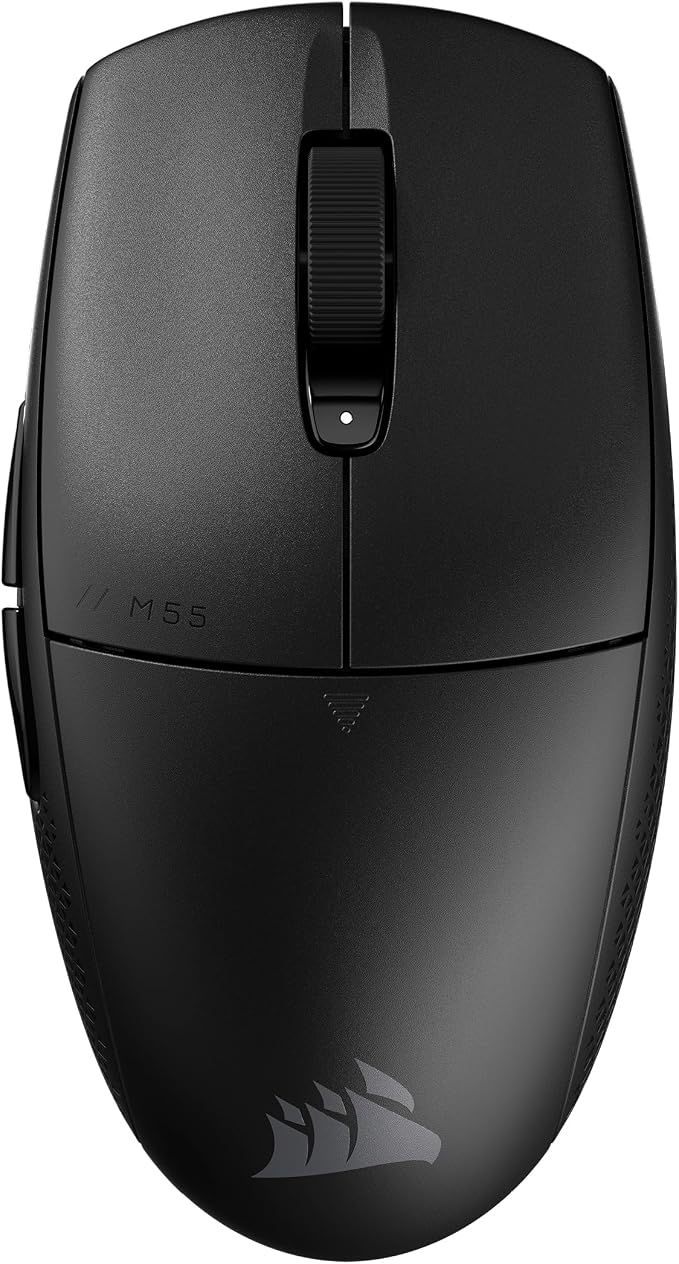
Corsair M55 RGB Pro Ambidextrous Multi Grip Gaming Black Mouse
M55 RGB PRO Ambidextrous Multi-Grip Gaming Mouse (AP) PICK A SIDE Weighing in at just 86g, the M55 RGB PRO's light and versatile ambidextrous design lets you play at your highest level with either hand using your most comfortable grip, be it palm, claw, or fingertip. Precision to Win Take control over your gaming thanks to a 12,400 DPI optical sensor for high-accuracy tracking. Built to Last Durable construction featuring 50 million click-rated Omron switches and a premium braided cable gives the M55 RGB PRO the strength to withstand years of intense gaming sessions.
M55 RGB PRO Ambidextrous Multi-Grip Gaming Mouse (AP) PICK A SIDE Weighing in at just 86g, the M55 RGB PRO's light and versatile ambidextrous design lets you play at your highest level with either hand using your most comfortable grip, be it palm, claw, or fingertip. Precision to Win Take control over your gaming thanks to a 12,400 DPI optical sensor for high-accuracy tracking. Built to Last Durable construction featuring 50 million click-rated Omron switches and a premium braided cable gives the M55 RGB PRO the strength to withstand years of intense gaming sessions.
M55 RGB PRO Ambidextrous Multi-Grip Gaming Mouse (AP) PICK A SIDE Weighing in at just 86g, the M55 RGB PRO's light and versatile ambidextrous design lets you play at your highest level with either hand using your most comfortable grip, be it palm, claw, or fingertip. Precision to Win Take control over your gaming thanks to a 12,400 DPI optical sensor for high-accuracy tracking. Built to Last Durable construction featuring 50 million click-rated Omron switches and a premium braided cable gives the M55 RGB PRO the strength to withstand years of intense gaming sessions.
M55 RGB PRO Ambidextrous Multi-Grip Gaming Mouse (AP) PICK A SIDE Weighing in at just 86g, the M55 RGB PRO's light and versatile ambidextrous design lets you play at your highest level with either hand using your most comfortable grip, be it palm, claw, or fingertip. Precision to Win Take control over your gaming thanks to a 12,400 DPI optical sensor for high-accuracy tracking. Built to Last Durable construction featuring 50 million click-rated Omron switches and a premium braided cable gives the M55 RGB PRO the strength to withstand years of intense gaming sessions.
in 5 offers
The lowest price for Corsair M55 RGB Pro Ambidextrous Multi Grip Gaming Black Mouse right now is $20.00 at CeX, compared across 5 retailers.
The all-time low was $10.00 on 1 June 2024 — today's price is 100% above the lowest ever. It has been notably cheaper before — worth setting a price alert.
Prices last updated 15 Oct 2026.
Last updated at 15/10/2026 04:56:55
Corsair M55 RGB Pro Gaming Mouse, B
Delivery $4
Corsair M55 RGB PRO Optical Gaming Mouse - Black
Delivery $11.99
Corsair M55 RGB PRO Mouse, 12400DPI
Corsair M55 RGB PRO Ambidextrous Multi-Grip Gaming Black Mouse, 200-12,400 DPI, ICUE Software. s
Corsair M55 RGB PRO Ambidextrous Multi-Grip Gaming Black Mouse, 200-12,400 DPI, ICUE Software. s
Free delivery between 16–24 Oct
originally posted on microcenter.com
I usually would have bought a more expensive mouse, but nearly all others I can find have a thumb rest which interferes with my grip in FPS games.I don't need a million programmable buttons, but the two is perfect for me.MOST OF ALL this thing is the most impressively durable device I've ever used. I'll be honest I tilt hard in some games, and I take it all out on this poor little mouse. Cracks started to appear after 7 months, and after the full year the top was a spiderweb, yet it still worked a charm. Just got myself another god rest its soul
originally posted on neweggbusiness.com
I have large hands and typically use a claw-grip on mice. My preferred mouse is actually a Corsair Sabre, but this one isn't too bad. My cons are relatively minor. To be honest, I barely change DPI anyway (unless it's by accident) and the claw-grip is to blame for hitting the opposing side buttons. Aside from that, the mouse still feels great to me. Although I still want to plug my Sabre back in and go back to using it, I wouldn't mind continuing to use this mouse indefinitely. I recently had an issue that I had to have my Sabre RMA'd for, and with no backup mouse, life was miserable for the duration of the RMA. I would have loved to have a backup mouse like this, so I'll definitely be holding on to this one for any future issues like that. For any left-handers out ... MoreI have large hands and typically use a claw-grip on mice. My preferred mouse is actually a Corsair Sabre, but this one isn't too bad. My cons are relatively minor. To be honest, I barely change DPI anyway (unless it's by accident) and the claw-grip is to blame for hitting the opposing side buttons. Aside from that, the mouse still feels great to me. Although I still want to plug my Sabre back in and go back to using it, I wouldn't mind continuing to use this mouse indefinitely. I recently had an issue that I had to have my Sabre RMA'd for, and with no backup mouse, life was miserable for the duration of the RMA. I would have loved to have a backup mouse like this, so I'll definitely be holding on to this one for any future issues like that. For any left-handers out there looking for a decent, inexpensive gaming mouse, this is a great choice. Or , you know, right-handers too. I guess it doesn't matter.
originally posted on neweggbusiness.com
Feels nice and comfortable to hold, but it's a bit lighter than I'm used to. Also, because of how light it is, it also feels a bit cheap and I'm a little worried about how long the buttons will last, but only time will tell. You can enable to the use of all side buttons in the settings(defaults to only one side depending on Right/Left Handed mode), although it's hard to make use of all of them unless you have some crazy grip style. Customizable DPI switch is nice for FPS, when you want more precise aiming at different ranges for different weapons. Not a fan of no on-board memory(to save settings). Programmable buttons sometime don't work unless I right-click the iCUE tray icon and 'bring to foreground' for a second. I didn't buy this mouse for RGB, so it's not a big ... MoreFeels nice and comfortable to hold, but it's a bit lighter than I'm used to. Also, because of how light it is, it also feels a bit cheap and I'm a little worried about how long the buttons will last, but only time will tell. You can enable to the use of all side buttons in the settings(defaults to only one side depending on Right/Left Handed mode), although it's hard to make use of all of them unless you have some crazy grip style. Customizable DPI switch is nice for FPS, when you want more precise aiming at different ranges for different weapons. Not a fan of no on-board memory(to save settings). Programmable buttons sometime don't work unless I right-click the iCUE tray icon and 'bring to foreground' for a second. I didn't buy this mouse for RGB, so it's not a big deal to me, but it would've been nice if there were some lights in a better position, like more up front and on the sides where you could actually see it during use, instead of being under your palm. Overall, a decent gaming mouse for the price and would buy again if I there are no better options at the time, and if the mouse buttons last a while.
| Top Use Cases | Gaming |
| Typical Users | Gamers |
| Connectivity Type | Wired |
| Interface | USB |
| Compatibility | Compatible with CORSAIR iCUE |
Corsair M55 RGB Pro Gaming Mouse, B
Delivery $4
Corsair M55 RGB PRO Optical Gaming Mouse - Black
Delivery $11.99
Corsair M55 RGB PRO Mouse, 12400DPI
Corsair M55 RGB PRO Ambidextrous Multi-Grip Gaming Black Mouse, 200-12,400 DPI, ICUE Software. s
Corsair M55 RGB PRO Ambidextrous Multi-Grip Gaming Black Mouse, 200-12,400 DPI, ICUE Software. s
Free delivery between 16–24 Oct
I usually would have bought a more expensive mouse, but nearly all others I can find have a thumb rest which interferes with my grip in FPS games.I don't need a million programmable buttons, but the two is perfect for me.MOST OF ALL this thing is the most impressively durable device I've ever used. I'll be honest I tilt hard in some games, and I take it all out on this poor little mouse. Cracks started to appear after 7 months, and after the full year the top was a spiderweb, yet it still worked a charm. Just got myself another god rest its soul
I have large hands and typically use a claw-grip on mice. My preferred mouse is actually a Corsair Sabre, but this one isn't too bad. My cons are relatively minor. To be honest, I barely change DPI anyway (unless it's by accident) and the claw-grip is to blame for hitting the opposing side buttons. Aside from that, the mouse still feels great to me. Although I still want to plug my Sabre back in and go back to using it, I wouldn't mind continuing to use this mouse indefinitely. I recently had an issue that I had to have my Sabre RMA'd for, and with no backup mouse, life was miserable for the duration of the RMA. I would have loved to have a backup mouse like this, so I'll definitely be holding on to this one for any future issues like that. For any left-handers out ... MoreI have large hands and typically use a claw-grip on mice. My preferred mouse is actually a Corsair Sabre, but this one isn't too bad. My cons are relatively minor. To be honest, I barely change DPI anyway (unless it's by accident) and the claw-grip is to blame for hitting the opposing side buttons. Aside from that, the mouse still feels great to me. Although I still want to plug my Sabre back in and go back to using it, I wouldn't mind continuing to use this mouse indefinitely. I recently had an issue that I had to have my Sabre RMA'd for, and with no backup mouse, life was miserable for the duration of the RMA. I would have loved to have a backup mouse like this, so I'll definitely be holding on to this one for any future issues like that. For any left-handers out there looking for a decent, inexpensive gaming mouse, this is a great choice. Or , you know, right-handers too. I guess it doesn't matter.
Feels nice and comfortable to hold, but it's a bit lighter than I'm used to. Also, because of how light it is, it also feels a bit cheap and I'm a little worried about how long the buttons will last, but only time will tell. You can enable to the use of all side buttons in the settings(defaults to only one side depending on Right/Left Handed mode), although it's hard to make use of all of them unless you have some crazy grip style. Customizable DPI switch is nice for FPS, when you want more precise aiming at different ranges for different weapons. Not a fan of no on-board memory(to save settings). Programmable buttons sometime don't work unless I right-click the iCUE tray icon and 'bring to foreground' for a second. I didn't buy this mouse for RGB, so it's not a big ... MoreFeels nice and comfortable to hold, but it's a bit lighter than I'm used to. Also, because of how light it is, it also feels a bit cheap and I'm a little worried about how long the buttons will last, but only time will tell. You can enable to the use of all side buttons in the settings(defaults to only one side depending on Right/Left Handed mode), although it's hard to make use of all of them unless you have some crazy grip style. Customizable DPI switch is nice for FPS, when you want more precise aiming at different ranges for different weapons. Not a fan of no on-board memory(to save settings). Programmable buttons sometime don't work unless I right-click the iCUE tray icon and 'bring to foreground' for a second. I didn't buy this mouse for RGB, so it's not a big deal to me, but it would've been nice if there were some lights in a better position, like more up front and on the sides where you could actually see it during use, instead of being under your palm. Overall, a decent gaming mouse for the price and would buy again if I there are no better options at the time, and if the mouse buttons last a while.
I'm not much of a gamer, but I love how gaming mice work on just about any surface and let me really dial in the sensitivity for creative work.This is nice medium size mouse that works for either hand, but still fits my right hand pretty well. My hands are just large enough that I sometimes need a larger mouse, but this is just about perfect. The iCue software lets me dial in the sensitivity to exactly what I want. The color cycles are nice, but I mostly turn that off to avoid the distraction.The first one I bought was flaky and died within a week of purchase, so I was doubly glad I paid for the extra protection through Microcenter. Resetting the mouse (hold both buttons while plugging it in for a few seconds) sometimes helped, but eventually it just stopped ... MoreI'm not much of a gamer, but I love how gaming mice work on just about any surface and let me really dial in the sensitivity for creative work.This is nice medium size mouse that works for either hand, but still fits my right hand pretty well. My hands are just large enough that I sometimes need a larger mouse, but this is just about perfect. The iCue software lets me dial in the sensitivity to exactly what I want. The color cycles are nice, but I mostly turn that off to avoid the distraction.The first one I bought was flaky and died within a week of purchase, so I was doubly glad I paid for the extra protection through Microcenter. Resetting the mouse (hold both buttons while plugging it in for a few seconds) sometimes helped, but eventually it just stopped responding.The extra buttons on the side are a little awkward for me, as I frequently bump them, but they're not configured to do anything yet so it's not an issue. The iCue software lets me record macros but only for the left side buttons. It seems to know about the right side buttons, but they're just grayed out and unresponsive. It might bother me once I find a use for them and can't use them.Microcenter replaced the mouse and the new one has performed exactly as expected. I would totally buy this again given what I know after having it for a week.
I am left handed and I like to use my mouse in that hand. Unfortunately, most mice are specially contoured for righties. Not this one. It fits just as well in the left as right hand. There's even a left hand mode which also allows you to disables the left side page back buttons so you don't brush them inadvertently.The mouse works well, the clicks aren't too loud, and feels good in the hand with textured thumb areas for better grip. It also has a DPI mode button to switch between DPI sensitivities for different purposes, including low dpi for precision when sniping heads in FPSs.I docked it one star because the USB cable that comes attached to it is so stiff that every time I let go of the mouse, the mouse moves to follow the bends in the cable which was put ... MoreI am left handed and I like to use my mouse in that hand. Unfortunately, most mice are specially contoured for righties. Not this one. It fits just as well in the left as right hand. There's even a left hand mode which also allows you to disables the left side page back buttons so you don't brush them inadvertently.The mouse works well, the clicks aren't too loud, and feels good in the hand with textured thumb areas for better grip. It also has a DPI mode button to switch between DPI sensitivities for different purposes, including low dpi for precision when sniping heads in FPSs.I docked it one star because the USB cable that comes attached to it is so stiff that every time I let go of the mouse, the mouse moves to follow the bends in the cable which was put there in packaging. In other words, the cable doesn't just want to lay flat and flex fluidly, it acts kinda more like a lightly coiled spring.
Corsair consistently makes some of my favorite products. So I was very interested to see their latest mouse offering, the M55 RGB PRO. I currently rock the M65 PRO RPG and it has been superb. First of all, packaging was pretty standard for this price tier, so nothing really to say there. But once unpacked I immediately noticed the weight, it is noticeably lighter than my M65. I personally like a little heft, so for me it is a little light feeling and is not tune-able. But it does feel very nice in the hand, with all the buttons being right where they need to be and provide good feedback. I did notice some accidental pressing of the opposite side thumb buttons, but that lessened as I got used to the design. The mouse wheel has nice resistance and changing the DPI on ... MoreCorsair consistently makes some of my favorite products. So I was very interested to see their latest mouse offering, the M55 RGB PRO. I currently rock the M65 PRO RPG and it has been superb. First of all, packaging was pretty standard for this price tier, so nothing really to say there. But once unpacked I immediately noticed the weight, it is noticeably lighter than my M65. I personally like a little heft, so for me it is a little light feeling and is not tune-able. But it does feel very nice in the hand, with all the buttons being right where they need to be and provide good feedback. I did notice some accidental pressing of the opposite side thumb buttons, but that lessened as I got used to the design. The mouse wheel has nice resistance and changing the DPI on the fly was effortless. 12400 DPI offers a lot of range for various types of games and is very welcomed. The iCUE software for tuning the lighting is solid, however there have been some times where it loses my color settings (with both mice). Still that is a notable, but minor gripe. The cord is a solid length and overall the mouse really is a quality product. Overall, I recommend it for the price point and especially if you are looking for a ambidextrous design. It is comfortable, performs great, looks good and does not do much extra and that is okay!
I recently bought this mouse. Near the beginning of November. It was for my current desktop, I started having the issue today, I was playing a game on my computer and it started bugging out on me. I don't know if it's my mouse setup or not, but something that I knew was not my mouse setup was the fact that the mouse was toggled and it wouldn't stop zooming out even when I zoomed in. I'm not the best with gaming, or technical problems. So it may have been one of the buttons on the side. it's a five star if this didn't happen. I have the Corsair headphones, and keyboard, too. Hopefully nothing happens with the keyboard or headphones. I'm not saying don't buy this, it's a great mouse, but I'm just putting it out there FYI.
Cons:1.) I have small hands and it is very difficult to hit button number 5 with my thumb and therefore do not use it for gaming or any application. 2.) The RGB sails on the mouse are not wanted.Pros:1.) My index and middle fingers easily reach the buttons. 2.) The DPI adjustment is very easy, just press the button below the scroll wheel. 3.) It is extremely light weight if that is what you want in a mouse. 4.) It is a corded mouse and produces less lag compared to a non-corded mouse in gaming. 5.) The small light between the scroll wheel and the DPI button make the buttons rapidly identifiable.Other:I do not use the software that can be downloaded, I have found it unnecessary.The scroll wheel has a course, mushy feeling movements however it does not ... MoreCons:1.) I have small hands and it is very difficult to hit button number 5 with my thumb and therefore do not use it for gaming or any application. 2.) The RGB sails on the mouse are not wanted.Pros:1.) My index and middle fingers easily reach the buttons. 2.) The DPI adjustment is very easy, just press the button below the scroll wheel. 3.) It is extremely light weight if that is what you want in a mouse. 4.) It is a corded mouse and produces less lag compared to a non-corded mouse in gaming. 5.) The small light between the scroll wheel and the DPI button make the buttons rapidly identifiable.Other:I do not use the software that can be downloaded, I have found it unnecessary.The scroll wheel has a course, mushy feeling movements however it does not affect function after I got used to it.
I'm too tired and lazy to get a replacement if the mouse wheel is defective, and this soon, it's hard to tell if this will break within a year like most modern tech. But so far, it's working good enough. Main reason I might not buy this mouse again, is that having buttons on both sides feels like it be more useful for a computer that multiple people uses and have different primary hands (Though you need the extra program to active only one side at the time. Out of the box, it defaults for right hand). As is, those buttons ends up being a little in the way, though they are enough out of the way that I have not accidently clicked them that that often. Most accidental clicks happened when I was still getting used to it. Clicking the thumb button furthest away from me ... MoreI'm too tired and lazy to get a replacement if the mouse wheel is defective, and this soon, it's hard to tell if this will break within a year like most modern tech. But so far, it's working good enough. Main reason I might not buy this mouse again, is that having buttons on both sides feels like it be more useful for a computer that multiple people uses and have different primary hands (Though you need the extra program to active only one side at the time. Out of the box, it defaults for right hand). As is, those buttons ends up being a little in the way, though they are enough out of the way that I have not accidently clicked them that that often. Most accidental clicks happened when I was still getting used to it. Clicking the thumb button furthest away from me was the main way for me to accidently press a button on the other side. But assuming this mouse don't break on me sooner than later, it's a fine mouse.
I wanted a mouse where I could program a one or more buttons to send a sequence of keys or mouse clicks when pressed.This mouse does that.However:1) the software to configure the mouse is clumsy to work with and use. The user cannot cut and past from one macro to another.2) The buttons that can be programmed are on the sides back from the front. For me that is not a natural position to click on and I actually have to look at the mouse to find and press the correct button.I really want a mouse I can click out of reflex to something on the screen. Maybe with more use I will get there with this mouse. So far (about a month) I am not there.
| Top Use Cases | Gaming |
| Typical Users | Gamers |
| Connectivity Type | Wired |
| Interface | USB |
| Compatibility | Compatible with CORSAIR iCUE |