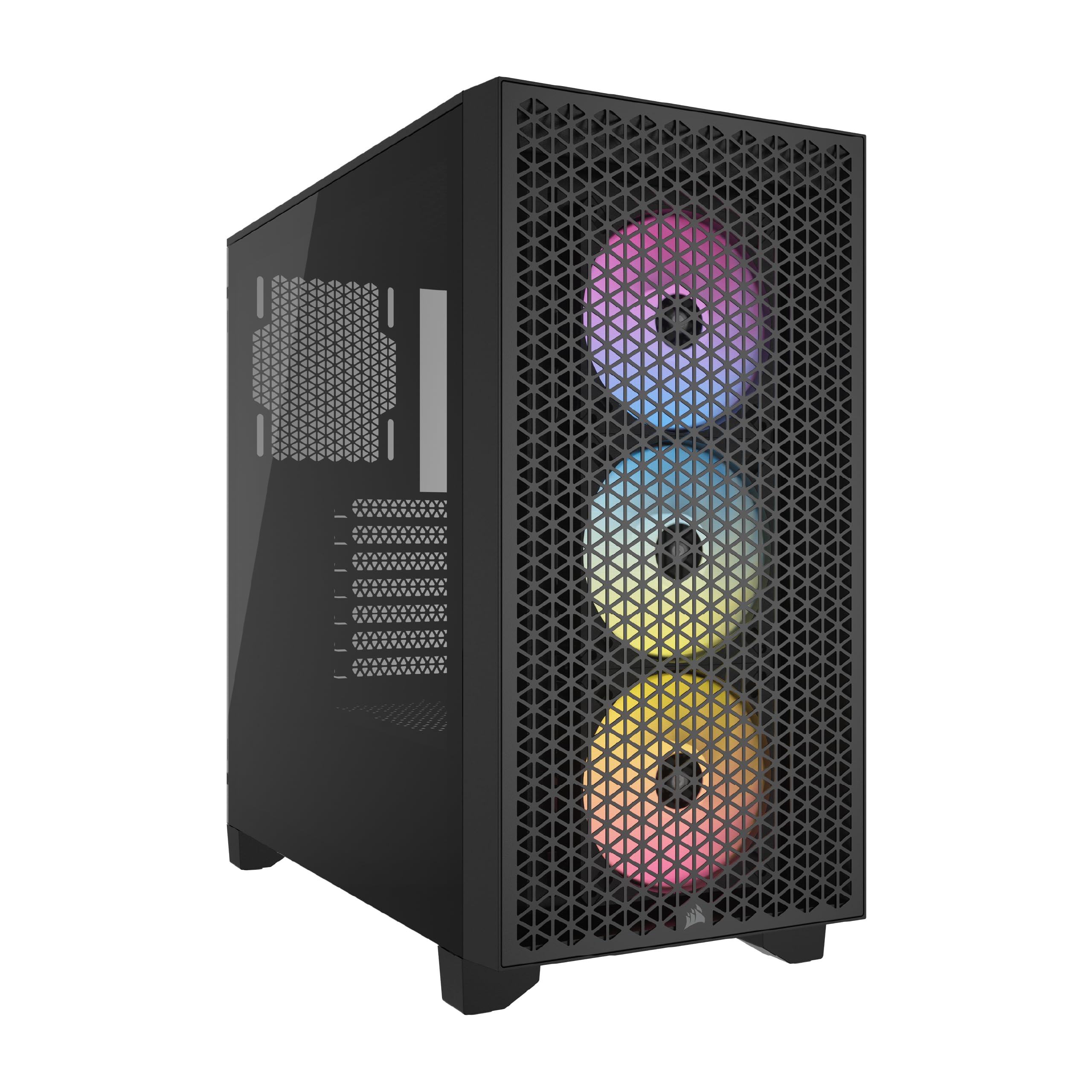
Corsair 3000D RGB Airflow Tempered Glass Mid Tower Case - Black
Experience unmatched performance and stunning aesthetics with the Corsair 3000D Airflow RGB Mid Tower Tempered. Ideal for builders seeking a blend of style and function, this mid tower case offers superior airflow to keep your components cool under pressure. The tempered glass side panel provides a clear view of your meticulously crafted setup while the RGB lighting adds a touch of flair. Whether you're gaming or working on demanding tasks, the CC-9011255-WW ensures your PC performs at its peak. Elevate your build with Corsair's 3000D Airflow RGB today.
Experience unmatched performance and stunning aesthetics with the Corsair 3000D Airflow RGB Mid Tower Tempered. Ideal for builders seeking a blend of style and function, this mid tower case offers superior airflow to keep your components cool under pressure. The tempered glass side panel provides a clear view of your meticulously crafted setup while the RGB lighting adds a touch of flair. Whether you're gaming or working on demanding tasks, the CC-9011255-WW ensures your PC performs at its peak. Elevate your build with Corsair's 3000D Airflow RGB today.
Experience unmatched performance and stunning aesthetics with the Corsair 3000D Airflow RGB Mid Tower Tempered. Ideal for builders seeking a blend of style and function, this mid tower case offers superior airflow to keep your components cool under pressure. The tempered glass side panel provides a clear view of your meticulously crafted setup while the RGB lighting adds a touch of flair. Whether you're gaming or working on demanding tasks, the CC-9011255-WW ensures your PC performs at its peak. Elevate your build with Corsair's 3000D Airflow RGB today.
Experience unmatched performance and stunning aesthetics with the Corsair 3000D Airflow RGB Mid Tower Tempered. Ideal for builders seeking a blend of style and function, this mid tower case offers superior airflow to keep your components cool under pressure. The tempered glass side panel provides a clear view of your meticulously crafted setup while the RGB lighting adds a touch of flair. Whether you're gaming or working on demanding tasks, the CC-9011255-WW ensures your PC performs at its peak. Elevate your build with Corsair's 3000D Airflow RGB today.
in 43 offers
The lowest price for Corsair 3000D RGB Airflow Tempered Glass Mid Tower Case - Black right now is $147.21 at microless.com, compared across 35 retailers.
The all-time low was $99.00 on 3 May 2026 — today's price is 49% above the lowest ever. It has been notably cheaper before — worth setting a price alert.
Prices last updated 21 Sept 2026.
Last updated at 21/09/2026 18:13:08
CORSAIR 3000D RGB Airflow Mid-Tower PC Case - Black - 3X AR120 RGB Fans - Three-Slot GPU Support – Fits up to 8X 120mm Fans - high-Airflow Design
Affiliate Disclosure: We may receive a small commission for purchases made through this link at no extra cost to you. This helps support our site. Thank you!
Corsair 3000D RGB AIRFLOW Mid-Tower PC Case, Tempered Glass & Airflow Optimized Front Panel, Up to 8x 120mm Fans & 360mm Radiators, 2*3.5"or 2*2.5" Dr
Delivery between 24 Sept – 1 Oct $182.34
CORSAIR Go Midi 3000D RGB Airflow (Tempered Glass) Black
Free delivery
Corsair 3000D AIRFLOW RGB LED Tempered Glass Black Mid Tower PC Case
Delivery $10.10
Corsair 3000D RGB AIRFLOW Mid-Tower PC Case - Black, ATX, 360 GPU, 170 CPU cooler, 220 PSU, 3x AR120 RGB, 2x USB-A 3.2 Gen 1
Corsair 3000D RGB AIRFLOW Mid-Tower PC Case - Black, ATX, 360 GPU, 170 CPU cooler, 220 PSU, 3x AR120 RGB, 2x USB-A 3.2 Gen 1
Delivery between Wed – Mon $45.55
Corsair 3000D RGB AIRFLOW Mid-Tower PC Case - Black, ATX, 360 GPU, 170 CPU cooler, 220 PSU, 3x AR120 RGB, 2x USB-A 3.2 Gen 1 CC-9011255-WW
Delivery $13
Corsair 3000D RGB AIRFLOW Mid-Tower PC Case - Black, ATX, 360 GPU, 170 CPU cooler, 220 PSU, 3x AR120 RGB, 2x USB-A 3.2 Gen 1
Delivery by 30 Sept $15
Corsair 3000D RGB AIRFLOW Mid-Tower PC Case - Black CC-9011255-WW
Delivery $15
Corsair CC-9011255-WW Computer 3000D RGB AIRFLOW Mid-Tower PC Case - Black, ATX, 360 GPU, 170 CPU cooler, 220 PSU, 3x AR120 RGB, 2x USB-A 3.2 Gen 1
Delivery $35
originally posted on newegg.com
Overall Review: - I would not recommend the mouse to enthusiasts or anyone with mobility issues or a physical disability. I can see this mouse giving a person carpal tunnel. I decided to give the mouse to the wifie, if it causes health issues down the line we will just order another mouse. I am a verified user and yes actually bought the mouse. You can see a big green circle that says VERIFIED USER. Manufacturer Response: "Hi David, And thanks for the feedback. Are you certain this is the mouse you have? It doesn't appear as a verified purchase under your account. Please reach out so we can help if needed: support.corsair.com -Art"
originally posted on neweggbusiness.com
I have large hands and typically use a claw-grip on mice. My preferred mouse is actually a Corsair Sabre, but this one isn't too bad. My cons are relatively minor. To be honest, I barely change DPI anyway (unless it's by accident) and the claw-grip is to blame for hitting the opposing side buttons. Aside from that, the mouse still feels great to me. Although I still want to plug my Sabre back in and go back to using it, I wouldn't mind continuing to use this mouse indefinitely. I recently had an issue that I had to have my Sabre RMA'd for, and with no backup mouse, life was miserable for the duration of the RMA. I would have loved to have a backup mouse like this, so I'll definitely be holding on to this one for any future issues like that. For any left-handers out ... MoreI have large hands and typically use a claw-grip on mice. My preferred mouse is actually a Corsair Sabre, but this one isn't too bad. My cons are relatively minor. To be honest, I barely change DPI anyway (unless it's by accident) and the claw-grip is to blame for hitting the opposing side buttons. Aside from that, the mouse still feels great to me. Although I still want to plug my Sabre back in and go back to using it, I wouldn't mind continuing to use this mouse indefinitely. I recently had an issue that I had to have my Sabre RMA'd for, and with no backup mouse, life was miserable for the duration of the RMA. I would have loved to have a backup mouse like this, so I'll definitely be holding on to this one for any future issues like that. For any left-handers out there looking for a decent, inexpensive gaming mouse, this is a great choice. Or , you know, right-handers too. I guess it doesn't matter.
originally posted on neweggbusiness.com
Feels nice and comfortable to hold, but it's a bit lighter than I'm used to. Also, because of how light it is, it also feels a bit cheap and I'm a little worried about how long the buttons will last, but only time will tell. You can enable to the use of all side buttons in the settings(defaults to only one side depending on Right/Left Handed mode), although it's hard to make use of all of them unless you have some crazy grip style. Customizable DPI switch is nice for FPS, when you want more precise aiming at different ranges for different weapons. Not a fan of no on-board memory(to save settings). Programmable buttons sometime don't work unless I right-click the iCUE tray icon and 'bring to foreground' for a second. I didn't buy this mouse for RGB, so it's not a big ... MoreFeels nice and comfortable to hold, but it's a bit lighter than I'm used to. Also, because of how light it is, it also feels a bit cheap and I'm a little worried about how long the buttons will last, but only time will tell. You can enable to the use of all side buttons in the settings(defaults to only one side depending on Right/Left Handed mode), although it's hard to make use of all of them unless you have some crazy grip style. Customizable DPI switch is nice for FPS, when you want more precise aiming at different ranges for different weapons. Not a fan of no on-board memory(to save settings). Programmable buttons sometime don't work unless I right-click the iCUE tray icon and 'bring to foreground' for a second. I didn't buy this mouse for RGB, so it's not a big deal to me, but it would've been nice if there were some lights in a better position, like more up front and on the sides where you could actually see it during use, instead of being under your palm. Overall, a decent gaming mouse for the price and would buy again if I there are no better options at the time, and if the mouse buttons last a while.
| Form factor | Midi Tower |
| Illumination | Y |
| Illumination colour | Multi |
| Number of 2.5" bays | 2 |
| Number of 3.5" bays | 2 |

CORSAIR 3000D RGB Airflow Mid-Tower PC Case - Black - 3X AR120 RGB Fans - Three-Slot GPU Support – Fits up to 8X 120mm Fans - high-Airflow Design
Affiliate Disclosure: We may receive a small commission for purchases made through this link at no extra cost to you. This helps support our site. Thank you!
Corsair 3000D RGB AIRFLOW Mid-Tower PC Case, Tempered Glass & Airflow Optimized Front Panel, Up to 8x 120mm Fans & 360mm Radiators, 2*3.5"or 2*2.5" Dr
Delivery between 24 Sept – 1 Oct $182.34
CORSAIR Go Midi 3000D RGB Airflow (Tempered Glass) Black
Free delivery
Corsair 3000D AIRFLOW RGB LED Tempered Glass Black Mid Tower PC Case
Delivery $10.10
Corsair 3000D RGB AIRFLOW Mid-Tower PC Case - Black, ATX, 360 GPU, 170 CPU cooler, 220 PSU, 3x AR120 RGB, 2x USB-A 3.2 Gen 1
Overall Review: - I would not recommend the mouse to enthusiasts or anyone with mobility issues or a physical disability. I can see this mouse giving a person carpal tunnel. I decided to give the mouse to the wifie, if it causes health issues down the line we will just order another mouse. I am a verified user and yes actually bought the mouse. You can see a big green circle that says VERIFIED USER. Manufacturer Response: "Hi David, And thanks for the feedback. Are you certain this is the mouse you have? It doesn't appear as a verified purchase under your account. Please reach out so we can help if needed: support.corsair.com -Art"
I have large hands and typically use a claw-grip on mice. My preferred mouse is actually a Corsair Sabre, but this one isn't too bad. My cons are relatively minor. To be honest, I barely change DPI anyway (unless it's by accident) and the claw-grip is to blame for hitting the opposing side buttons. Aside from that, the mouse still feels great to me. Although I still want to plug my Sabre back in and go back to using it, I wouldn't mind continuing to use this mouse indefinitely. I recently had an issue that I had to have my Sabre RMA'd for, and with no backup mouse, life was miserable for the duration of the RMA. I would have loved to have a backup mouse like this, so I'll definitely be holding on to this one for any future issues like that. For any left-handers out ... MoreI have large hands and typically use a claw-grip on mice. My preferred mouse is actually a Corsair Sabre, but this one isn't too bad. My cons are relatively minor. To be honest, I barely change DPI anyway (unless it's by accident) and the claw-grip is to blame for hitting the opposing side buttons. Aside from that, the mouse still feels great to me. Although I still want to plug my Sabre back in and go back to using it, I wouldn't mind continuing to use this mouse indefinitely. I recently had an issue that I had to have my Sabre RMA'd for, and with no backup mouse, life was miserable for the duration of the RMA. I would have loved to have a backup mouse like this, so I'll definitely be holding on to this one for any future issues like that. For any left-handers out there looking for a decent, inexpensive gaming mouse, this is a great choice. Or , you know, right-handers too. I guess it doesn't matter.
Feels nice and comfortable to hold, but it's a bit lighter than I'm used to. Also, because of how light it is, it also feels a bit cheap and I'm a little worried about how long the buttons will last, but only time will tell. You can enable to the use of all side buttons in the settings(defaults to only one side depending on Right/Left Handed mode), although it's hard to make use of all of them unless you have some crazy grip style. Customizable DPI switch is nice for FPS, when you want more precise aiming at different ranges for different weapons. Not a fan of no on-board memory(to save settings). Programmable buttons sometime don't work unless I right-click the iCUE tray icon and 'bring to foreground' for a second. I didn't buy this mouse for RGB, so it's not a big ... MoreFeels nice and comfortable to hold, but it's a bit lighter than I'm used to. Also, because of how light it is, it also feels a bit cheap and I'm a little worried about how long the buttons will last, but only time will tell. You can enable to the use of all side buttons in the settings(defaults to only one side depending on Right/Left Handed mode), although it's hard to make use of all of them unless you have some crazy grip style. Customizable DPI switch is nice for FPS, when you want more precise aiming at different ranges for different weapons. Not a fan of no on-board memory(to save settings). Programmable buttons sometime don't work unless I right-click the iCUE tray icon and 'bring to foreground' for a second. I didn't buy this mouse for RGB, so it's not a big deal to me, but it would've been nice if there were some lights in a better position, like more up front and on the sides where you could actually see it during use, instead of being under your palm. Overall, a decent gaming mouse for the price and would buy again if I there are no better options at the time, and if the mouse buttons last a while.
Great little case. Looks awesome, none of that rgb crap to ruin the aesthetics. Plenty of ventilation for airflow and keeps ky rig running nice and cool. The magnetic filter on the top means if things do get hot i can always remove it for optimal flow.
Over all, the functional aspect of this mouse is really good. I just wish there was an option to store your preferences in memory on the mouse, or an off/cycle switch on the bottom. I do get Corsair wants a uniform platform to control all its peripherals, however, give consumers a choice. On the reverse, I do not want this to deter someone from picking up this mouse. If your system already has other Corsair devices using iCUE, this will not bother you in the lease. Pick up the $40 mouse and enjoy. It’s not a crazy design and works well.
Corsair consistently makes some of my favorite products. So I was very interested to see their latest mouse offering, the M55 RGB PRO. I currently rock the M65 PRO RPG and it has been superb. First of all, packaging was pretty standard for this price tier, so nothing really to say there. But once unpacked I immediately noticed the weight, it is noticeably lighter than my M65. I personally like a little heft, so for me it is a little light feeling and is not tune-able. But it does feel very nice in the hand, with all the buttons being right where they need to be and provide good feedback. I did notice some accidental pressing of the opposite side thumb buttons, but that lessened as I got used to the design. The mouse wheel has nice resistance and changing the DPI on ... MoreCorsair consistently makes some of my favorite products. So I was very interested to see their latest mouse offering, the M55 RGB PRO. I currently rock the M65 PRO RPG and it has been superb. First of all, packaging was pretty standard for this price tier, so nothing really to say there. But once unpacked I immediately noticed the weight, it is noticeably lighter than my M65. I personally like a little heft, so for me it is a little light feeling and is not tune-able. But it does feel very nice in the hand, with all the buttons being right where they need to be and provide good feedback. I did notice some accidental pressing of the opposite side thumb buttons, but that lessened as I got used to the design. The mouse wheel has nice resistance and changing the DPI on the fly was effortless. 12400 DPI offers a lot of range for various types of games and is very welcomed. The iCUE software for tuning the lighting is solid, however there have been some times where it loses my color settings (with both mice). Still that is a notable, but minor gripe. The cord is a solid length and overall the mouse really is a quality product. Overall, I recommend it for the price point and especially if you are looking for a ambidextrous design. It is comfortable, performs great, looks good and does not do much extra and that is okay!
I would recommend this product if it wasn't for the scrolling wheel. I don't ask much from my mouse, but I expect the basic functions to work properly. The mouse offers more than the basic stuff in that regard, but the wheel... Whenever you click on it it tends to get stuck and stays clicked. You have to mess around with the wheel and unjam it. One would have thought this was a malfunction, but this seems to be by design. You see, if you click it in a perfectly vertical angle: no problem, works as intended. But if you so much have a slight forward tilt in your click, the wheel gets jammed into clicked position. It is also so sensible that it tends to get stuck whenever you just want to scroll. And that is why I don't recommend it.
This is my first foray into the "RGB" for a computer mouse; everything but my graphics card (and technically my primary mouse) is RGB capable. The mouse is very much lighter than my primary G500s. I don't find the cable to be too stiff - pretty lax in terms of flexibility. Any and all customizations and configurations must happen within the iCue software. I like having configurable RGB lighting for my computer system, but I haven't had much luck with longevity; 2 Corsair RGB keyboards I own both have ~6 LED lights that no longer work after 1-2 years of use. Quality-wise, this mouse is comparable to my G500s; build, buttons and all. I'll admit, I wouldn't have bought a gaming mouse at $40 prior to receiving this one due to the price-point. My opinion has changed.
I'm too tired and lazy to get a replacement if the mouse wheel is defective, and this soon, it's hard to tell if this will break within a year like most modern tech. But so far, it's working good enough. Main reason I might not buy this mouse again, is that having buttons on both sides feels like it be more useful for a computer that multiple people uses and have different primary hands (Though you need the extra program to active only one side at the time. Out of the box, it defaults for right hand). As is, those buttons ends up being a little in the way, though they are enough out of the way that I have not accidently clicked them that that often. Most accidental clicks happened when I was still getting used to it. Clicking the thumb button furthest away from me ... MoreI'm too tired and lazy to get a replacement if the mouse wheel is defective, and this soon, it's hard to tell if this will break within a year like most modern tech. But so far, it's working good enough. Main reason I might not buy this mouse again, is that having buttons on both sides feels like it be more useful for a computer that multiple people uses and have different primary hands (Though you need the extra program to active only one side at the time. Out of the box, it defaults for right hand). As is, those buttons ends up being a little in the way, though they are enough out of the way that I have not accidently clicked them that that often. Most accidental clicks happened when I was still getting used to it. Clicking the thumb button furthest away from me was the main way for me to accidently press a button on the other side. But assuming this mouse don't break on me sooner than later, it's a fine mouse.
The mouse is great, the sides (pinky and thumb areas) and main body have different textures, both suit their respective needs well. It took me a bit to learn how to change the light color by the scroll wheel (it's under "DPI", not "lighting" like the logo) but I eventually got it figured out. I didn't choose the mouse because of its ambidextrous but I can see how the symmetrical design can be be beneficial. I have a sort of claw grip when I use a mouse and this one's great for that. I've been using the mouse for over a week, the lighting was left alone after I got it set the first time but I've went in to change the actions & pointer speed a few times. I'm pretty sure it's set where it'll stay but making changes is easy in Corsair's iCUE software if I decide it's ... MoreThe mouse is great, the sides (pinky and thumb areas) and main body have different textures, both suit their respective needs well. It took me a bit to learn how to change the light color by the scroll wheel (it's under "DPI", not "lighting" like the logo) but I eventually got it figured out. I didn't choose the mouse because of its ambidextrous but I can see how the symmetrical design can be be beneficial. I have a sort of claw grip when I use a mouse and this one's great for that. I've been using the mouse for over a week, the lighting was left alone after I got it set the first time but I've went in to change the actions & pointer speed a few times. I'm pretty sure it's set where it'll stay but making changes is easy in Corsair's iCUE software if I decide it's still not right.
| Form factor | Midi Tower |
| Illumination | Y |
| Illumination colour | Multi |
| Number of 2.5" bays | 2 |
| Number of 3.5" bays | 2 |


