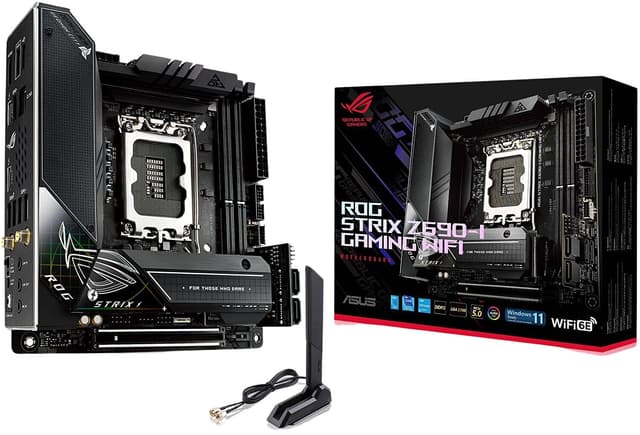
Asus ROG Strix Z690-I Gaming Wifi LGA 1700 Mini-ITX Motherboard
The motherboard or mainboard is the component that connects all the different parts of your computer. Often it has some integrated components like a sound card, enabling your computer to play sound, or a network card, to connect your computer to the network. The standard form factor (size) for motherboards is ATX, you need at least a midi-tower to fit one of those in. Micro-ATX motherboards are often more complete and have more onboard devices, like a video board and fit in smaller cases, but are generally less expandable.
The motherboard or mainboard is the component that connects all the different parts of your computer. Often it has some integrated components like a sound card, enabling your computer to play sound, or a network card, to connect your computer to the network. The standard form factor (size) for motherboards is ATX, you need at least a midi-tower to fit one of those in. Micro-ATX motherboards are often more complete and have more onboard devices, like a video board and fit in smaller cases, but are generally less expandable.
The motherboard or mainboard is the component that connects all the different parts of your computer. Often it has some integrated components like a sound card, enabling your computer to play sound, or a network card, to connect your computer to the network. The standard form factor (size) for motherboards is ATX, you need at least a midi-tower to fit one of those in. Micro-ATX motherboards are often more complete and have more onboard devices, like a video board and fit in smaller cases, but are generally less expandable.
The motherboard or mainboard is the component that connects all the different parts of your computer. Often it has some integrated components like a sound card, enabling your computer to play sound, or a network card, to connect your computer to the network. The standard form factor (size) for motherboards is ATX, you need at least a midi-tower to fit one of those in. Micro-ATX motherboards are often more complete and have more onboard devices, like a video board and fit in smaller cases, but are generally less expandable.
in 7 offers
The lowest price for Asus ROG Strix Z690-I Gaming Wifi LGA 1700 Mini-ITX Motherboard right now is $92.26 at eBay.com.au, compared across 4 retailers.
The all-time low was $91.53 on 29 Oct 2026 — today's price is 1% above the lowest ever. This is at or near its all-time low — a good time to buy.
Prices last updated 1 Nov 2026.
Last updated at 01/11/2026 12:44:57
ASUS ROG Strix Z690-I Gaming WiFi LGA 1700 Mini-ITX Intel Motherboard
Affiliate Disclosure: We may receive a small commission for purchases made through this link at no extra cost to you. This helps support our site. Thank you!
ASUS ROG Strix Z690-I Gaming WiFi Intel Z690 LGA1700 Mini-ITX DDR5 Motherboard - Refurbished (Untested) - Excellent - Refurbished
Free delivery between 4–10 Nov
Asus ROG Strix Z690-I GAMING WIFI Gaming Desktop Motherboard - Intel Z690 Chipset - Socket LGA-1700 - Mini ITX
Delivery $30
ASUS ROG Strix Z690-I Gaming mini-ITX Motherboard - WiFi 6E, PCIe 5.0, DDR5, Thunderbolt 4, M.2
Delivery between 7–10 Nov $29
originally posted on microcenter.com
This was bought and used for two months before it bricked. Asus refuses to address m.2 driver compatibility issues that cause your system to be completely inoperable. First started noticing signs of failure when the system would occasionally boot back to the bios screen during sleep. Suddenly, I wake up and it won’t turn on / gets stuck in a crash / boot loop. Spent this ENTIRE week troubleshooting. Multiple attempts at fresh windows install. Ensured all of my drivers across the system were the latest. Repaired and wiped my storage. Replaced my storage, RAM, PSU and cables. Symptoms persist even when using onboard graphics, can’t be gpu. Virus scan negative. Never overclocked my system and has always been extremely cool. ASUS support is hardly support and won’t read ... MoreThis was bought and used for two months before it bricked. Asus refuses to address m.2 driver compatibility issues that cause your system to be completely inoperable. First started noticing signs of failure when the system would occasionally boot back to the bios screen during sleep. Suddenly, I wake up and it won’t turn on / gets stuck in a crash / boot loop. Spent this ENTIRE week troubleshooting. Multiple attempts at fresh windows install. Ensured all of my drivers across the system were the latest. Repaired and wiped my storage. Replaced my storage, RAM, PSU and cables. Symptoms persist even when using onboard graphics, can’t be gpu. Virus scan negative. Never overclocked my system and has always been extremely cool. ASUS support is hardly support and won’t read your report no matter how detailed. Look up WHEA-Logger 17 Z690i issue, I’m not the only one who threw $400 into the wind apparently.
originally posted on microcenter.com
A micro ATX motherboard with everything you could possibly ask for and need. Excellent power delivery, a healthy amount of I/O, support for two NVME 4th generation storage along with DDR5 sets you up nicely for now and the future. Having the BIOS flashback button is such a nice feature to have. I paired this board with an i5 13600k. The flashback ensured the BIOS were good to go for the 13th gen processor. I enjoyed building my daughter’s new pc with this board. Everything about the layout works well the 360 AIO, ARGB, USB-C, and on and on.
originally posted on microcenter.com
BLUF: Board is fine, had issues at start but is stable now. Do not recommend at $400 MSRP, but issues are acceptable for $210 (+diagnosis fee).First motherboard was DOA. Took back to store, spent two hours waiting for troubleshooting, paid $43 for techs to confirm it was dead, then exchanged for replacement board.Paired with G.Skill Ripjaws S5 DDR5 from Micro Center, which support XMP 3.0, and the board crashes when XMP support is enabled in BIOS. Updated firmware out of the box so unknown if 13th Gen works without update. Board had issues with Intel stock cooling fan due to warping. I ordered a Noctua NH-L9i from a MC competitor since MC didn’t stock it and decreased temps ~15*C at idle.Once the replacement was running, it’s been fine. Long POST times to ... MoreBLUF: Board is fine, had issues at start but is stable now. Do not recommend at $400 MSRP, but issues are acceptable for $210 (+diagnosis fee).First motherboard was DOA. Took back to store, spent two hours waiting for troubleshooting, paid $43 for techs to confirm it was dead, then exchanged for replacement board.Paired with G.Skill Ripjaws S5 DDR5 from Micro Center, which support XMP 3.0, and the board crashes when XMP support is enabled in BIOS. Updated firmware out of the box so unknown if 13th Gen works without update. Board had issues with Intel stock cooling fan due to warping. I ordered a Noctua NH-L9i from a MC competitor since MC didn’t stock it and decreased temps ~15*C at idle.Once the replacement was running, it’s been fine. Long POST times to check DDR5, as expected. Nice port options for ITX. Accessing second M.2 is a bit of a hassle, won’t do that often.I don’t recommend this board to anyone who’s expecting a hassle-free experience. Given the $400 MSRP, I expected the motherboard to not be DOA. Maybe spend less money on included keychains and more on final assembly QC?
| Memory | |
| Maximum internal memory | 64 GB |
| Supported memory clock speeds | 6400 MHz |
| Memory channels | Dual-channel |
| Number of memory slots | 2 |
ASUS ROG Strix Z690-I Gaming WiFi LGA 1700 Mini-ITX Intel Motherboard
Affiliate Disclosure: We may receive a small commission for purchases made through this link at no extra cost to you. This helps support our site. Thank you!
ASUS ROG Strix Z690-I Gaming WiFi Intel Z690 LGA1700 Mini-ITX DDR5 Motherboard - Refurbished (Untested) - Excellent - Refurbished
Free delivery between 4–10 Nov
Asus ROG Strix Z690-I GAMING WIFI Gaming Desktop Motherboard - Intel Z690 Chipset - Socket LGA-1700 - Mini ITX
Delivery $30
ASUS ROG Strix Z690-I Gaming mini-ITX Motherboard - WiFi 6E, PCIe 5.0, DDR5, Thunderbolt 4, M.2
Delivery between 7–10 Nov $29
This was bought and used for two months before it bricked. Asus refuses to address m.2 driver compatibility issues that cause your system to be completely inoperable. First started noticing signs of failure when the system would occasionally boot back to the bios screen during sleep. Suddenly, I wake up and it won’t turn on / gets stuck in a crash / boot loop. Spent this ENTIRE week troubleshooting. Multiple attempts at fresh windows install. Ensured all of my drivers across the system were the latest. Repaired and wiped my storage. Replaced my storage, RAM, PSU and cables. Symptoms persist even when using onboard graphics, can’t be gpu. Virus scan negative. Never overclocked my system and has always been extremely cool. ASUS support is hardly support and won’t read ... MoreThis was bought and used for two months before it bricked. Asus refuses to address m.2 driver compatibility issues that cause your system to be completely inoperable. First started noticing signs of failure when the system would occasionally boot back to the bios screen during sleep. Suddenly, I wake up and it won’t turn on / gets stuck in a crash / boot loop. Spent this ENTIRE week troubleshooting. Multiple attempts at fresh windows install. Ensured all of my drivers across the system were the latest. Repaired and wiped my storage. Replaced my storage, RAM, PSU and cables. Symptoms persist even when using onboard graphics, can’t be gpu. Virus scan negative. Never overclocked my system and has always been extremely cool. ASUS support is hardly support and won’t read your report no matter how detailed. Look up WHEA-Logger 17 Z690i issue, I’m not the only one who threw $400 into the wind apparently.
A micro ATX motherboard with everything you could possibly ask for and need. Excellent power delivery, a healthy amount of I/O, support for two NVME 4th generation storage along with DDR5 sets you up nicely for now and the future. Having the BIOS flashback button is such a nice feature to have. I paired this board with an i5 13600k. The flashback ensured the BIOS were good to go for the 13th gen processor. I enjoyed building my daughter’s new pc with this board. Everything about the layout works well the 360 AIO, ARGB, USB-C, and on and on.
BLUF: Board is fine, had issues at start but is stable now. Do not recommend at $400 MSRP, but issues are acceptable for $210 (+diagnosis fee).First motherboard was DOA. Took back to store, spent two hours waiting for troubleshooting, paid $43 for techs to confirm it was dead, then exchanged for replacement board.Paired with G.Skill Ripjaws S5 DDR5 from Micro Center, which support XMP 3.0, and the board crashes when XMP support is enabled in BIOS. Updated firmware out of the box so unknown if 13th Gen works without update. Board had issues with Intel stock cooling fan due to warping. I ordered a Noctua NH-L9i from a MC competitor since MC didn’t stock it and decreased temps ~15*C at idle.Once the replacement was running, it’s been fine. Long POST times to ... MoreBLUF: Board is fine, had issues at start but is stable now. Do not recommend at $400 MSRP, but issues are acceptable for $210 (+diagnosis fee).First motherboard was DOA. Took back to store, spent two hours waiting for troubleshooting, paid $43 for techs to confirm it was dead, then exchanged for replacement board.Paired with G.Skill Ripjaws S5 DDR5 from Micro Center, which support XMP 3.0, and the board crashes when XMP support is enabled in BIOS. Updated firmware out of the box so unknown if 13th Gen works without update. Board had issues with Intel stock cooling fan due to warping. I ordered a Noctua NH-L9i from a MC competitor since MC didn’t stock it and decreased temps ~15*C at idle.Once the replacement was running, it’s been fine. Long POST times to check DDR5, as expected. Nice port options for ITX. Accessing second M.2 is a bit of a hassle, won’t do that often.I don’t recommend this board to anyone who’s expecting a hassle-free experience. Given the $400 MSRP, I expected the motherboard to not be DOA. Maybe spend less money on included keychains and more on final assembly QC?
No one, including Asus, advertises that this mobo has not only LGA 1700 cooler mounting holes, but also has the 75mm LGA 115x holes. Currently using my 1156 Asetek AIO pump on it. You also can order 1700 brackets for your Asetek cooler as well if needed, Thermaltake offers one for $10. You will most likely HAVE to liquid cool with this mobo. Due to the size of ITX and the bottom stacked NVMe PCBs, there's no room for normal large air coolers like the Noctua NH-U12S. You CAN fit a stock intel cooler. I was able to fit a STOCK Intel 2600K LGA 1155 cooler on it, but we know that the modern stock intel coolers aren't very good, and CPUs like my 12700k do not come with one because they use too much power.There is a VRM fan buried inside, but the only time I heard it ... MoreNo one, including Asus, advertises that this mobo has not only LGA 1700 cooler mounting holes, but also has the 75mm LGA 115x holes. Currently using my 1156 Asetek AIO pump on it. You also can order 1700 brackets for your Asetek cooler as well if needed, Thermaltake offers one for $10. You will most likely HAVE to liquid cool with this mobo. Due to the size of ITX and the bottom stacked NVMe PCBs, there's no room for normal large air coolers like the Noctua NH-U12S. You CAN fit a stock intel cooler. I was able to fit a STOCK Intel 2600K LGA 1155 cooler on it, but we know that the modern stock intel coolers aren't very good, and CPUs like my 12700k do not come with one because they use too much power.There is a VRM fan buried inside, but the only time I heard it was when pulling 200w and 100c with Prime95 Small FFTs, so it doesn't come on during normal use. (Yes the 12700K pulls 200w+ with Small FFTs, but normally 125-150w max, gaming is less). I ran Prime95 again a week later and my temps were down to 94c at 200w and the fan did not kick on, so I believe it was trying to help the CPU out as it hit 100c. Normally my temps are 55-73c.NOTE: These tests were ran with Multicore Enhancement turned OFF. By default it is turned ON, and I had to turn it off myself. I don't like that it was turned on by default, but many companies are doing this to make their mobos perform "faster" than the competitions'.I run GPU at PCIe Gen4 x16, and both SSDs Gen4 x4. Plenty of bandwidth with the CPU lanes and Chipset lanes. The NVMes are stacked in that bottom part above the GPU. The bottom slot is NVMe2 that goes through the chipset PCIe lanes, and the top slot is NVMe1. Be care with the ribbon cable that connects to NVMe1/top slot. Also note that the Audio and Fan3 header are on NVMe2/bottom slot PCB, so it has to squeeze between the GPU, so be sure to plug them in before you plug the GPU in. The four SATA ports, one ARGB lighting header, and connectors for a front panel header and a PC speaker are located on a separate PCB that connects to the mobo by 2 vertical USB-C connectors, pretty creative. There's also a 2pin power connector on the mobo that you can use instead.- Phanteks Eclipse P200A Performance- Intel 12700k- Asus ROG Strix Z690-I Gaming Wifi- Corsair Vengeance 2x16GB DDR5 4800mhz 40-40-40-77- Zotac 3060ti Twin Edge OC- Thermaltake Water 2.0 Pump/Blocks- XSPC EX240 Copper + Thermaltake 120mm Aluminum Radiator- eBay 140mm Acrylic Reservoir- XSPC ECX Clear Ultra Concentrate Fluid 100ml- 3x Noctua NF-F12s w/LNA- 2x Noctua NF-A14s w/LNA- WD Black SN850 500GB PCIe 4.0 x4- WD Black SN850 2TB PCIe 4.0 x4- XCILO StablePower Gold 1000w PSU with NF-A14 FLX w/2x LNA- Silverstone CPF04 1-to-8 PWM Fan Hub- Thermal Grizzly Kryonaut
I usually use ITX boards but my case also takes M-atx so I tried this board. First thing I notice is post time, Best I could do with this board was 13secs, which for me is quite high, But I did notice that unlike ALL other Intel Z690 boards that I tried, this board powers on right away after a power loss, Unlike the others that have a 2.5-4sec delay, but even with this attribute, it still posted slower than most, and that is with fast boot and no storage devices attached, attach a usb storage device, regardless of speed and it will add several secs to Asus boards, why they take so long to check a non-boot device is way beyond me. Board did see my G.Skill 6000 ram perfectly and XMP worked without issues. Using the one button click with the Amory crate software to Oc ... MoreI usually use ITX boards but my case also takes M-atx so I tried this board. First thing I notice is post time, Best I could do with this board was 13secs, which for me is quite high, But I did notice that unlike ALL other Intel Z690 boards that I tried, this board powers on right away after a power loss, Unlike the others that have a 2.5-4sec delay, but even with this attribute, it still posted slower than most, and that is with fast boot and no storage devices attached, attach a usb storage device, regardless of speed and it will add several secs to Asus boards, why they take so long to check a non-boot device is way beyond me. Board did see my G.Skill 6000 ram perfectly and XMP worked without issues. Using the one button click with the Amory crate software to Oc the system achieved good results with minimal heat increase. Of course the Amory crate software has around a zillion services running which concerns me. Rgb lights worked well, software worked well, Fan control was good. Unlike the Msi control center the Amory crate software was stable at all times. My benchmarks on this board were comparable to the Other Intel competitors, If this board would post quicker I would of kept it, but my MSI Meg Unify posts quicker and runs just as well.
Most money I've ever spent for a motherboard. Chasis fan 3 header directly next to the CPU socket and hidden under the CPU cooler. With CPU air coolers as large as they are now, the chasis 3 fan header is difficult to access. Same for the M2 slots. Have an RTX 3080 and both are covered by the GPU as well as the 1x PCI. Any tinkering post install is quite difficult. 4x Power Header located which is nearly impossible to get to especially if there are exhaust fans at the top of the case. It is a microATX board; but, layout of pins and headers in some very difficult to reach locations. Definitely not a motherboard for easy upgrades in the future. Tinkering requires disassembly. Also, had an M2 drive die after day 1. Not sure if it's the socket or the drive. This socket, ... MoreMost money I've ever spent for a motherboard. Chasis fan 3 header directly next to the CPU socket and hidden under the CPU cooler. With CPU air coolers as large as they are now, the chasis 3 fan header is difficult to access. Same for the M2 slots. Have an RTX 3080 and both are covered by the GPU as well as the 1x PCI. Any tinkering post install is quite difficult. 4x Power Header located which is nearly impossible to get to especially if there are exhaust fans at the top of the case. It is a microATX board; but, layout of pins and headers in some very difficult to reach locations. Definitely not a motherboard for easy upgrades in the future. Tinkering requires disassembly. Also, had an M2 drive die after day 1. Not sure if it's the socket or the drive. This socket, like those in recent past also extremely fragile, even with caution. Bending pins are extremely easy, even if you've built PCs before.
No this is not a great value board. Not even close. But what I can say is that its robust, flawless, packed with features and you can force almost any modern AIO onto the socket. I saw many other people had various problems getting PCIe 5.0/nvme drives/ memory working. I had exactly zero issues with this board everything worked for me out of the box with Trident Z5 6000 Mhz, Rocket4plus 2TB, a GTX 1080 and the 12900K. If you bought top shelf components then this is what you need. I highly recommend performing the washer LGA 1700 ILM socket fix as it will net you around 5C+ lower temps on this board (tested with X63 Kraken with 12900K). You can actually feel the difference in heat transfer around the radiator after the washer fix. I'm not liable for whatever you do ... MoreNo this is not a great value board. Not even close. But what I can say is that its robust, flawless, packed with features and you can force almost any modern AIO onto the socket. I saw many other people had various problems getting PCIe 5.0/nvme drives/ memory working. I had exactly zero issues with this board everything worked for me out of the box with Trident Z5 6000 Mhz, Rocket4plus 2TB, a GTX 1080 and the 12900K. If you bought top shelf components then this is what you need. I highly recommend performing the washer LGA 1700 ILM socket fix as it will net you around 5C+ lower temps on this board (tested with X63 Kraken with 12900K). You can actually feel the difference in heat transfer around the radiator after the washer fix. I'm not liable for whatever you do to your board, but it does seem to me that the ILM washer fix was very easy to do and not that dangerous of an operation. So, if you're on the fence and you have the screw driver with a star head and 4 washers from your AIO/case parts give it a shot. Two downfalls to this board and one is fixable: 1) price 2) DDR5 6000 RAM and up won't work with their specified XMP 3.0 profiles yet They just spit out tons of memory errors in memtest. Hopefully a BIOS update will fix this in the near future. 4 stars because its overpriced but a no brainer for enthusiasts.
ASUS have significantly over-designed the heatsink blocks around the CPU socket, making this board effectively incompatible with all but the most minimal air CPU coolers, and the major AIO/water blocks on offer too. Beware when buying, check to make sure your cooler is compatible, then check again. Most sites are wrong, this thing can only take coolers with minimal footprints.This largely defeats the purpose of a high-end board, which you would pair with a high-end CPU in turn needing a large cooler.ASUS have had this issue since the z390 but despite the 3 generations since are still choosing chunky aesthetic blocks rather than ensuring compatibility.Additionally, these boards have seen significant issues with their secondary m.2 slot not being recognised by ... MoreASUS have significantly over-designed the heatsink blocks around the CPU socket, making this board effectively incompatible with all but the most minimal air CPU coolers, and the major AIO/water blocks on offer too. Beware when buying, check to make sure your cooler is compatible, then check again. Most sites are wrong, this thing can only take coolers with minimal footprints.This largely defeats the purpose of a high-end board, which you would pair with a high-end CPU in turn needing a large cooler.ASUS have had this issue since the z390 but despite the 3 generations since are still choosing chunky aesthetic blocks rather than ensuring compatibility.Additionally, these boards have seen significant issues with their secondary m.2 slot not being recognised by either the bios or Windows. Their first m.2 slot is also improperly spaced, so that the "squishing" heatsinks don't make full contact and instead bend your SSD.Overall there are a lot of issues with this board that you should no expect from a costly high-end product. Steer clear.
Coming from a Maximus IX Hero and wanting to stay with ASUS for an Alder Lake setup, I searched for a smaller form factor this time around and this was the only SKU available. ASUS delivered, once again, with a quality motherboard that packs plenty of features (most which I dont even use) and a stable product from what I have seen so far. The board is very easy to work with and if I had to complain about anything, it would be the 24 and 4 pin (aux EPS) connectors. Not really a con but when connecting my PSU cables, it was a bit hard to for the cable clip to seat all the way. I tried with the supplied cables from my PSU as well as custom sleeved cables. In the end, I got them to seat but it required a bit of force. One more issue I encountered, again not a con in my ... MoreComing from a Maximus IX Hero and wanting to stay with ASUS for an Alder Lake setup, I searched for a smaller form factor this time around and this was the only SKU available. ASUS delivered, once again, with a quality motherboard that packs plenty of features (most which I dont even use) and a stable product from what I have seen so far. The board is very easy to work with and if I had to complain about anything, it would be the 24 and 4 pin (aux EPS) connectors. Not really a con but when connecting my PSU cables, it was a bit hard to for the cable clip to seat all the way. I tried with the supplied cables from my PSU as well as custom sleeved cables. In the end, I got them to seat but it required a bit of force. One more issue I encountered, again not a con in my opinion, is that Im unable to run my RAM with XMP enabled. At first, I only had 2x16GB @ 5600 Dom sticks which ran perfectly fine. Adding another kit, same model, speeds, and memory manufacturer (Samsung) for a total of 4x16 sticks, I was no longer able to post with XMP enabled. I realize that with a new memory controller, trace layouts, etc, that this could end up happening and may eventually get ironed out with a BIOS update (currently running 1003) so I dont think its worth deducting an egg for. Im ok with my RAM running at 4000MT/s for now with the ability to manually tweak the timings myself if I need to. Overall, this is a great board!
It's pricey but worth the money in my opnion. It's the only itx board on the market that offers two thunderbolt 4 ports and ddr5 with 105a vrm's. Which makes up for the lack of extra pcie slots. 105a vrm's packs a punch when paired with a high powered power supply. My 12900k idles at 27c and never goes past 70c under heavy load. This is a top tier board and runs at the front of the pack in every benchmark i've thrown at it. Amazing in every way. Although it would be nice to see intel get back into quad channel memory support again. Board came with the first bios version. Upgrading it to the latest bios plus ME firmware, and usb audio firmware was a breeze and neccessary. After several days of use it has BSOD'd acouple of times in odd instances. Go's with the ... MoreIt's pricey but worth the money in my opnion. It's the only itx board on the market that offers two thunderbolt 4 ports and ddr5 with 105a vrm's. Which makes up for the lack of extra pcie slots. 105a vrm's packs a punch when paired with a high powered power supply. My 12900k idles at 27c and never goes past 70c under heavy load. This is a top tier board and runs at the front of the pack in every benchmark i've thrown at it. Amazing in every way. Although it would be nice to see intel get back into quad channel memory support again. Board came with the first bios version. Upgrading it to the latest bios plus ME firmware, and usb audio firmware was a breeze and neccessary. After several days of use it has BSOD'd acouple of times in odd instances. Go's with the territory of bleeding edge consumer tech. I'm also running win 11 insider beta program which may have something to do with it. Memory benchmarks are hitting 87gbs... not bad at all. Update. After disabling iGP UHD 770 onboard graphics in the bios and going solely with my rtx 2070 the bsod's have stopped. I think there may be issues with certain drivers, dual video cards (sharing ram) and thunderbolt 4 ports possibly. I also disabled armory crate in game rgb.... and MyAsus iphone sync... kept sending notifications to my pc in game (very annoying). I can actually play BF 2042 without crashing now. No BSOD's for 2 weeks
| Memory | |
| Maximum internal memory | 64 GB |
| Supported memory clock speeds | 6400 MHz |
| Memory channels | Dual-channel |
| Number of memory slots | 2 |

