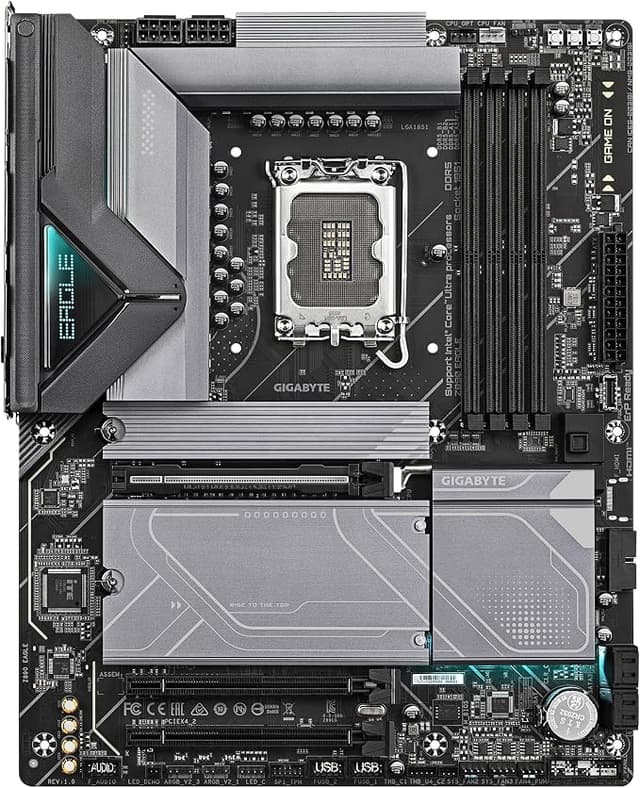
Dominate the battlefield with the ASUS ROG Maximus Z890 Apex! Engineered for premium performance, this ATX motherboard supports the latest Intel LGA1851 processors, ensuring you stay ahead of the competition.
Dominate the battlefield with the ASUS ROG Maximus Z890 Apex! Engineered for premium performance, this ATX motherboard supports the latest Intel LGA1851 processors, ensuring you stay ahead of the competition.
in 2 offers
The lowest price for Asus ROG Maximus Z890 Apex LGA1851 ATX Motherboard right now is $739.00 at PLE Computers, compared across 2 retailers.
The all-time low was $729.00 on 3 Oct 2026 — today's price is 1% above the lowest ever. This is at or near its all-time low — a good time to buy.
Prices last updated 16 Oct 2026.
Asus ROG Maximus Z890 Apex LGA1851 ATX Motherboard
Dominate the battlefield with the ASUS ROG Maximus Z890 Apex! Engineered for premium performance, this ATX motherboard supports the latest Intel LGA1851 processors, ensuring you stay ahead of the competition.
Dominate the battlefield with the ASUS ROG Maximus Z890 Apex! Engineered for premium performance, this ATX motherboard supports the latest Intel LGA1851 processors, ensuring you stay ahead of the competition.
Last updated at 16/10/2026 18:48:05
ASUS ROG Maximus Z890 Apex LGA1851 ATX Desktop Motherboard
Delivery between 20–29 Oct $24.06
ASUS ROG MAXIMUS Z890 APEX Motherboard
Delivery $17
originally posted on asus.com
So the Dark Hero board is impressive fromThe outset - the box is large, heavy - and black…tying in with the “dark” theme.On opening the box, you have the motherboard itself which seems well laid out and with a decent specification. The back panel has everything you would need, from an HDMI port for on chip GFX, to ports for the built in sound. Also there are loads of USB-A and USB-C ports. There is a single 2.5Gbps Ethernet LAN port. Lastly there are connectors for the WiFI-6 dongle that will give you rapid connectivity if you want to avoid Ethernet cables. However, the vast majority of people using this board will have a discrete (probably high end) video card, probably a dedicated sound card and will use a wired network connection for low latency/low ping ... MoreSo the Dark Hero board is impressive fromThe outset - the box is large, heavy - and black…tying in with the “dark” theme.On opening the box, you have the motherboard itself which seems well laid out and with a decent specification. The back panel has everything you would need, from an HDMI port for on chip GFX, to ports for the built in sound. Also there are loads of USB-A and USB-C ports. There is a single 2.5Gbps Ethernet LAN port. Lastly there are connectors for the WiFI-6 dongle that will give you rapid connectivity if you want to avoid Ethernet cables. However, the vast majority of people using this board will have a discrete (probably high end) video card, probably a dedicated sound card and will use a wired network connection for low latency/low ping gaming. The boats can take a huge amount of DDR5 memory over 4 slots (max 192GB if I remember right).The board was super easy to fit (it helped the at my previous board was an ASUS X99). The on board connectors are well labelled and easy to get things running - even for someone who last did this 25 years ago (I still got it 🤣).So on to the “buts”. Number one was the utter nightmare I had with drivers. The motherboard comes with some branded “ROG” swag like stickers and a keychain thingy, but very usefully has a branded ROG USB drive with all the drivers you needed to set things up - except my one was totally blank. I contacted ASUs who said contact the board vendor who in turn said they could source one - so going in circles. I eventually managed to get things running by downloading individual drivers, but some items in device manager were not obvious to say the least.Secondly - and this is a potential red flag for some. If you fit a 5th gen M.2 drive into the dedicated 5th gen M.2 slot, it means that you can only run a x8 GFX card. If you insert the next generation of graphics cards that will have x16, then the 5th gen M.2 slot is disabled, because that M.2 and the main PCIE slot share lanes. There is a YouTube review flagging this up as well. For me, I don’t game much, so I am happy with a current gen gfx card - but would not be happy if I had to move my nice fast PCIE 5 M.2 to a PCIE 4 slot.Overall, a great board but it could have been better if there had been more lanes to share between the main M.2 and PCIE SLOT
originally posted on asus.com
Highly unstable, many problems like DDR5 does not support full speed (from 5600mhz only 4000). After waiting years got bios update - now pc randomly shutting down, games crashing! It's definitely not for everyday use! Definitely not for gaming! Definitely not recommended for professional or amature. And on top of that you have that ROG lights who annoying if you do not turn it off! Worst thing - when you shut your pc down - you need to shut the power supply! As that ROG lights sight will stay on and annoys every person in the room! The worst motherboard i ever come to, and i'm building my own pc's since 2004! Do not sink your single dolar in this one!
originally posted on asus.com
I have had this board in my system for over three weeks now and I can tell you that I am very impressed. Not only does it look fantastic, but it is a very strong and stable board.The only issues that I have with the board are the Thunderbolt functionality and the BIOS settings. With TB, It would have been nice to know that the display functionality only works if CSM is turned OFF. Thankfully, ASUS support helped with the issue, and I suggested that this cadveat should be included in the motherboard manual.The second quirk is the UEFI BIOS itself. There are a myriad of settings that, although have a short description of what they do, it can be a bit confusing as to which setting does what. For example, it would be nice to know what the individual Discrete ... MoreI have had this board in my system for over three weeks now and I can tell you that I am very impressed. Not only does it look fantastic, but it is a very strong and stable board.The only issues that I have with the board are the Thunderbolt functionality and the BIOS settings. With TB, It would have been nice to know that the display functionality only works if CSM is turned OFF. Thankfully, ASUS support helped with the issue, and I suggested that this cadveat should be included in the motherboard manual.The second quirk is the UEFI BIOS itself. There are a myriad of settings that, although have a short description of what they do, it can be a bit confusing as to which setting does what. For example, it would be nice to know what the individual Discrete Thunderbolt settings do.Does changing the memory settings enable DP capabilities? This is something that enthusiasts like myself would like to know when we are tinkering around on our machines.All in all, I love this board. I will definitely recommend this to my friends when they are ready to upgrade.
| Brand | ASUS |
| Form Factor | ATX |
| RAM Type | DDR |
| Expansion Slot | PCI, PCI Express |
| Chipset Brand | Intel Chipset |
ASUS ROG Maximus Z890 Apex LGA1851 ATX Desktop Motherboard
Delivery between 20–29 Oct $24.06
ASUS ROG MAXIMUS Z890 APEX Motherboard
Delivery $17
So the Dark Hero board is impressive fromThe outset - the box is large, heavy - and black…tying in with the “dark” theme.On opening the box, you have the motherboard itself which seems well laid out and with a decent specification. The back panel has everything you would need, from an HDMI port for on chip GFX, to ports for the built in sound. Also there are loads of USB-A and USB-C ports. There is a single 2.5Gbps Ethernet LAN port. Lastly there are connectors for the WiFI-6 dongle that will give you rapid connectivity if you want to avoid Ethernet cables. However, the vast majority of people using this board will have a discrete (probably high end) video card, probably a dedicated sound card and will use a wired network connection for low latency/low ping ... MoreSo the Dark Hero board is impressive fromThe outset - the box is large, heavy - and black…tying in with the “dark” theme.On opening the box, you have the motherboard itself which seems well laid out and with a decent specification. The back panel has everything you would need, from an HDMI port for on chip GFX, to ports for the built in sound. Also there are loads of USB-A and USB-C ports. There is a single 2.5Gbps Ethernet LAN port. Lastly there are connectors for the WiFI-6 dongle that will give you rapid connectivity if you want to avoid Ethernet cables. However, the vast majority of people using this board will have a discrete (probably high end) video card, probably a dedicated sound card and will use a wired network connection for low latency/low ping gaming. The boats can take a huge amount of DDR5 memory over 4 slots (max 192GB if I remember right).The board was super easy to fit (it helped the at my previous board was an ASUS X99). The on board connectors are well labelled and easy to get things running - even for someone who last did this 25 years ago (I still got it 🤣).So on to the “buts”. Number one was the utter nightmare I had with drivers. The motherboard comes with some branded “ROG” swag like stickers and a keychain thingy, but very usefully has a branded ROG USB drive with all the drivers you needed to set things up - except my one was totally blank. I contacted ASUs who said contact the board vendor who in turn said they could source one - so going in circles. I eventually managed to get things running by downloading individual drivers, but some items in device manager were not obvious to say the least.Secondly - and this is a potential red flag for some. If you fit a 5th gen M.2 drive into the dedicated 5th gen M.2 slot, it means that you can only run a x8 GFX card. If you insert the next generation of graphics cards that will have x16, then the 5th gen M.2 slot is disabled, because that M.2 and the main PCIE slot share lanes. There is a YouTube review flagging this up as well. For me, I don’t game much, so I am happy with a current gen gfx card - but would not be happy if I had to move my nice fast PCIE 5 M.2 to a PCIE 4 slot.Overall, a great board but it could have been better if there had been more lanes to share between the main M.2 and PCIE SLOT
Highly unstable, many problems like DDR5 does not support full speed (from 5600mhz only 4000). After waiting years got bios update - now pc randomly shutting down, games crashing! It's definitely not for everyday use! Definitely not for gaming! Definitely not recommended for professional or amature. And on top of that you have that ROG lights who annoying if you do not turn it off! Worst thing - when you shut your pc down - you need to shut the power supply! As that ROG lights sight will stay on and annoys every person in the room! The worst motherboard i ever come to, and i'm building my own pc's since 2004! Do not sink your single dolar in this one!
I have had this board in my system for over three weeks now and I can tell you that I am very impressed. Not only does it look fantastic, but it is a very strong and stable board.The only issues that I have with the board are the Thunderbolt functionality and the BIOS settings. With TB, It would have been nice to know that the display functionality only works if CSM is turned OFF. Thankfully, ASUS support helped with the issue, and I suggested that this cadveat should be included in the motherboard manual.The second quirk is the UEFI BIOS itself. There are a myriad of settings that, although have a short description of what they do, it can be a bit confusing as to which setting does what. For example, it would be nice to know what the individual Discrete ... MoreI have had this board in my system for over three weeks now and I can tell you that I am very impressed. Not only does it look fantastic, but it is a very strong and stable board.The only issues that I have with the board are the Thunderbolt functionality and the BIOS settings. With TB, It would have been nice to know that the display functionality only works if CSM is turned OFF. Thankfully, ASUS support helped with the issue, and I suggested that this cadveat should be included in the motherboard manual.The second quirk is the UEFI BIOS itself. There are a myriad of settings that, although have a short description of what they do, it can be a bit confusing as to which setting does what. For example, it would be nice to know what the individual Discrete Thunderbolt settings do.Does changing the memory settings enable DP capabilities? This is something that enthusiasts like myself would like to know when we are tinkering around on our machines.All in all, I love this board. I will definitely recommend this to my friends when they are ready to upgrade.
This motherboard has everything u need. Its a high quality, easy to install and full of features motherboard. One word of warning is to make sure the board has the minimum required BIOS for your CPU already installed or the board will not post. ASUS will say that it should still post to BIOS but I can tell you from first hand experience that it won't until it is updated. Apart from that the board is superb. Using the built in AI overclocking software it achieves settings just as good as I could get manually which makes overclocking so much quicker. I achieved 49 ratio on 6 cores and 50 ratio on 3 cores with an i5-9600k Refresh (R0 stepping). I also managed to overclock my Corsair Vengeance DDR4 memory from stock 2133MHz C13 to 3200MHz C16 at 1.35v. The only negative ... MoreThis motherboard has everything u need. Its a high quality, easy to install and full of features motherboard. One word of warning is to make sure the board has the minimum required BIOS for your CPU already installed or the board will not post. ASUS will say that it should still post to BIOS but I can tell you from first hand experience that it won't until it is updated. Apart from that the board is superb. Using the built in AI overclocking software it achieves settings just as good as I could get manually which makes overclocking so much quicker. I achieved 49 ratio on 6 cores and 50 ratio on 3 cores with an i5-9600k Refresh (R0 stepping). I also managed to overclock my Corsair Vengeance DDR4 memory from stock 2133MHz C13 to 3200MHz C16 at 1.35v. The only negative I found for this board is the CPU usage for Aura lighting. I must point out though that this issue is not exclusive to this board, it is the same on all ASUS ROG Strix boards.
I bought this board to use with an i9-12900k, which is connected to an AIO cooler solution.Physically, the motherboard feels very solid, has good protection down the bottom left hand side (which is helpful in protecting against knocks when installing the graphics card, etc. and has a good amount of connectivity options, including a couple of USB2.0 headers (which are still useful for some components, such as Corsair's Commander Core fan/RGB control units).In terms of software and with the system up and running, the motherboard is rock solid - I've had no BSODs (I know I'm tempting fate here!) on Windows 11 Pro and the system as a whole has been incredibly reliable.I haven't tried any overclocking, haven't made use of any ASUS software. I've used a couple of Adata ... MoreI bought this board to use with an i9-12900k, which is connected to an AIO cooler solution.Physically, the motherboard feels very solid, has good protection down the bottom left hand side (which is helpful in protecting against knocks when installing the graphics card, etc. and has a good amount of connectivity options, including a couple of USB2.0 headers (which are still useful for some components, such as Corsair's Commander Core fan/RGB control units).In terms of software and with the system up and running, the motherboard is rock solid - I've had no BSODs (I know I'm tempting fate here!) on Windows 11 Pro and the system as a whole has been incredibly reliable.I haven't tried any overclocking, haven't made use of any ASUS software. I've used a couple of Adata DDR5 sticks, so nothing special there.There are quite a few useful extra accessories, particularly the ROG graphics card holder, which helps prevent graphics card sag.
I am shall we say a more mature user at 61? I am a solidworks user a mild gamer all round instrument engineer that has a particular requirement. This suited my needs and as i have always appreciated Asus quality inovation was what i chose for my job. With i9 1400KS, corsair Titanium 2x 96gb pairs and my trusty Asus AMD Radeon 6700XT. I am able to run multiple 3D cad windows have loads of background apps running then in my down time play the odd game or stream the latest Motogp racing. This Motherboard has all the features you could want. With great WIFi support. With multiple support for M2 NVME ssd it is blisteringly fast. Yet to overclock but that will come in time.
I bought this to run high frequency ram and i was not dissapointed. I just installed my gskill memory 8000mhz ddr5 , went into bios and set ai tweaker to xmp tweaked and memory booted first time to 8000mhz. Passing memtest for 4 hours no problem.Front panel usbc connector providing full power fast charging with charge watcher.I used onboard PCIe® 5.0 M.2 slot for lightning-fast storage using my gen 5 T700 nvme.The onboard Next-gen WiFi 7* chipset introduces all-new ultrawide 320 MHz channel bandwidth in the 6 GHz band and 4096 QAM, delivering up to 2.4X ultra-fast WiFi speeds*.Overall happy with this Excellent Motherboard.
I really regret buying the ROG Maximus Z690 Hero motherboard! The BIOS updates are a nightmare; I'm stuck rolling back to version 2602 even though version 3501 is available. ASUS customer service has been no help at all—they don't seem to read the emails thoroughly since they keep suggesting fixes I’ve already tried multiple times. Also, let’s not forget the infamous issue with the ROG Maximus Z690 Hero motherboards having misattached capacitors that could cause fires. Luckily, mine didn’t catch fire, but it's still not functioning properly!
I am not a gamer and I like this board because it is rock stable. It is what I need when long time calculation is being performed. I7-11700K CPU was plugged, without overclocking, I don't need overclocked CPU, but I need stability over long time. MB performance is exellent and BIOS contains incredibly lot of features I like. It is certainly superb MB. But, we can't forget also on some poorly done things. Like PCH is having about 85°C when surrounding temp. is 30°C during idle load. I don't know if that is right, but I had to add additional ventilator to make temp. down to 45°C. Above it I removed some plastic cover I don't understand. Anyway board is meticulously designed. Maybe I know several features I'd like to see in bios, but it is not important. BIOS update ... MoreI am not a gamer and I like this board because it is rock stable. It is what I need when long time calculation is being performed. I7-11700K CPU was plugged, without overclocking, I don't need overclocked CPU, but I need stability over long time. MB performance is exellent and BIOS contains incredibly lot of features I like. It is certainly superb MB. But, we can't forget also on some poorly done things. Like PCH is having about 85°C when surrounding temp. is 30°C during idle load. I don't know if that is right, but I had to add additional ventilator to make temp. down to 45°C. Above it I removed some plastic cover I don't understand. Anyway board is meticulously designed. Maybe I know several features I'd like to see in bios, but it is not important. BIOS update was bit unresponsive and I didn't know if it crashed or if I need to wait. Still BIOS update was successful. There is still tons of features I haven't explored.
This is an amazing Z590 board that is full of great features. From the moment you open the box you can tell it is a quality product, it is well built and feature rich. Install was easy and there are loads of fan and water pump headers. I love the BIOS and easy update along with the other software tools and they made it easy to set up the RAM to run at its optimum speed. Fan expert makes it simple to configure airflow and control the fan speed relative to power consumption and temperature. The AI over clocking works perfectly and increased my I7 11700k by 41%. If you are more adventurous you can go further and tweak each core in the chip. I run it non overclock Ed but it is great to know that the headroom is there. This board is blisteringly fast with the PCIE 4 ssd ... MoreThis is an amazing Z590 board that is full of great features. From the moment you open the box you can tell it is a quality product, it is well built and feature rich. Install was easy and there are loads of fan and water pump headers. I love the BIOS and easy update along with the other software tools and they made it easy to set up the RAM to run at its optimum speed. Fan expert makes it simple to configure airflow and control the fan speed relative to power consumption and temperature. The AI over clocking works perfectly and increased my I7 11700k by 41%. If you are more adventurous you can go further and tweak each core in the chip. I run it non overclock Ed but it is great to know that the headroom is there. This board is blisteringly fast with the PCIE 4 ssd and I’m confident it will last me for many years. I had originally ordered a cheap mainboard from a competitor but it looked and felt inferior so I exchanged it for the ASUS and I’m so glad I made that choice and didn’t compromise on the mainboard.
| Brand | ASUS |
| Form Factor | ATX |
| RAM Type | DDR |
| Expansion Slot | PCI, PCI Express |
| Chipset Brand | Intel Chipset |