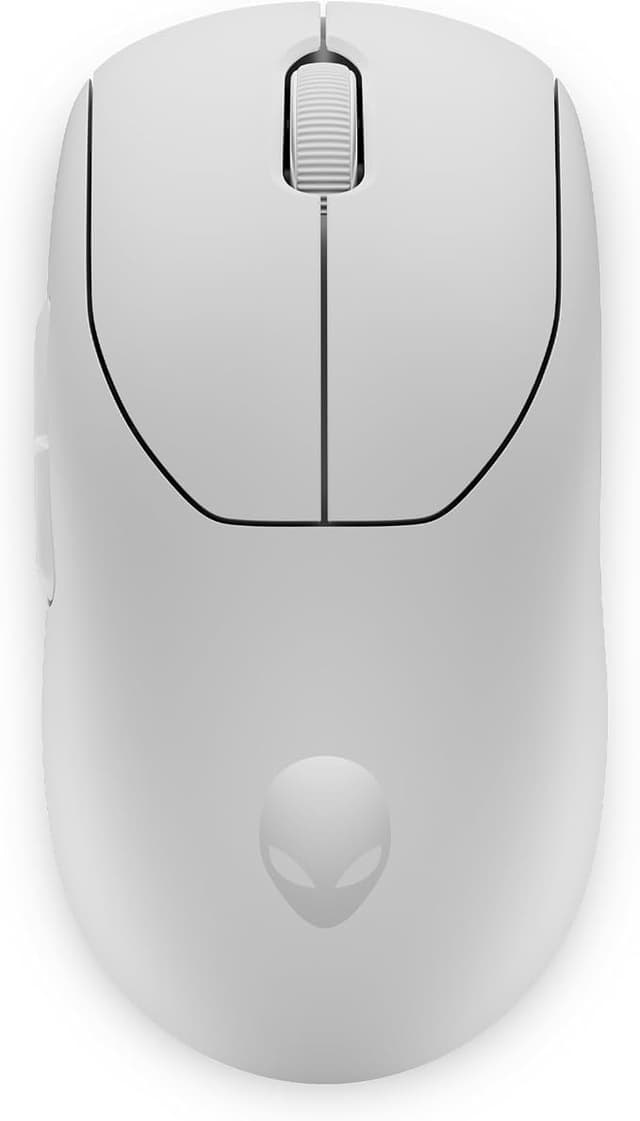
Gaming mouse with 4KHz wireless or 8KHz wired polling rates for a pure mind-to-mouse connection. Professionally approved and ultra-lightweight at <60g. With insights from Team Liquid, the most awarded team in esports history, Alienware has designed a gaming mouse with one core idea in mind - winning. Esports ready with both 4KHz wireless and 8KHz wired polling rates, equating to 0.25ms and 0.125ms response time respectively. Get the advantage when a millisecond is the difference between 1st and 2nd place and pinpoint precision with high polling rates to minimize input delay for a more responsive and seamless connection from your brain, to the mouse, to the game.
Gaming mouse with 4KHz wireless or 8KHz wired polling rates for a pure mind-to-mouse connection. Professionally approved and ultra-lightweight at <60g. With insights from Team Liquid, the most awarded team in esports history, Alienware has designed a gaming mouse with one core idea in mind - winning. Esports ready with both 4KHz wireless and 8KHz wired polling rates, equating to 0.25ms and 0.125ms response time respectively. Get the advantage when a millisecond is the difference between 1st and 2nd place and pinpoint precision with high polling rates to minimize input delay for a more responsive and seamless connection from your brain, to the mouse, to the game.
in 1 offers
The lowest price for Alienware Pro Wireless Gaming Keyboard right now is $238.97 at Amazon.com.au.
The all-time low was $159.99 on 2 Dec 2025 — today's price is 49% above the lowest ever. It has been notably cheaper before — worth setting a price alert.
Prices last updated 5 Oct 2026.
Alienware Pro Wireless Gaming Keyboard
Gaming mouse with 4KHz wireless or 8KHz wired polling rates for a pure mind-to-mouse connection. Professionally approved and ultra-lightweight at <60g. With insights from Team Liquid, the most awarded team in esports history, Alienware has designed a gaming mouse with one core idea in mind - winning. Esports ready with both 4KHz wireless and 8KHz wired polling rates, equating to 0.25ms and 0.125ms response time respectively. Get the advantage when a millisecond is the difference between 1st and 2nd place and pinpoint precision with high polling rates to minimize input delay for a more responsive and seamless connection from your brain, to the mouse, to the game.
Gaming mouse with 4KHz wireless or 8KHz wired polling rates for a pure mind-to-mouse connection. Professionally approved and ultra-lightweight at <60g. With insights from Team Liquid, the most awarded team in esports history, Alienware has designed a gaming mouse with one core idea in mind - winning. Esports ready with both 4KHz wireless and 8KHz wired polling rates, equating to 0.25ms and 0.125ms response time respectively. Get the advantage when a millisecond is the difference between 1st and 2nd place and pinpoint precision with high polling rates to minimize input delay for a more responsive and seamless connection from your brain, to the mouse, to the game.
Last updated at 05/10/2026 16:32:34
Dell Alienware Pro Tri-Mode Wireless Gaming Keyboard – US Linear Mechanical Switches, 2.4G/Bluetooth/USB, Per-Key 16.8M RGB, Programmable Keys, Lunar
Free delivery
Affiliate Disclosure: We may receive a small commission for purchases made through this link at no extra cost to you. This helps support our site. Thank you!
originally posted on dell.com
Great keyboard. It sounds nice and is very portable. The 70% layout is a lot better than a full sized keyboard. The only thing I have noticed is that the battery life really doesn't last as long as they had talked. I do have to charge it every 5 days or so, which isn't bad. Beautiful design, the lights are nice and bright, it is a clicky keyboard so be prepared (it's not a silent one). Sometimes too it will disappear from the Alienware Control Center even if you're using it. Just some minor tweaks that Dell needs to fix and it'll be perfect.
originally posted on dell.com
This actually the first time I'm using any kind of straight liner switch. I'm used to laptop keyboards and Blue switches that have an audible click to them. It's very smooth, thought that could be because I've never used reds. It's to the point I'm not used to the feel, and I'm having to readjust. It's also odd because I'm used to 100% keyboards. It's a bit cramped because it's not 100%, but some people like the smaller footprint. It definitely has a cleaner aesthetic because it's not 100%. It's smooth, not particularly loud, the keys have the subtlest of texture, but it's still decently nice
originally posted on dell.com
This keyboard has a lot going for it, with some negatives that may or may not matter. Pros Excellent build quality Very compact and sleak design Extremely smooth feeling switches Quiet (except spacebar, which can be fixed with some foam inside spacebar keycap) Amazing battery life Great connectivity options Cons Keycaps feel kind of thin and cheap to me Spacebar is not a standard size, it is 6U instead of 6.25U which makes it very hard to find any replacements for the keycaps Software to manage keyboard is trash. Using it is a hassle as sometimes clicks don't do anything inside the app. It is clunky to use and installed about 6-8 processes that always run in the background. You cannot really re-assign keys but rather bind a key to a macro, which can be a single key. ... MoreThis keyboard has a lot going for it, with some negatives that may or may not matter. Pros Excellent build quality Very compact and sleak design Extremely smooth feeling switches Quiet (except spacebar, which can be fixed with some foam inside spacebar keycap) Amazing battery life Great connectivity options Cons Keycaps feel kind of thin and cheap to me Spacebar is not a standard size, it is 6U instead of 6.25U which makes it very hard to find any replacements for the keycaps Software to manage keyboard is trash. Using it is a hassle as sometimes clicks don't do anything inside the app. It is clunky to use and installed about 6-8 processes that always run in the background. You cannot really re-assign keys but rather bind a key to a macro, which can be a single key. However this doesn't really work well. There is a noticeable lag for any key bind done in this way, and the key doesn't work normally. There is no repeat like if you were just pressing the key that it is bound to. I removed the dell software completely and just use PowerToys for Windows Keyboard Manager and it works much better for remapping keys and also can support combo key shortcuts, which the dell app cannot. Overall, the keyboard physically is pretty awesome, except for perhaps the keycaps (which seem to be OEM profile).
| Brand | Alienware |
| Model Name | Pro Wireless Gaming Keyboard |
| Series | Pro |
| Form Factor | Gaming |
| Keyboard Subtype | Wireless keyboard, Gaming keyboard |

Dell Alienware Pro Tri-Mode Wireless Gaming Keyboard – US Linear Mechanical Switches, 2.4G/Bluetooth/USB, Per-Key 16.8M RGB, Programmable Keys, Lunar
Free delivery
Affiliate Disclosure: We may receive a small commission for purchases made through this link at no extra cost to you. This helps support our site. Thank you!
Great keyboard. It sounds nice and is very portable. The 70% layout is a lot better than a full sized keyboard. The only thing I have noticed is that the battery life really doesn't last as long as they had talked. I do have to charge it every 5 days or so, which isn't bad. Beautiful design, the lights are nice and bright, it is a clicky keyboard so be prepared (it's not a silent one). Sometimes too it will disappear from the Alienware Control Center even if you're using it. Just some minor tweaks that Dell needs to fix and it'll be perfect.
This actually the first time I'm using any kind of straight liner switch. I'm used to laptop keyboards and Blue switches that have an audible click to them. It's very smooth, thought that could be because I've never used reds. It's to the point I'm not used to the feel, and I'm having to readjust. It's also odd because I'm used to 100% keyboards. It's a bit cramped because it's not 100%, but some people like the smaller footprint. It definitely has a cleaner aesthetic because it's not 100%. It's smooth, not particularly loud, the keys have the subtlest of texture, but it's still decently nice
This keyboard has a lot going for it, with some negatives that may or may not matter. Pros Excellent build quality Very compact and sleak design Extremely smooth feeling switches Quiet (except spacebar, which can be fixed with some foam inside spacebar keycap) Amazing battery life Great connectivity options Cons Keycaps feel kind of thin and cheap to me Spacebar is not a standard size, it is 6U instead of 6.25U which makes it very hard to find any replacements for the keycaps Software to manage keyboard is trash. Using it is a hassle as sometimes clicks don't do anything inside the app. It is clunky to use and installed about 6-8 processes that always run in the background. You cannot really re-assign keys but rather bind a key to a macro, which can be a single key. ... MoreThis keyboard has a lot going for it, with some negatives that may or may not matter. Pros Excellent build quality Very compact and sleak design Extremely smooth feeling switches Quiet (except spacebar, which can be fixed with some foam inside spacebar keycap) Amazing battery life Great connectivity options Cons Keycaps feel kind of thin and cheap to me Spacebar is not a standard size, it is 6U instead of 6.25U which makes it very hard to find any replacements for the keycaps Software to manage keyboard is trash. Using it is a hassle as sometimes clicks don't do anything inside the app. It is clunky to use and installed about 6-8 processes that always run in the background. You cannot really re-assign keys but rather bind a key to a macro, which can be a single key. However this doesn't really work well. There is a noticeable lag for any key bind done in this way, and the key doesn't work normally. There is no repeat like if you were just pressing the key that it is bound to. I removed the dell software completely and just use PowerToys for Windows Keyboard Manager and it works much better for remapping keys and also can support combo key shortcuts, which the dell app cannot. Overall, the keyboard physically is pretty awesome, except for perhaps the keycaps (which seem to be OEM profile).
I love the colors! Light up keys are so fun. Plus I like the size. I travel occasionally for work and this will fit into my computer bag! In standard dell fashion, this keyboard is easy to work on! This unit had cherry red mechanical switches, but I could easily swap them out for other ones. The unit is sturdy. It feels well made! I tested the unit on a few online emulated games. The response was good. What I don't love is the dongle and adapter. The dongle has a great hiding spot in the keyboard, but when I had to use the adapter to plug it into my laptop it sticks out far. So much so that I ended up breaking the adapter when I knocked my laptop off the couch. The good news is I was able to get another adapter and everything worked great! This keyboard also has a ... MoreI love the colors! Light up keys are so fun. Plus I like the size. I travel occasionally for work and this will fit into my computer bag! In standard dell fashion, this keyboard is easy to work on! This unit had cherry red mechanical switches, but I could easily swap them out for other ones. The unit is sturdy. It feels well made! I tested the unit on a few online emulated games. The response was good. What I don't love is the dongle and adapter. The dongle has a great hiding spot in the keyboard, but when I had to use the adapter to plug it into my laptop it sticks out far. So much so that I ended up breaking the adapter when I knocked my laptop off the couch. The good news is I was able to get another adapter and everything worked great! This keyboard also has a Bluetooth option and can connect to several devices so you don't have to move the dongle from device to device. Yes, I would recommend this item if you are looking for a compact, wireless keyboard!
I AM SO EXCITED about this keyboard. I've been in the market for a new keyboard for awhile now. I really like wireless and 10 keyless (no number pad) for my gaming needs (& spacing). I don't mind clicky switches but sometimes when I'm really immersed in a game, I forget that other people in the voice chat can hear the clicking sounds so I've been looking for something more quite. This Keyboard is clicky BUT not as bad as my last keyboard and you can switch out the keys. I love that you can lightsync it to your games as well, so when I'm playing the sims the keys change colors to match the characters moods or when you are getting chased by the police in gtav the keys light up red and blue. Alienware makes good products so I'm excited to explore more.
The most important thing I consider from a keyboard is the key. The keys are designed and made in a low-profile style (exposing the switch pins), which is very popular recently with the keycaps raised above the horizontal surface of the panel. This design also helps users easily remove the keycap and clean the keyboard base with a brush, or with a handheld mini vacuum cleaner without using specialized keyboard cleaning slimes such as with conventional design. The above buttons are arranged with LED lights so they can create beautiful light color effects in 3 modes. However, this design does not have separate lights for each key, so it cannot create separate effects. In general, this is a good gaming keyboard but not too functional.
To start off this review I need to offer a disclaimer as to what kind of consumer I am. (1) I am a mechanical keyboard enthusiast who has been in the customs hobby for a couple of years now, and (2) I am an avid Alienware fan. With regards to mechanical keyboards I have owned (or still own) boards from Owlab, Mode, Momoka, Rama, Drop, and the like. I currently have 8 keyboards, 5 of which are customs. With regards to Alienware I own a desktop, laptop, and arguably every peripheral you can think of. With all this in mind it begs the question: How does one reconcile these two facts in order to form realistic expectations for Alienware's newest mechanical keyboard? A product that's already drowning in a sea of competition. Well, I set my expectations reasonably low and ... MoreTo start off this review I need to offer a disclaimer as to what kind of consumer I am. (1) I am a mechanical keyboard enthusiast who has been in the customs hobby for a couple of years now, and (2) I am an avid Alienware fan. With regards to mechanical keyboards I have owned (or still own) boards from Owlab, Mode, Momoka, Rama, Drop, and the like. I currently have 8 keyboards, 5 of which are customs. With regards to Alienware I own a desktop, laptop, and arguably every peripheral you can think of. With all this in mind it begs the question: How does one reconcile these two facts in order to form realistic expectations for Alienware's newest mechanical keyboard? A product that's already drowning in a sea of competition. Well, I set my expectations reasonably low and truly only held out hope for their proprietary linear switches. That is to say, I didn't have much hope for the overall build quality of the board nor did I think the sound would be anything to write home about. I did however think the typing experience from their linear switches would prove to be quite tasteful. Fast forward to the moment I unboxed the keyboard and started using it and I can honestly say I'm blown away. For this being a "gamer" keyboard from a large corporation it truly does sound incredible, even taking on many characteristics of a $250+ custom. In my opinion Alienware's linear switches actually remind me of Holy Pandas (which are tactile switches) as they do have a satisfying bump during actuation. In terms of sound this keyboard really has no right sounding this good. In no way does the sound profile seem hollow or cheap; quite the contrary. The sound offers similar thocky, poppy notes you might expect from a custom board with foam. Regarding the actual case itself the board has a nice heft that I was not expecting (presumably from the battery). I absolutely love this keyboard and am really happy I rounded out my Pro collection with it since I got the mouse the other week.
I love the colors! Light up keys are so fun. Plus I like the size. I travel occasionally for work and this will fit into my computer bag! In standard dell fashion, this keyboard is easy to work on! This unit had cherry red mechanical switches, but I could easily swap them out for other ones. The unit is sturdy. It feels well made! I tested the unit on a few online emulated games. The response was good. What I don't love is the dongle and adapter. The dongle has a great hiding spot in the keyboard, but when I had to use the adapter to plug it into my laptop it sticks out far. So much so that I ended up breaking the adapter when I knocked my laptop off the couch. The good news is I was able to get another adapter and everything worked great! This keyboard also has a ... MoreI love the colors! Light up keys are so fun. Plus I like the size. I travel occasionally for work and this will fit into my computer bag! In standard dell fashion, this keyboard is easy to work on! This unit had cherry red mechanical switches, but I could easily swap them out for other ones. The unit is sturdy. It feels well made! I tested the unit on a few online emulated games. The response was good. What I don't love is the dongle and adapter. The dongle has a great hiding spot in the keyboard, but when I had to use the adapter to plug it into my laptop it sticks out far. So much so that I ended up breaking the adapter when I knocked my laptop off the couch. The good news is I was able to get another adapter and everything worked great! This keyboard also has a Bluetooth option and can connect to several devices so you don't have to move the dongle from device to device. Yes, I would recommend this item if you are looking for a compact, wireless keyboard!
I AM SO EXCITED about this keyboard. I’ve been in the market for a new keyboard for awhile now. I really like wireless and 10 keyless (no number pad) for my gaming needs (& spacing). I don’t mind clicky switches but sometimes when I’m really immersed in a game, I forget that other people in the voice chat can hear the clicking sounds so I’ve been looking for something more quite. This Keyboard is clicky BUT not as bad as my last keyboard and you can switch out the keys. I love that you can lightsync it to your games as well, so when I’m playing the sims the keys change colors to match the characters moods or when you are getting chased by the police in gtav the keys light up red and blue. Alienware makes good products so I’m excited to explore more.
The most important thing I consider from a keyboard is the key. The keys are designed and made in a low-profile style (exposing the switch pins), which is very popular recently with the keycaps raised above the horizontal surface of the panel. This design also helps users easily remove the keycap and clean the keyboard base with a brush, or with a handheld mini vacuum cleaner without using specializedkeyboard cleaning slimes such as with conventional design. The above buttons are arranged with LED lights so they can create beautiful light color effects in 3 modes.However, this design does not have separate lights for each key, so it cannot create separate effects.In general, this is a good gaming keyboard but not too functional.
| Brand | Alienware |
| Model Name | Pro Wireless Gaming Keyboard |
| Series | Pro |
| Form Factor | Gaming |
| Keyboard Subtype | Wireless keyboard, Gaming keyboard |


