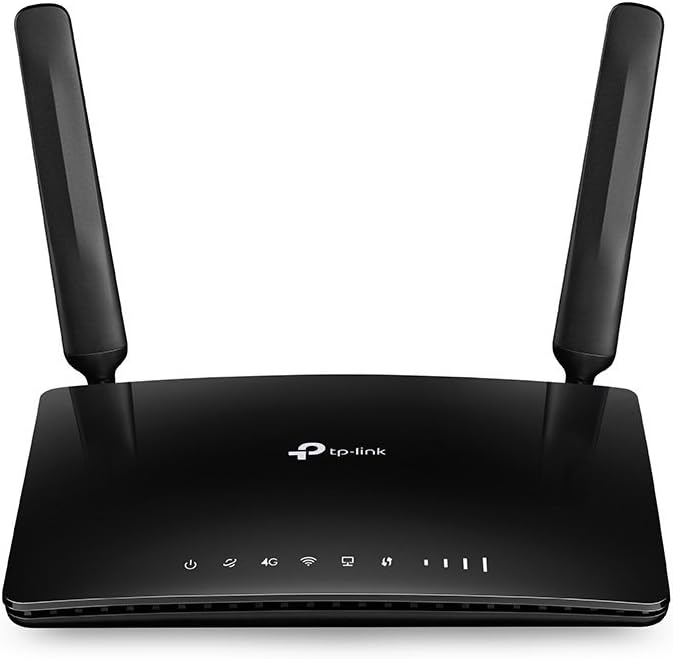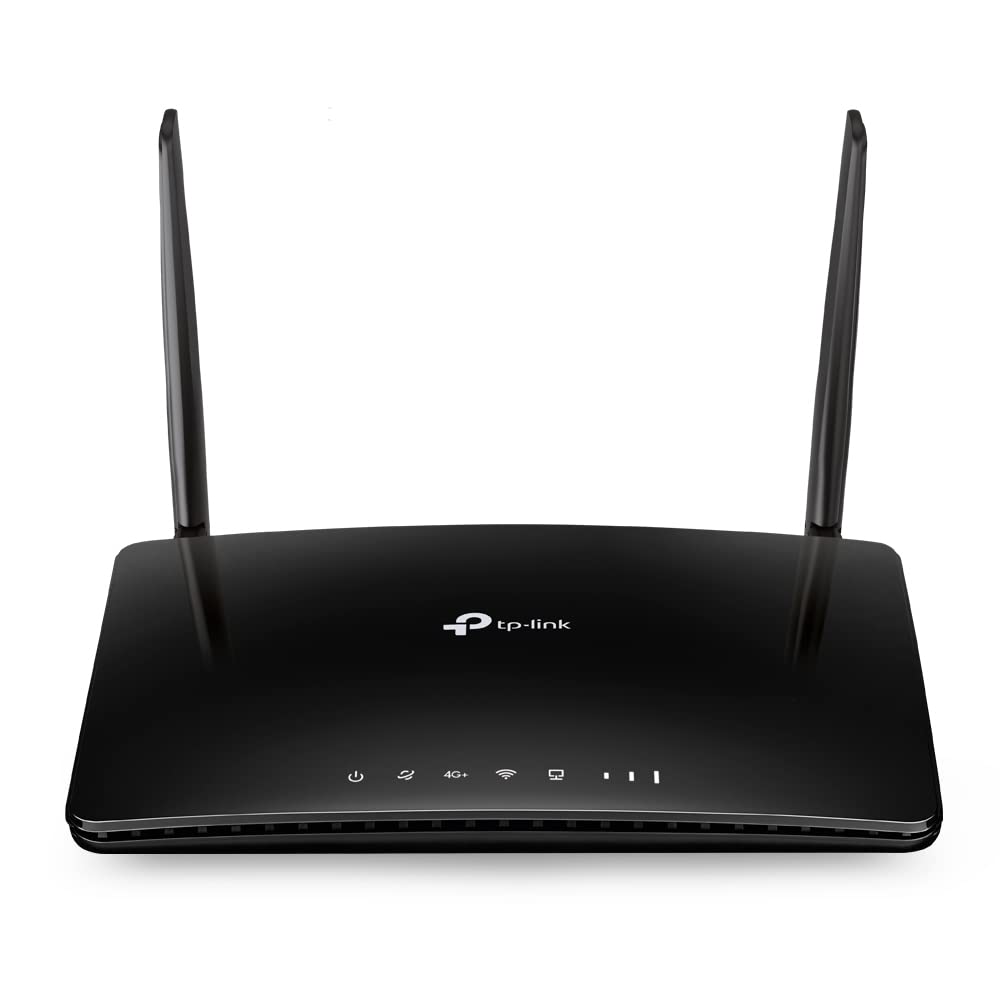
Enjoy 4G+ Speed Sharing Everywhere 4G+ Cat6 AC1200 Wireless Dual Band Gigabit Router Boost Your 4G+ Speed Supports the 4G+ Cat6 which used Carrier Aggregation technology to boost the data speeds of up to 300 Mbps. Plug your SIM card and enjoy HD movies without interruption downloading files in seconds and smooth online gaming. Fully Gigabit Ports for Consummate Connectivity Fully gigabit Ethernet ports provide warp speeds and reliable connections for high-intensive wired devices such as your smart TV game console NAS and more. Wi-Fi Where You Need It Enjoy unmatched convenience and versatility. Tested in the field for years to ensure universal compatibility with 2 advanced LTE antennas to deliver a smooth connection. Simply plug in a micro SIM card and power on this elegant piece of technology to utilize fast and stable Wi-Fi whether you’re at home or working remote. Got SIM Card? Then Plug and Play With an integrated 4G+ modem and a built-in SIM card slot all you need to do is insert a micro SIM card and turn on the Router. Enjoying fast stable Wi-Fi on a 4G+ network has never been easier. Reliable Access for Up to 64 Devices Simultaneously Easily share a 3G/4G connection with up to 64 wireless devices such as phones tablets and laptops at the same time. 4 LAN ports stand ready to provide internet for wired devices like desktop computers. Easy Setup and Management Set up the Archer MR600 in minutes thanks to its intuitive web interface and the powerful Tether app. Tether also lets you manage its network settings from any Android or iOS device including parental controls and access control.
Enjoy 4G+ Speed Sharing Everywhere 4G+ Cat6 AC1200 Wireless Dual Band Gigabit Router Boost Your 4G+ Speed Supports the 4G+ Cat6 which used Carrier Aggregation technology to boost the data speeds of up to 300 Mbps. Plug your SIM card and enjoy HD movies without interruption downloading files in seconds and smooth online gaming. Fully Gigabit Ports for Consummate Connectivity Fully gigabit Ethernet ports provide warp speeds and reliable connections for high-intensive wired devices such as your smart TV game console NAS and more. Wi-Fi Where You Need It Enjoy unmatched convenience and versatility. Tested in the field for years to ensure universal compatibility with 2 advanced LTE antennas to deliver a smooth connection. Simply plug in a micro SIM card and power on this elegant piece of technology to utilize fast and stable Wi-Fi whether you’re at home or working remote. Got SIM Card? Then Plug and Play With an integrated 4G+ modem and a built-in SIM card slot all you need to do is insert a micro SIM card and turn on the Router. Enjoying fast stable Wi-Fi on a 4G+ network has never been easier. Reliable Access for Up to 64 Devices Simultaneously Easily share a 3G/4G connection with up to 64 wireless devices such as phones tablets and laptops at the same time. 4 LAN ports stand ready to provide internet for wired devices like desktop computers. Easy Setup and Management Set up the Archer MR600 in minutes thanks to its intuitive web interface and the powerful Tether app. Tether also lets you manage its network settings from any Android or iOS device including parental controls and access control.
in 34 offers
last seen 24 Oct 2026
TP-Link Archer MR600 4G+ Cat6 AC1200 Wireless Dual Band Gigabit Router
Enjoy 4G+ Speed Sharing Everywhere 4G+ Cat6 AC1200 Wireless Dual Band Gigabit Router Boost Your 4G+ Speed Supports the 4G+ Cat6 which used Carrier Aggregation technology to boost the data speeds of up to 300 Mbps. Plug your SIM card and enjoy HD movies without interruption downloading files in seconds and smooth online gaming. Fully Gigabit Ports for Consummate Connectivity Fully gigabit Ethernet ports provide warp speeds and reliable connections for high-intensive wired devices such as your smart TV game console NAS and more. Wi-Fi Where You Need It Enjoy unmatched convenience and versatility. Tested in the field for years to ensure universal compatibility with 2 advanced LTE antennas to deliver a smooth connection. Simply plug in a micro SIM card and power on this elegant piece of technology to utilize fast and stable Wi-Fi whether you’re at home or working remote. Got SIM Card? Then Plug and Play With an integrated 4G+ modem and a built-in SIM card slot all you need to do is insert a micro SIM card and turn on the Router. Enjoying fast stable Wi-Fi on a 4G+ network has never been easier. Reliable Access for Up to 64 Devices Simultaneously Easily share a 3G/4G connection with up to 64 wireless devices such as phones tablets and laptops at the same time. 4 LAN ports stand ready to provide internet for wired devices like desktop computers. Easy Setup and Management Set up the Archer MR600 in minutes thanks to its intuitive web interface and the powerful Tether app. Tether also lets you manage its network settings from any Android or iOS device including parental controls and access control.
Enjoy 4G+ Speed Sharing Everywhere 4G+ Cat6 AC1200 Wireless Dual Band Gigabit Router Boost Your 4G+ Speed Supports the 4G+ Cat6 which used Carrier Aggregation technology to boost the data speeds of up to 300 Mbps. Plug your SIM card and enjoy HD movies without interruption downloading files in seconds and smooth online gaming. Fully Gigabit Ports for Consummate Connectivity Fully gigabit Ethernet ports provide warp speeds and reliable connections for high-intensive wired devices such as your smart TV game console NAS and more. Wi-Fi Where You Need It Enjoy unmatched convenience and versatility. Tested in the field for years to ensure universal compatibility with 2 advanced LTE antennas to deliver a smooth connection. Simply plug in a micro SIM card and power on this elegant piece of technology to utilize fast and stable Wi-Fi whether you’re at home or working remote. Got SIM Card? Then Plug and Play With an integrated 4G+ modem and a built-in SIM card slot all you need to do is insert a micro SIM card and turn on the Router. Enjoying fast stable Wi-Fi on a 4G+ network has never been easier. Reliable Access for Up to 64 Devices Simultaneously Easily share a 3G/4G connection with up to 64 wireless devices such as phones tablets and laptops at the same time. 4 LAN ports stand ready to provide internet for wired devices like desktop computers. Easy Setup and Management Set up the Archer MR600 in minutes thanks to its intuitive web interface and the powerful Tether app. Tether also lets you manage its network settings from any Android or iOS device including parental controls and access control.
The lowest price we last saw for TP-Link Archer MR600 4G+ Cat6 AC1200 Wireless Dual Band Gigabit Router was $159.44 at 友和 Yoho, compared across 31 retailers (last seen 24 Oct 2026). Prices may have changed since.
The all-time low we recorded was $20.60 on 18 Dec 2025.
Prices last updated 24 Oct 2026.
Last updated at 24/10/2026 19:56:22
Mastercard $100 OFF | TP-Link Archer MR600 AC1200 Dual-Band 3G/4G LTE Cat6 Wi-Fi Router
Delivery $25.39
TP-Link Archer MR600 4G+ Cat6 AC1200 Wireless Dual Band Gigabit Router
Free delivery between Tue – Fri
TP-Link Archer MR600 4G+ Cat6 AC1200 Wireless Dual Band Gigabit Router
Delivery between Wed – Sat $10
TP-Link Archer MR600 4G+ Cat6 AC1200 Gigabit Router
Delivery between 28 Oct – 2 Nov $15
TP Link 4G AC1200 Wireless Dual Band Gigabit Router Archer MR600 - Routers
Delivery $15.63
TP Link 4G AC1200 Wireless Dual Band Gigabit Router Archer MR600 - Routers
Delivery $13
TP-Link Archer MR600 AC1200 Wireless Dual Band 4G+ LTE Gigabit Router
Free delivery between Tue – Wed
TP-Link Archer MR600 - AC1200 Dual-Band 4G+ CAT6 Wi-Fi 5 Router
Delivery between 27 Oct – 5 Nov $15.90
TP-Link Archer MR600 AC1200 Wireless Dual Band 4G+ LTE Gigabit Router
Delivery $9.85
TP-Link Archer MR600 4G+ Cat6 AC1200 Wireless Dual Band Gigabit Router
Delivery between Tue – Thu $15
originally posted on pbtech.co.nz
I purchased this router for my Lodge as there is no Internet in that building. As we had upgraded our TV it was time to enter the new millennium! I plugged the SIM card (2°) in and it all installed and works beautifully. The phone APP just worked - easy! We may get fibre installed at some point which this modem can handle, that way we shall have the SIM card as a fallback - fail-safe option if needed.
originally posted on pbtech.co.nz
With the usual superhighquality TPLink hardware and software :-). I live in a "no 4G coverage" area and have to use a signalbooster to even be able to get 1bar of signalstrength - sometimes :-(. Yet this excellent little thingy connected immediately to the 4G network even 10m away from the booster aerials and through 2walls :-). I've bought/installed it because soon Spark will effectively be letting the copperline network become extinct - and fibre just isn't an option here costwise. As it says on the box can be done with it: I have "daisychained" my old DSL modem(router) to it (with its wifi turned off) and will use the copperline network until it dies - at which time I will then simply have to push in the SIMcard on the MR600 to access the www over the 4G network ... MoreWith the usual superhighquality TPLink hardware and software :-). I live in a "no 4G coverage" area and have to use a signalbooster to even be able to get 1bar of signalstrength - sometimes :-(. Yet this excellent little thingy connected immediately to the 4G network even 10m away from the booster aerials and through 2walls :-). I've bought/installed it because soon Spark will effectively be letting the copperline network become extinct - and fibre just isn't an option here costwise. As it says on the box can be done with it: I have "daisychained" my old DSL modem(router) to it (with its wifi turned off) and will use the copperline network until it dies - at which time I will then simply have to push in the SIMcard on the MR600 to access the www over the 4G network :-) :-).
originally posted on pbtech.co.nz
This router is fantastic and got us out of a real jam (more on that shortly). I plugged in a vodafone mobile sim card and it worked straight off. It was also easy to reconfigure the name and password for the network and I've hooked up multiple devices to it now, with zero issues. I downloaded the TP-link tether app that allows you to track data usage (and configure all sorts of settings) and that appears to work well too. This was a cost-effective way of replacing our broken landline and we are getting better speeds too (20 to 40 Mbs compared to the 10 I used to get over copper). We live on the suburban/rural fringe (just down the road there's fibre but we only have a fixed copper line). Our ADSL/VDSL copper connection has been getting flakier every year and after ... MoreThis router is fantastic and got us out of a real jam (more on that shortly). I plugged in a vodafone mobile sim card and it worked straight off. It was also easy to reconfigure the name and password for the network and I've hooked up multiple devices to it now, with zero issues. I downloaded the TP-link tether app that allows you to track data usage (and configure all sorts of settings) and that appears to work well too. This was a cost-effective way of replacing our broken landline and we are getting better speeds too (20 to 40 Mbs compared to the 10 I used to get over copper). We live on the suburban/rural fringe (just down the road there's fibre but we only have a fixed copper line). Our ADSL/VDSL copper connection has been getting flakier every year and after yet another technician callout, the Chorus guy suggested going wireless. Unfortunately, neither Vodafone or Spark's standard wireless broadband packages were available at our address but I have no problem getting 4G on my mobile. Queue the creative solution of getting an unlimited data mobile plan activated on a Vodafone sim card and throwing that sim card into the TP-Link Archer MR600. Worked like a charm and the added bonus is we can take the router with us to the bach (or anywhere else that has 4G coverage).
| General | |
| Device Type | Wireless router - 3-port switch (integrated) |
| Enclosure Type | Desktop |
| Connectivity Technology | Wireless, wired |
| Data Link Protocol | Ethernet, Fast Ethernet, Gigabit Ethernet, IEEE 802.11b, IEEE 802.11a, IEEE 802.11g, IEEE 802.11n, IEEE 802.11ac |
Mastercard $100 OFF | TP-Link Archer MR600 AC1200 Dual-Band 3G/4G LTE Cat6 Wi-Fi Router
Delivery $25.39
TP-Link Archer MR600 4G+ Cat6 AC1200 Wireless Dual Band Gigabit Router
Free delivery between Tue – Fri
TP-Link Archer MR600 4G+ Cat6 AC1200 Wireless Dual Band Gigabit Router
Delivery between Wed – Sat $10
TP-Link Archer MR600 4G+ Cat6 AC1200 Gigabit Router
Delivery between 28 Oct – 2 Nov $15
TP Link 4G AC1200 Wireless Dual Band Gigabit Router Archer MR600 - Routers
Delivery $15.63
I purchased this router for my Lodge as there is no Internet in that building. As we had upgraded our TV it was time to enter the new millennium! I plugged the SIM card (2°) in and it all installed and works beautifully. The phone APP just worked - easy! We may get fibre installed at some point which this modem can handle, that way we shall have the SIM card as a fallback - fail-safe option if needed.
With the usual superhighquality TPLink hardware and software :-). I live in a "no 4G coverage" area and have to use a signalbooster to even be able to get 1bar of signalstrength - sometimes :-(. Yet this excellent little thingy connected immediately to the 4G network even 10m away from the booster aerials and through 2walls :-). I've bought/installed it because soon Spark will effectively be letting the copperline network become extinct - and fibre just isn't an option here costwise. As it says on the box can be done with it: I have "daisychained" my old DSL modem(router) to it (with its wifi turned off) and will use the copperline network until it dies - at which time I will then simply have to push in the SIMcard on the MR600 to access the www over the 4G network ... MoreWith the usual superhighquality TPLink hardware and software :-). I live in a "no 4G coverage" area and have to use a signalbooster to even be able to get 1bar of signalstrength - sometimes :-(. Yet this excellent little thingy connected immediately to the 4G network even 10m away from the booster aerials and through 2walls :-). I've bought/installed it because soon Spark will effectively be letting the copperline network become extinct - and fibre just isn't an option here costwise. As it says on the box can be done with it: I have "daisychained" my old DSL modem(router) to it (with its wifi turned off) and will use the copperline network until it dies - at which time I will then simply have to push in the SIMcard on the MR600 to access the www over the 4G network :-) :-).
This router is fantastic and got us out of a real jam (more on that shortly). I plugged in a vodafone mobile sim card and it worked straight off. It was also easy to reconfigure the name and password for the network and I've hooked up multiple devices to it now, with zero issues. I downloaded the TP-link tether app that allows you to track data usage (and configure all sorts of settings) and that appears to work well too. This was a cost-effective way of replacing our broken landline and we are getting better speeds too (20 to 40 Mbs compared to the 10 I used to get over copper). We live on the suburban/rural fringe (just down the road there's fibre but we only have a fixed copper line). Our ADSL/VDSL copper connection has been getting flakier every year and after ... MoreThis router is fantastic and got us out of a real jam (more on that shortly). I plugged in a vodafone mobile sim card and it worked straight off. It was also easy to reconfigure the name and password for the network and I've hooked up multiple devices to it now, with zero issues. I downloaded the TP-link tether app that allows you to track data usage (and configure all sorts of settings) and that appears to work well too. This was a cost-effective way of replacing our broken landline and we are getting better speeds too (20 to 40 Mbs compared to the 10 I used to get over copper). We live on the suburban/rural fringe (just down the road there's fibre but we only have a fixed copper line). Our ADSL/VDSL copper connection has been getting flakier every year and after yet another technician callout, the Chorus guy suggested going wireless. Unfortunately, neither Vodafone or Spark's standard wireless broadband packages were available at our address but I have no problem getting 4G on my mobile. Queue the creative solution of getting an unlimited data mobile plan activated on a Vodafone sim card and throwing that sim card into the TP-Link Archer MR600. Worked like a charm and the added bonus is we can take the router with us to the bach (or anywhere else that has 4G coverage).
Pros: Easy to use, plugged it in and popped my 4g sim card in and its never failed since. Ca run several devices/TV off it at the same time with no lag. Glad I made the purchase, it saved me from scrolling through millions of broadband deals with waiting times to get activated and high line rental coats Cons: Everything working great so far! No complaints
Pros: I was a bit skeptical at first moving from traditional internet to 4G internet. Going with a brand I trust was a big part of choosing my 4G router and the TP-Link Archer MR600 didn’t disappoint. It’s compatible with any network and setup is a simple plug and play with the helpful use of the app. There is no noticeable slowing when multiple devices are connected and the ability to connect up to 64 devices simultaneously is more than enough for our needs. Speeds are as good and better than our previous traditional internet and the broadcasting of the Wi-Fi signal is 100% better. While the Wi-Fi signal is suitable for me as it is, the router is compatible with the TP-Link OneMesh system allowing you to extend your coverage seamlessly. The router has all the ... MorePros: I was a bit skeptical at first moving from traditional internet to 4G internet. Going with a brand I trust was a big part of choosing my 4G router and the TP-Link Archer MR600 didn’t disappoint. It’s compatible with any network and setup is a simple plug and play with the helpful use of the app. There is no noticeable slowing when multiple devices are connected and the ability to connect up to 64 devices simultaneously is more than enough for our needs. Speeds are as good and better than our previous traditional internet and the broadcasting of the Wi-Fi signal is 100% better. While the Wi-Fi signal is suitable for me as it is, the router is compatible with the TP-Link OneMesh system allowing you to extend your coverage seamlessly. The router has all the settings you would need. Things like being able to set up a guest network for friends and family, parental controls so you can establish access times and control content, encryption of WPA-PSK and WPA2-PSK, and QoS (quality of service) function allowing you to specify prioritization of traffic. If you are looking to break free of traditional internet providers and into the world of 4G home internet, then I would highly recommend this router. Cons: None
Easy to set up via tplink tether app. Perfect for people just want to plug in and go. I plugged in my smarty 4g SIM card and it work straight away. Without any need to set up the 3 apn account. I placed the modem about 1.5 metres away from the window of the house and it gets 3 out of 3 bars of mobile reception. Getting 40 Mbit down and 30 Mbit up. The WiFi coverage is adequate. 3 out of 3 bars on ground floor where the modem is installed and dropping to 1 bar at the furthest possible location upstairs. Would consider to add a powerlink or mesh network on top to carry the WiFi across the entire house. Tether app does not have the advance configuration such as QoS, port management, etc. You would need the
Bought this device a few weeks back (before it was discounted...) to replace my Swisscom ADSL setup. I am evaluating the concept (home internet through 4G) more than the device itself as this is my first router of this kind and I have no point of comparison.In short, we were able to hold zoom meetings (2 people working from home), run NAS sync and watch Netflix concurrently with zero connection issue!The main drawbacks do not relate to the device but to the 4G connection (here Swisscom).1. Variable connection speed.I switched from a 20 up / 5 down Mbit/s ADSL and this router gets me a download speed anywhere from 20 (never less) to 100 Mbit/s with an average around 45 Mbit/s. So very positive for me but could be different for someone else. The upload speed is ... MoreBought this device a few weeks back (before it was discounted...) to replace my Swisscom ADSL setup. I am evaluating the concept (home internet through 4G) more than the device itself as this is my first router of this kind and I have no point of comparison.In short, we were able to hold zoom meetings (2 people working from home), run NAS sync and watch Netflix concurrently with zero connection issue!The main drawbacks do not relate to the device but to the 4G connection (here Swisscom).1. Variable connection speed.I switched from a 20 up / 5 down Mbit/s ADSL and this router gets me a download speed anywhere from 20 (never less) to 100 Mbit/s with an average around 45 Mbit/s. So very positive for me but could be different for someone else. The upload speed is stable around 45 Mbit/s, way better than my ADSL!2. Latency higher than ADSL.I get a latency of about 20-25 ms vs 10 ms with ADSL. As I am not a pro gamer, it does not really matter to me.For my use case, it's great as I increase my internet speed and decreased my cost significantly (with an unlimited 4G additional card from an existing subscription).
This is such a great underrated product, one of the best 4G modem/routers I've ever used. It provides a very strong and durable WIFI connectivity for a bigger area. It provides a great configuration and software tool set up which allows you to do all kinds of awesome stuff, and its really comprehensive.I live in an area where my Sunrise mobile connection got very low cellular signal (2/4 signal bars) even on the phone, hence I was suffering from broken internet connectivity for a while now with less than 1MBps up and down bandwidth. But with this modem its no longer a problem as it increased my bandwidth over 10Mpbs up and down stream, which is more than enough for my requirements.This model is a bit pricey but I believe its totally worth it if you're in a similar ... MoreThis is such a great underrated product, one of the best 4G modem/routers I've ever used. It provides a very strong and durable WIFI connectivity for a bigger area. It provides a great configuration and software tool set up which allows you to do all kinds of awesome stuff, and its really comprehensive.I live in an area where my Sunrise mobile connection got very low cellular signal (2/4 signal bars) even on the phone, hence I was suffering from broken internet connectivity for a while now with less than 1MBps up and down bandwidth. But with this modem its no longer a problem as it increased my bandwidth over 10Mpbs up and down stream, which is more than enough for my requirements.This model is a bit pricey but I believe its totally worth it if you're in a similar situation. It has a very stylish looking design, which can easily blend with a nice tech set up.One negative experience was that the original packaging was already removed and broken off when I received it, and most likely unpacked and used before as I've shown in the picture. But it works without any issue so far, hence I'm satisfied. :) Totally recommend the product and really impressive performance!
Pros: Good looking unit that works to a degree if ypu only have a option of cellular Internet.Cons: I installed this unit on work site 20m from a 4G mast, on my mobile device I was getting 160mbps but yet even though this unit says 300mbps+ I only managed 60mbps at that same location... a drastic drop from what I got on my mobile device and what the unit says its capable of. I couldn't of been in a better reception area.
Pros: I wish we’d have gotten one of these sooner. It’s so much more reliable than our fibre broadband was and the speeds are much better too. We have recently moved to a rural area and it’s absolutely fine with streaming, gaming, working from home etc. extremely pleased. Cons: A little pricey but worth it in my opinion.
| General | |
| Device Type | Wireless router - 3-port switch (integrated) |
| Enclosure Type | Desktop |
| Connectivity Technology | Wireless, wired |
| Data Link Protocol | Ethernet, Fast Ethernet, Gigabit Ethernet, IEEE 802.11b, IEEE 802.11a, IEEE 802.11g, IEEE 802.11n, IEEE 802.11ac |