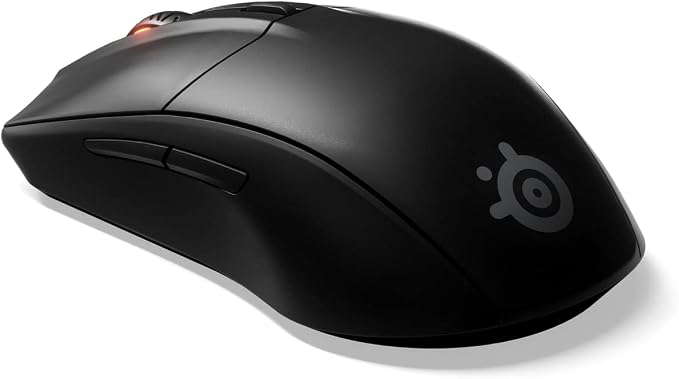
SteelSeries Rival 310 CS:GO Howl Edition
Engineered for Esports The custom SteelSeries TrueMove3 12,000 CPI optical sensor was engineered specifically for esports, giving you ultra-precise control. Ergonomic Design Designed for maximum comfort and performance, the right-handed design ensures balance and speed with all grip styles. Ultra-durable rubber side grips deliver a solid feel and a lifetime of use. Exclusive Split-Trigger Buttons Featuring industry-leading 50-million click switches, our exclusive split-trigger buttons deliver long-lasting durability and a fast and consistent click feel. Prism RGB Multi-Color Illumination Choose from the full spectrum of 16.8 million colors, lighting effects and further immerse yourself with exclusive GameSense event-based lighting. Reactive illumination responds to in-game events like low ammo, health, kills, and more. Settings On-the-Go Save all your performance and lighting settings directly to the mouse. Your key remaps and settings are saved for software- free use at LAN events and tournaments. Prism Lighting Sync Sync dynamic multi-color lighting effects between all your SteelSeries Prism-enabled gear. From one-click lighting effects to complex light shows, Prism Sync gives you the power to level-up the style of your battlestation. Lightweight 90g Construction New, lightweight and durable materials reduce the weight of the mouse to 90g, giving it fast and natural movement. Soft Resistance-Free Cable Soft rubber cable provides resistance-free movement for less cable fighting.
Engineered for Esports The custom SteelSeries TrueMove3 12,000 CPI optical sensor was engineered specifically for esports, giving you ultra-precise control. Ergonomic Design Designed for maximum comfort and performance, the right-handed design ensures balance and speed with all grip styles. Ultra-durable rubber side grips deliver a solid feel and a lifetime of use. Exclusive Split-Trigger Buttons Featuring industry-leading 50-million click switches, our exclusive split-trigger buttons deliver long-lasting durability and a fast and consistent click feel. Prism RGB Multi-Color Illumination Choose from the full spectrum of 16.8 million colors, lighting effects and further immerse yourself with exclusive GameSense event-based lighting. Reactive illumination responds to in-game events like low ammo, health, kills, and more. Settings On-the-Go Save all your performance and lighting settings directly to the mouse. Your key remaps and settings are saved for software- free use at LAN events and tournaments. Prism Lighting Sync Sync dynamic multi-color lighting effects between all your SteelSeries Prism-enabled gear. From one-click lighting effects to complex light shows, Prism Sync gives you the power to level-up the style of your battlestation. Lightweight 90g Construction New, lightweight and durable materials reduce the weight of the mouse to 90g, giving it fast and natural movement. Soft Resistance-Free Cable Soft rubber cable provides resistance-free movement for less cable fighting.
Engineered for Esports The custom SteelSeries TrueMove3 12,000 CPI optical sensor was engineered specifically for esports, giving you ultra-precise control. Ergonomic Design Designed for maximum comfort and performance, the right-handed design ensures balance and speed with all grip styles. Ultra-durable rubber side grips deliver a solid feel and a lifetime of use. Exclusive Split-Trigger Buttons Featuring industry-leading 50-million click switches, our exclusive split-trigger buttons deliver long-lasting durability and a fast and consistent click feel. Prism RGB Multi-Color Illumination Choose from the full spectrum of 16.8 million colors, lighting effects and further immerse yourself with exclusive GameSense event-based lighting. Reactive illumination responds to in-game events like low ammo, health, kills, and more. Settings On-the-Go Save all your performance and lighting settings directly to the mouse. Your key remaps and settings are saved for software- free use at LAN events and tournaments. Prism Lighting Sync Sync dynamic multi-color lighting effects between all your SteelSeries Prism-enabled gear. From one-click lighting effects to complex light shows, Prism Sync gives you the power to level-up the style of your battlestation. Lightweight 90g Construction New, lightweight and durable materials reduce the weight of the mouse to 90g, giving it fast and natural movement. Soft Resistance-Free Cable Soft rubber cable provides resistance-free movement for less cable fighting.
Engineered for Esports The custom SteelSeries TrueMove3 12,000 CPI optical sensor was engineered specifically for esports, giving you ultra-precise control. Ergonomic Design Designed for maximum comfort and performance, the right-handed design ensures balance and speed with all grip styles. Ultra-durable rubber side grips deliver a solid feel and a lifetime of use. Exclusive Split-Trigger Buttons Featuring industry-leading 50-million click switches, our exclusive split-trigger buttons deliver long-lasting durability and a fast and consistent click feel. Prism RGB Multi-Color Illumination Choose from the full spectrum of 16.8 million colors, lighting effects and further immerse yourself with exclusive GameSense event-based lighting. Reactive illumination responds to in-game events like low ammo, health, kills, and more. Settings On-the-Go Save all your performance and lighting settings directly to the mouse. Your key remaps and settings are saved for software- free use at LAN events and tournaments. Prism Lighting Sync Sync dynamic multi-color lighting effects between all your SteelSeries Prism-enabled gear. From one-click lighting effects to complex light shows, Prism Sync gives you the power to level-up the style of your battlestation. Lightweight 90g Construction New, lightweight and durable materials reduce the weight of the mouse to 90g, giving it fast and natural movement. Soft Resistance-Free Cable Soft rubber cable provides resistance-free movement for less cable fighting.
in 2 offers
The lowest price for SteelSeries Rival 310 CS:GO Howl Edition right now is $84.89 at eBay.com.au, compared across 2 retailers.
The all-time low was $46.05 on 29 Jan 2024 — today's price is 84% above the lowest ever. It has been notably cheaper before — worth setting a price alert.
Prices last updated 24 Oct 2026.
Last updated at 24/10/2026 18:50:51
Steelseries Rival 310 Wired 12000 Dpi Gaming Mouse
Delivery $23.10
Affiliate Disclosure: We may receive a small commission for purchases made through this link at no extra cost to you. This helps support our site. Thank you!
SteelSeries Rival 310 CS:GO Howl Edition
originally posted on pbtech.co.nz
I've had this mouse for about two years, replacing my Roccat Kone which was a little too large and heavy for me. Love the weight and agility of this mouse, great for gaming if you have smaller hands. But it loses one star, as unfortunately, like some other mice from Steel Series, it looks as if there's an issue with the adhesive used to hold the rubber grips in place, and after a while (about 12 months) it seems to break down, leaving you with slidey side grips that you'll need to replace, or re-stick down yourself, which is not ideal. I thought it was just me until I found others on the forums having the same problem with a couple of other models. If it weren't for this, I'd recommend this as a great product. If you know this out of the gate and are happy fixing it ... MoreI've had this mouse for about two years, replacing my Roccat Kone which was a little too large and heavy for me. Love the weight and agility of this mouse, great for gaming if you have smaller hands. But it loses one star, as unfortunately, like some other mice from Steel Series, it looks as if there's an issue with the adhesive used to hold the rubber grips in place, and after a while (about 12 months) it seems to break down, leaving you with slidey side grips that you'll need to replace, or re-stick down yourself, which is not ideal. I thought it was just me until I found others on the forums having the same problem with a couple of other models. If it weren't for this, I'd recommend this as a great product. If you know this out of the gate and are happy fixing it yourself, it's a great mouse.
originally posted on bestbuy.ca
This mouse easily has some of the best tracking characteristics and feel in the whole industry. Not many reviews here are written by actual gamers so read this one. I'm Master rank in Apex legends, Legendary Eagle Master in CSGO and Immortal in Valorant. I used to have an old g502 and this is leagues better than that both in terms of mouse feel and tracking precision. If you get this on sale for 40 dollars, which happens regularly btw, this is the best possible mouse to get. The steelseries software is also very polished and easy to use.Cons: Made for medium to large hands. If u have small to medium hands then this may be way too big for you as this is a large mouse. Try it out in person if you can.
originally posted on dell.com
I threw it away, it was so bad (I used expiring rewards to buy it, so it was a freebie to me). There's a button to change dpi, but no way to figure out what the button is doing other than by trial and error. Presumably, you could change the color scheme, but again .... The so-called "software" leads to a web page, which is basically a promotion. Oh, wait, also a way to record and manage game play clips, but since I don't do that, that part is worthless to me. I tried the software using Firefox, Bing and Chrome, but no way magically appeared for controlling DPI or color scheme. Finally, and worst of all, the connection from the mouse to the computer intermittently cut off. Sadly, that happened frequently enough (and not with my other mouse) that I pitched it. I will ... MoreI threw it away, it was so bad (I used expiring rewards to buy it, so it was a freebie to me). There's a button to change dpi, but no way to figure out what the button is doing other than by trial and error. Presumably, you could change the color scheme, but again .... The so-called "software" leads to a web page, which is basically a promotion. Oh, wait, also a way to record and manage game play clips, but since I don't do that, that part is worthless to me. I tried the software using Firefox, Bing and Chrome, but no way magically appeared for controlling DPI or color scheme. Finally, and worst of all, the connection from the mouse to the computer intermittently cut off. Sadly, that happened frequently enough (and not with my other mouse) that I pitched it. I will say this, it was very comfortable in my hand.
| Top Use Cases | Gaming |
| Typical Users | Gamers |
| Connectivity Type | Wired |
| Interface | USB |
| Compatibility | Microsoft Windows, Apple MacOS, Linux |
Steelseries Rival 310 Wired 12000 Dpi Gaming Mouse
Delivery $23.10
Affiliate Disclosure: We may receive a small commission for purchases made through this link at no extra cost to you. This helps support our site. Thank you!
SteelSeries Rival 310 CS:GO Howl Edition
I've had this mouse for about two years, replacing my Roccat Kone which was a little too large and heavy for me. Love the weight and agility of this mouse, great for gaming if you have smaller hands. But it loses one star, as unfortunately, like some other mice from Steel Series, it looks as if there's an issue with the adhesive used to hold the rubber grips in place, and after a while (about 12 months) it seems to break down, leaving you with slidey side grips that you'll need to replace, or re-stick down yourself, which is not ideal. I thought it was just me until I found others on the forums having the same problem with a couple of other models. If it weren't for this, I'd recommend this as a great product. If you know this out of the gate and are happy fixing it ... MoreI've had this mouse for about two years, replacing my Roccat Kone which was a little too large and heavy for me. Love the weight and agility of this mouse, great for gaming if you have smaller hands. But it loses one star, as unfortunately, like some other mice from Steel Series, it looks as if there's an issue with the adhesive used to hold the rubber grips in place, and after a while (about 12 months) it seems to break down, leaving you with slidey side grips that you'll need to replace, or re-stick down yourself, which is not ideal. I thought it was just me until I found others on the forums having the same problem with a couple of other models. If it weren't for this, I'd recommend this as a great product. If you know this out of the gate and are happy fixing it yourself, it's a great mouse.
This mouse easily has some of the best tracking characteristics and feel in the whole industry. Not many reviews here are written by actual gamers so read this one. I'm Master rank in Apex legends, Legendary Eagle Master in CSGO and Immortal in Valorant. I used to have an old g502 and this is leagues better than that both in terms of mouse feel and tracking precision. If you get this on sale for 40 dollars, which happens regularly btw, this is the best possible mouse to get. The steelseries software is also very polished and easy to use.Cons: Made for medium to large hands. If u have small to medium hands then this may be way too big for you as this is a large mouse. Try it out in person if you can.
I threw it away, it was so bad (I used expiring rewards to buy it, so it was a freebie to me). There's a button to change dpi, but no way to figure out what the button is doing other than by trial and error. Presumably, you could change the color scheme, but again .... The so-called "software" leads to a web page, which is basically a promotion. Oh, wait, also a way to record and manage game play clips, but since I don't do that, that part is worthless to me. I tried the software using Firefox, Bing and Chrome, but no way magically appeared for controlling DPI or color scheme. Finally, and worst of all, the connection from the mouse to the computer intermittently cut off. Sadly, that happened frequently enough (and not with my other mouse) that I pitched it. I will ... MoreI threw it away, it was so bad (I used expiring rewards to buy it, so it was a freebie to me). There's a button to change dpi, but no way to figure out what the button is doing other than by trial and error. Presumably, you could change the color scheme, but again .... The so-called "software" leads to a web page, which is basically a promotion. Oh, wait, also a way to record and manage game play clips, but since I don't do that, that part is worthless to me. I tried the software using Firefox, Bing and Chrome, but no way magically appeared for controlling DPI or color scheme. Finally, and worst of all, the connection from the mouse to the computer intermittently cut off. Sadly, that happened frequently enough (and not with my other mouse) that I pitched it. I will say this, it was very comfortable in my hand.
This is extremely decent for the money. I've used mostly a Razer Mamba 2013 edition, coming from a 2008 one, as my main mouse for about 12 years, along with a Logitech MX Master 2 on another system. So as a general rule, I like higher-end mice, and those two were what I had previously decided were just about right for my grip. The switches in both Mambas were starting to fail so I ordered the Rival 310 to be a spare, and maybe a keeper if I liked it. The first thing that I found disappointing was that it actually has an optical sensor - Steelseries' marketing of a '1-to-1' sensor had given me the impression that it was laser. Interestingly, it seems to have a more complex setup than most optical mice, and frankly it seemed to perform more on par with all of my ... MoreThis is extremely decent for the money. I've used mostly a Razer Mamba 2013 edition, coming from a 2008 one, as my main mouse for about 12 years, along with a Logitech MX Master 2 on another system. So as a general rule, I like higher-end mice, and those two were what I had previously decided were just about right for my grip. The switches in both Mambas were starting to fail so I ordered the Rival 310 to be a spare, and maybe a keeper if I liked it. The first thing that I found disappointing was that it actually has an optical sensor - Steelseries' marketing of a '1-to-1' sensor had given me the impression that it was laser. Interestingly, it seems to have a more complex setup than most optical mice, and frankly it seemed to perform more on par with all of my lasers than even my nicer optical mice, so I got over the prejudice very quickly. I really like the shape of it, it's maybe not perfect, but it's about equivalent size to a Razer Mamba or maybe a Deathadder. Very much not set up for left handed use, though, if that's important to you. The standout bit of build quality is how solid the switches are - it's a nice crisp click, without needing excessive force. The slightly taller nature of the ergonomics, and the little tilt towards the side are definitely on the better sidefrom a wrist fatigue perspective. It's certainly comfortable to use for an extended period of time. I've only had it for a day or two so far, so I can't speak to the longevity, but the build quality seems pretty decent for what it is, and the materials are nice. The only other gripe I had was that out of the box, it had an absurdly low default sensitivity, even turned all the way up in Windows. Now, once I downloaded their driver pack, I could make that comfortable and disable the garish LEDs as well (some people might like the very deep game integration that it also enables, but it's not to my taste). However, this means that it's probably going to be unpleasant to use on Linux machines, and I resent having to add another piece of bloatware just to get core functionality working - something that I never needed to do on the Mamba or the MX Master, despite their software flaws. Ultimately, it really is very comfortable and certainly 'good enough' for proper gaming. If the caveats I mentioned are not important to you, the only thing still in question is how well it fits your hand. If you like slightly larger mice (or normal circa-2005) and use a palm grip, you'll probably be pretty happy with it. Granted, I found it for about $17. At retail price, I wouldn't be as happy aboutit, and would probably try to find another older Mamba. Nevertheless, it proved to me that you really can get a decent mouse for not a lot of money nowadays - it's miles better than the Gigabyte Ghost ones half my family uses.
I'm a petite woman. My hands are on the small side of medium. I expected a better grip. The front end of it, where the buttons are, are too low. I have to hold my fingers at an uncomfortable position so I'm not dragging my thumb and pinky across the mat with the mouse. A thumb indentation would help with this problem, but it's flat on the side. I have to hold my thumb up rather than letting it rest while using the mouse. The mouse buttons are louder than necessary - they're louder than all my previous cheaper mice, which were more comfortable to grip too. It feels like plastic, not luxury. I really did not want RGB, but it seems all mice have it these days. I was able to turn off the main light, but not the light under the scroll wheel. I really feel like I'm ... MoreI'm a petite woman. My hands are on the small side of medium. I expected a better grip. The front end of it, where the buttons are, are too low. I have to hold my fingers at an uncomfortable position so I'm not dragging my thumb and pinky across the mat with the mouse. A thumb indentation would help with this problem, but it's flat on the side. I have to hold my thumb up rather than letting it rest while using the mouse. The mouse buttons are louder than necessary - they're louder than all my previous cheaper mice, which were more comfortable to grip too. It feels like plastic, not luxury. I really did not want RGB, but it seems all mice have it these days. I was able to turn off the main light, but not the light under the scroll wheel. I really feel like I'm settling with this mouse. I'm not in love with it.It glides very well, the DPI settings are great, the accuracy is very good... all the core features are great. It's purely the design of the mouse that I'm not in love with.
Honestly, so far, the best ambidextrous/left-handed mouse I've used in years. I've gone through Razer mice, and found both that the thumb buttons weren't quite in the right place for me, making them difficult to actually use in game, and lately, I have to say their quality/durability has fallen off. First Razer mouse I used, an original copperhead, is actually still functional but very worn and looks it. Last Razer mouse, Orochi, lasted less than 2 months before a main button stopped working. After that, tried EVGA, just because the price was amazing. I got 2 Torx 3X Laser mice. Same problem with thumb button, needed to somewhat turn mouse to use thumb buttons, making them less than convenient and undependable in game. Also, very quickly, inside of 2 months, the ... MoreHonestly, so far, the best ambidextrous/left-handed mouse I've used in years. I've gone through Razer mice, and found both that the thumb buttons weren't quite in the right place for me, making them difficult to actually use in game, and lately, I have to say their quality/durability has fallen off. First Razer mouse I used, an original copperhead, is actually still functional but very worn and looks it. Last Razer mouse, Orochi, lasted less than 2 months before a main button stopped working. After that, tried EVGA, just because the price was amazing. I got 2 Torx 3X Laser mice. Same problem with thumb button, needed to somewhat turn mouse to use thumb buttons, making them less than convenient and undependable in game. Also, very quickly, inside of 2 months, the rubber on the mouse wheel loosened, making the wheel close to completely non-functional. Also, for my hand, somewhat small, the whole mouse seemed somewhat long and flat. I then tried the logitech G300 mouse, but found the mouse a strange shape, very high, with the left and right buttons 'grooved' so low it was impossible to hit those buttons and the middle mouse button/wheel at the same time, which I do for some games. I also could not use the 'thumb' buttons and right mouse button at the same time, as the 'thumb' buttons faced straight up and were designed to be pressed by the same finger that pressed the right mouse button - index finger in my case as I'm left-handed. Again, I use that combination of thumb and right mouse button in some games, so the Logitech mouse was a no-go for games. Finally I tried this mouse, the SteelSeries Sensei 310 Gaming Mouse. It feels so good, just perfect in my hand. the thumb buttons are in the right place to use w/o twisting the mouse, and I may even be able to use the 2 buttons on the other side. As I am not pressing them accidently, I think I can leave them active and use them, a first for an ambidextrous mouse in my experience. The materials feel good, the switches seem solid so far, and the software is great once you get used to it. It even has a cloud feature, so I can keep the settings the same for the mouse I use /w my laptop, and the one I use /w my desktop. The only other mouse I'd consider is the second newest Logitech wired/wireless one, G900, (I don't need Lightspeed charging of G903), but the G900 Still costs over $100, more than 2x the cost of the Sensei 310. Again, for me, so far, 2 months in, this is best ambidextrous/left-handed mouse I've ever used - just great design overall.
Of the mice that I tested from Best Buy wired and wireless by 3 other brands this was the best mouse choice for me personally. It fits perfectly within my palm the way I like to hold the mouse or rather the back curve is molded just in the right spot. Doesn't slide out of palm at rest like at least one or two Razer (the palm curve is all wrong and/or the surface is too slippery) mice and it has the perfect side grips for the right side ring and pinky fingers plus the left side thumb which I believe is based on the material component and feel of the plastic surface. Coming from the Logitech Wave MK550 (M510 mouse) combo this is a very nice change in sync with everyday usage plus gaming.
This mouse got a very good review on a tech-heavy site that actually tested it against the alternatives, especially for ergonomics (right-handed) and resilience (the buttons don't wear out). To that I would add the long, flexible cord and pleasant feel of the surface. My previous mouse was also a Steelseries but after a decade of heavy daily use and abuse it started to fail. This mouse has two flaws to consider: 1. There's a VERY bright lighted logo on the side that faces the user, which I found distracting when my hand wasn't actually on the mouse. I covered this up with electrician's tape, which somewhat changes the feel of it in my hand, so the continued impact was minor. Later I found a way to turn this lighting off; that was satisfactory but hard to find in the ... MoreThis mouse got a very good review on a tech-heavy site that actually tested it against the alternatives, especially for ergonomics (right-handed) and resilience (the buttons don't wear out). To that I would add the long, flexible cord and pleasant feel of the surface. My previous mouse was also a Steelseries but after a decade of heavy daily use and abuse it started to fail. This mouse has two flaws to consider: 1. There's a VERY bright lighted logo on the side that faces the user, which I found distracting when my hand wasn't actually on the mouse. I covered this up with electrician's tape, which somewhat changes the feel of it in my hand, so the continued impact was minor. Later I found a way to turn this lighting off; that was satisfactory but hard to find in the SteelSeries Engine. 2. My old gaming mouse had a couple of buttons on the right that I could compress with my ring finger, and that was very convenient for programming common actions triggered by E or F in games. This mouse has two thumb buttons plus the normal three up front and a fourth on top like the old one. My ring finger still twitches at times because that's wired into my brain for talking to an NPC or picking up an object, but I'll get over it. Most people would find this one has enough buttons, but I've seen them with a lot more. A lot depends on your keyboard; I have the Merc Stealth keyboard with a gaming keypad on the left, so I don't need a mouse with six extra buttons. Overall, I think the average gamer will find this mouse very satisfactory!
The Basics Beginning of Jan I purchased the Rival 310. The mousewheel on my G403 had lost some tactility and the R310 checked virtually all the boxes. 3360 variant sensor, 50m omron switches, RGB and a safe shape. I used it for 6 days before writing this review. My Nit-Noidy thoughts are as follows. The Good: The mouse is very light but manages to feel well made and not hollow. The mouse was balanced in the hand regardless of grip type, no "heavy butt" problems here. The clicks all around feel good. Resistance is significantly more than a G403, but less than a Huano. The side buttons are some of the best I've ever used - medium resistance and tactile without appreciable pretravel etc. I appreciated that the middle click was one of the easiest to press in, some mice ... MoreThe Basics Beginning of Jan I purchased the Rival 310. The mousewheel on my G403 had lost some tactility and the R310 checked virtually all the boxes. 3360 variant sensor, 50m omron switches, RGB and a safe shape. I used it for 6 days before writing this review. My Nit-Noidy thoughts are as follows. The Good: The mouse is very light but manages to feel well made and not hollow. The mouse was balanced in the hand regardless of grip type, no "heavy butt" problems here. The clicks all around feel good. Resistance is significantly more than a G403, but less than a Huano. The side buttons are some of the best I've ever used - medium resistance and tactile without appreciable pretravel etc. I appreciated that the middle click was one of the easiest to press in, some mice have a middle click so stiff that its utility is virtually eliminated. Some folks have said that the scroll wheel feels cheap, I differ on this point. There is no rattle or wobble and the tactility is excellent with very light resistance - that means it is good for both gaming and browsing. One of my favorite aspects of the mouse vs the G403 are the subtle groove ledges flanking the scroll wheel. I tend to keep my fingers close to the scroll wheel and something about that ledge just felt right. The plastic texture on the mouse is good, it gives you a feel of the mouse but does not quite evoke a feeling of "premium" like some of Corsair's products. The sensor is outstanding as you would expect, I just wish it were placed a little farther forward. Lift off distance is low. The shape is very safe and comfortable, especially for a palm grip. It also works fine for fingertip and claw, but only assuming larger hands. Last but not least, the software is EXCELLENT. I'd considered Logitech to be the gold standard here, now I'm thinking Steelseries. The Logitech G software is around 270mb last I checked, is clean, functional and lightweight. The Steelseries software was only a 108mb download and managed to be even more intuitive with more functions than Logitech's offerings for the G403. One thing that the R310 does not have that many Logitech mice have is sensor surface tuning, but I never missed it. The Middling: The cord is the least stiff of any I've tried and kinks were worked out very easily. However, the rubber on the cord is more "grabby" than most when it comes into contact with soft mousepads. (Not an issue with a decent bungee.) The primary clicks are tactile, but not quite light enough to be considered properly "MMO spammable" in my opinion. The DPI button is out of the way but a little too far aft of the scroll to be useful for time-critical functions. The mouse has everything you need, not much you don't. That said, I'd have liked to see an equivalent "G-Shift" option in the software to add more possible macro functions. The mouse isn't as viable to cross over to productivity work like the G502 with all its bells and whistles, but it's still ok. The Bad: The silicone sides have a subtle mush to them, which is kinda meh. They do not feel great despite the nice patterning. They can retain a little bit of heat and do not fare particularly well for grip when/if the going gets moist...I think the choice is adequate for what it is intended for, and it SHOULD be fairly durable, but I'm not 100% sure. I would have much preferred the same textured plastic on the sides as on the top. My copy had slight pretravel on the left click with definite differences in click sound and feel between left and right click. My copy developed also developed a slight rattle on the aft thumb button after a few days. The mouse is very long while being wider and relatively low compared to the G403. If you have average or smaller hands, fingertipping the mouse will lead to either clicking the primary buttons toward the rear of the mouse (meaning stiffer clicks) OR you'll continually have the butt of the mouse bumping into your palm when looking/shooting down in-game. Using a claw grip for me meant reducing the thumb surface touching the mouse, making it feel less controllable. My in-game performance was still very good, but the mouse definitely caters to palm and/or large hands. For me, it felt like there was a whole lot of mouse wasted forward of the scroll and aft of the thumb and I ended up clicking about even with the back of the scroll wheel. If the mouse retained its basic shape while being shorter, it would be a more versatile option for more people, but might sacrifice awesomeness factor for big/palm types. Conclusion: Despite the questionable choice of silicone, the mouse is fantastic overall and performs as a top-tier option in my opinion. The software is probably the best I've ever seen. It is an easy recommend for any grip style, but with the caveat that your hand ideally be 18.5cm+ in length. It is because of the many good qualities of this mouse that the unsuitably large size makes me sad :( Nit-Noid Grade: B+
There are newer, fancier gaming mice available, and other mice of the same size with slightly lighter weight for FPS gaming, but it has a smooth, accurate sensor that improved my gameplay, and doesn't have many superfluous features to get in the way. This is currently my favorite mouse.I liked the overall shape of the mouse, even for my large (20cm) hands. It allowed shifting my grip during play to suit the situation without feeling unstable. Despite being slightly too small to quite fill out my grip, the shape of the back end still felt better than larger mice, the sculpted side panels aid grip, and in my experience, the way the primary buttons curve down toward the front and slightly to the right side provide better ergonomics compared to a flatter profile - ... MoreThere are newer, fancier gaming mice available, and other mice of the same size with slightly lighter weight for FPS gaming, but it has a smooth, accurate sensor that improved my gameplay, and doesn't have many superfluous features to get in the way. This is currently my favorite mouse.I liked the overall shape of the mouse, even for my large (20cm) hands. It allowed shifting my grip during play to suit the situation without feeling unstable. Despite being slightly too small to quite fill out my grip, the shape of the back end still felt better than larger mice, the sculpted side panels aid grip, and in my experience, the way the primary buttons curve down toward the front and slightly to the right side provide better ergonomics compared to a flatter profile - this last point was important for me. Most of the body and primary buttons are hard plastic with a matte texture that initially felt slippery with cold hands, but that improved after a few minutes of use. The side grip panels also feel relatively smooth; rubberized, but not sticky. Most of the grip on these panels comes from the texturing. The cable is not removable, and feels light enough that it doesn't interfere with movement provided there's enough room in front of the mouse. The scroll wheel and CPI button are low profile enough to stay out of the way, and the CPI button was still quite easy to press with my middle knuckle when needed. The wheel has a firm feel and good tactility, which is good for distinguishing incremental movements during gameplay and makes it easy to press as a middle mouse button without accidentally scrolling. However, it's firm enough to be difficult to spin quickly, so it's great for gaming but not ideal for scrolling rapidly through web pages or documents.I found the primary button clicks felt slightly plasticky, but still durable, fast, and reliable. They are light enough to click quickly but firm enough to prevent accidental clicks. The thumb buttons were easy to locate thanks to their large size, but are still in a good location to prevent accidental presses.The RGB lighting is tastefully applied, and glows smoothly. Both of the glow areas are mostly covered by the hand during use, so it's not distracting. Colors are customizable in the SteelSeries software, but I haven't made use of this feature yet. By default, they cycles through the many available colors.
| Top Use Cases | Gaming |
| Typical Users | Gamers |
| Connectivity Type | Wired |
| Interface | USB |
| Compatibility | Microsoft Windows, Apple MacOS, Linux |