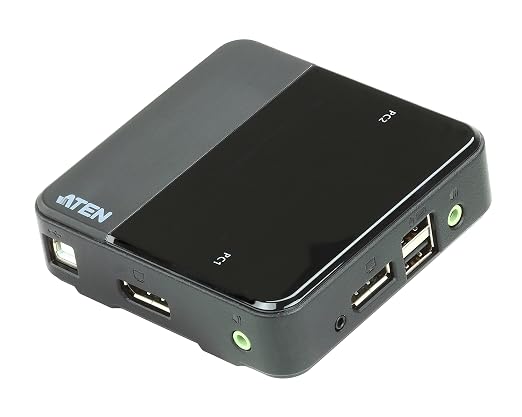
StarTech 2-Port 4K 60Hz DisplayPort Dual-Monitor KVM Switch
Description This dual DisplayPort KVM switch combines next-generation digital display standards with seamless KVM control. The 2-port KVM switch features audio and USB peripheral support along with dual-display capability, which makes it easy to create a multimedia workstation that can switch between two dual-head or twin DisplayPort systems. Maximize productivity with dual video With support for two DisplayPort video inputs and two different computers, this KVM switch helps maximize productivity.You can access multiple computers, giving you the freedom to multitask and increase your productivity. Each of the DP ports supports resolutions up to 4K for maximum screen viewing space. You can also use low-cost adapters to achieve a dual-monitor setup using your computer's secondary HDMI or DVI port. Astonishing picture quality The dual DisplayPort KVM switch supports resolutions up to Ultra HD 4K at 60Hz, and can drive two large DP displays with ease. This makes it the ideal solution for creating workstations where high-quality imaging is critical, such as for graphic design. Complete multimedia control The KVM switch features auxiliary 3.5 mm audio ports that let you share independent analog audio, from each of your connected computers, with your desktop speaker set. With independent audio support, along with dual 4K DP video, you get full multimedia control between different computers which makes this the perfect KVM switch for creative professional applications such as video and sound design or editing. Convenient peripheral sharing This KVM switch offers a built-in 2-port USB hub that's separate from your HID keyboard and mouse. This enables you to share USB peripherals between each connected computer and avoid the expense of separate equipment. The USB hub automatically switches your connected USB devices to the selected computer, saving you the hassle and cost of outfitting each of your computers with their own peripherals.
Description This dual DisplayPort KVM switch combines next-generation digital display standards with seamless KVM control. The 2-port KVM switch features audio and USB peripheral support along with dual-display capability, which makes it easy to create a multimedia workstation that can switch between two dual-head or twin DisplayPort systems. Maximize productivity with dual video With support for two DisplayPort video inputs and two different computers, this KVM switch helps maximize productivity.You can access multiple computers, giving you the freedom to multitask and increase your productivity. Each of the DP ports supports resolutions up to 4K for maximum screen viewing space. You can also use low-cost adapters to achieve a dual-monitor setup using your computer's secondary HDMI or DVI port. Astonishing picture quality The dual DisplayPort KVM switch supports resolutions up to Ultra HD 4K at 60Hz, and can drive two large DP displays with ease. This makes it the ideal solution for creating workstations where high-quality imaging is critical, such as for graphic design. Complete multimedia control The KVM switch features auxiliary 3.5 mm audio ports that let you share independent analog audio, from each of your connected computers, with your desktop speaker set. With independent audio support, along with dual 4K DP video, you get full multimedia control between different computers which makes this the perfect KVM switch for creative professional applications such as video and sound design or editing. Convenient peripheral sharing This KVM switch offers a built-in 2-port USB hub that's separate from your HID keyboard and mouse. This enables you to share USB peripherals between each connected computer and avoid the expense of separate equipment. The USB hub automatically switches your connected USB devices to the selected computer, saving you the hassle and cost of outfitting each of your computers with their own peripherals.
Description This dual DisplayPort KVM switch combines next-generation digital display standards with seamless KVM control. The 2-port KVM switch features audio and USB peripheral support along with dual-display capability, which makes it easy to create a multimedia workstation that can switch between two dual-head or twin DisplayPort systems. Maximize productivity with dual video With support for two DisplayPort video inputs and two different computers, this KVM switch helps maximize productivity.You can access multiple computers, giving you the freedom to multitask and increase your productivity. Each of the DP ports supports resolutions up to 4K for maximum screen viewing space. You can also use low-cost adapters to achieve a dual-monitor setup using your computer's secondary HDMI or DVI port. Astonishing picture quality The dual DisplayPort KVM switch supports resolutions up to Ultra HD 4K at 60Hz, and can drive two large DP displays with ease. This makes it the ideal solution for creating workstations where high-quality imaging is critical, such as for graphic design. Complete multimedia control The KVM switch features auxiliary 3.5 mm audio ports that let you share independent analog audio, from each of your connected computers, with your desktop speaker set. With independent audio support, along with dual 4K DP video, you get full multimedia control between different computers which makes this the perfect KVM switch for creative professional applications such as video and sound design or editing. Convenient peripheral sharing This KVM switch offers a built-in 2-port USB hub that's separate from your HID keyboard and mouse. This enables you to share USB peripherals between each connected computer and avoid the expense of separate equipment. The USB hub automatically switches your connected USB devices to the selected computer, saving you the hassle and cost of outfitting each of your computers with their own peripherals.
Description This dual DisplayPort KVM switch combines next-generation digital display standards with seamless KVM control. The 2-port KVM switch features audio and USB peripheral support along with dual-display capability, which makes it easy to create a multimedia workstation that can switch between two dual-head or twin DisplayPort systems. Maximize productivity with dual video With support for two DisplayPort video inputs and two different computers, this KVM switch helps maximize productivity.You can access multiple computers, giving you the freedom to multitask and increase your productivity. Each of the DP ports supports resolutions up to 4K for maximum screen viewing space. You can also use low-cost adapters to achieve a dual-monitor setup using your computer's secondary HDMI or DVI port. Astonishing picture quality The dual DisplayPort KVM switch supports resolutions up to Ultra HD 4K at 60Hz, and can drive two large DP displays with ease. This makes it the ideal solution for creating workstations where high-quality imaging is critical, such as for graphic design. Complete multimedia control The KVM switch features auxiliary 3.5 mm audio ports that let you share independent analog audio, from each of your connected computers, with your desktop speaker set. With independent audio support, along with dual 4K DP video, you get full multimedia control between different computers which makes this the perfect KVM switch for creative professional applications such as video and sound design or editing. Convenient peripheral sharing This KVM switch offers a built-in 2-port USB hub that's separate from your HID keyboard and mouse. This enables you to share USB peripherals between each connected computer and avoid the expense of separate equipment. The USB hub automatically switches your connected USB devices to the selected computer, saving you the hassle and cost of outfitting each of your computers with their own peripherals.
in 45 offers
The lowest price for StarTech 2-Port 4K 60Hz DisplayPort Dual-Monitor KVM Switch right now is $49.00 at Australian Computer Traders, compared across 37 retailers.
The all-time low was $49.00 on 1 Nov 2026. That's the lowest price we've ever tracked — a great time to buy.
Prices last updated 5 Nov 2026.
Last updated at 05/11/2026 15:46:27
StarTech.com - DisplayPort KVM Switch - 2 Port - Dual-Display - 4k 60hz - USB Hub - Audio and Microphone
Affiliate Disclosure: We may receive a small commission for purchases made through this link at no extra cost to you. This helps support our site. Thank you!
StarTech 2-Port DisplayPort Dual-Monitor KVM Switch 4K 60Hz SV231DPDDUA2 | Refurbished StarTech Monitors
Free delivery between 10–16 Nov
StarTech SV231DPDDUA 2 Port Dual DisplayPort USB KVM Switch with Audio & USB Hub
Delivery between 9–20 Nov $57.31
2-Port DisplayPort Dual-Monitor KVM Switch - 4K 60Hz - TAA
StarTech SV231DPDDUA2 4K Dual KVM Switch DisplayPort Computers and Monitors
Free delivery between 9–16 Nov
StarTech.com SV231DPDDUA2 2-Port DisplayPort Dual-Monitor KVM Switch - 4K 60Hz TAA Compliant
Free delivery between 10–15 Nov
Startech Kvm Displayport Dual Monitor 2 Port 4k Black
Delivery $41.99
StarTech.com 2-Port Dual DisplayPort KVM Switch (4K 60Hz) with USB Hub & Audio - SV231DPDDUA2 | Computers & Accessories
Delivery $8.95
StarTech SV231DPDDUA2 2-Port DisplayPort Dual-Monitor KVM Switch
Delivery $14
StarTech SV231DPDDUA2 2 Port DisplayPort Dual-Monitor KVM - 4K
Delivery between 9–13 Nov $14.50
originally posted on pbtech.co.nz
I needed to use this product to enable me to continue working from home given the need to keep private computer separate from my work equipment. Works a charm but there are a few things purchasers need to be aware of even if you end up buying this more expensive DisplayPort capable unit: 1) I run a dual monitor system with high end monitors which have be set to a refresh rate of max. 60Hz regardless of display resolution capacity. Otherwise, the monitors will flicker or blank out. 2) You need to order the correct adaptors running in the correct way, e.g. in order to display correctly from a laptop with a HDMI and USB-C outputs. Although the USB-C is unlikely to be a problem (just use a USB-C to DP adaptor cable), for the second display I had to organize a special ... MoreI needed to use this product to enable me to continue working from home given the need to keep private computer separate from my work equipment. Works a charm but there are a few things purchasers need to be aware of even if you end up buying this more expensive DisplayPort capable unit: 1) I run a dual monitor system with high end monitors which have be set to a refresh rate of max. 60Hz regardless of display resolution capacity. Otherwise, the monitors will flicker or blank out. 2) You need to order the correct adaptors running in the correct way, e.g. in order to display correctly from a laptop with a HDMI and USB-C outputs. Although the USB-C is unlikely to be a problem (just use a USB-C to DP adaptor cable), for the second display I had to organize a special (and expensive) HDMI-DISPLAYPORT HDMI to DisplayPort Adapter HDMI capable of 4K@60Hz + in my case adding a 3m DP to DP cable. Don't make the mistake of ordering a much cheaper DP to HDMI cable, which although fits just won't work (they are not two way capable, therefore must be HDMI to DP, not DP to HDMI). The other thing that works well is the keyboard and mouse console so I can operate everything from the one place (the whole point here) BUT also my fingerprint reader and webcam also both work just fine interfacing with both computers. Pretty neat! Highly recommended but make sure you get the right model that suits your setup and needs
originally posted on startech.com
I have been in the technology business for over 35 years and for the past 20+ years I have been asked to provide unbiased reviews of various products from both the AV and IT world. In review of this product I have found that this product provides true 4K video from the dual display port. Unlike others I have tested, there is no tearing or pixelation during fast motion video partly due to the 60Hz refresh rate where others in this same class only allow 30Hz. The auxiliary 3.5 mm audio ports allows you to share analog audio, from each of your connected computers, with your independent speaker system. When performing audio or video editing, this unit is a must have, as the performance is excellent. In the box: -KVM Switch -Universal Power Adapter (NA, EU, UK, ANZ) ... MoreI have been in the technology business for over 35 years and for the past 20+ years I have been asked to provide unbiased reviews of various products from both the AV and IT world. In review of this product I have found that this product provides true 4K video from the dual display port. Unlike others I have tested, there is no tearing or pixelation during fast motion video partly due to the 60Hz refresh rate where others in this same class only allow 30Hz. The auxiliary 3.5 mm audio ports allows you to share analog audio, from each of your connected computers, with your independent speaker system. When performing audio or video editing, this unit is a must have, as the performance is excellent. In the box: -KVM Switch -Universal Power Adapter (NA, EU, UK, ANZ) -Instruction Manual In summation, solid product, intuitive and easy to use. I received this product in exchange for an unbiased review.
originally posted on homeessentialsdirect.com
Another reviewer has said that there is no good DP++ switching solution on the market. This one will work for you only if you have no plans to switch between /working/ computers. If, however, you do, the video cards see monitors abruptly disconnected and become very unhappy. Specifically, at some point the PC sees only one monitor and moves *everything* from the other onto this one, does not return where it was. (Maybe it's just a Windows bug, but I expect no fixes from Redmond.) You push the button, monitors start flickering for half a minute, then you may need to reboot the PC because it completely lost one monitor, or switched them. This product does not work much better than a few Teledyne relays tied together by a duct tape. If you can, skip this device and ... MoreAnother reviewer has said that there is no good DP++ switching solution on the market. This one will work for you only if you have no plans to switch between /working/ computers. If, however, you do, the video cards see monitors abruptly disconnected and become very unhappy. Specifically, at some point the PC sees only one monitor and moves *everything* from the other onto this one, does not return where it was. (Maybe it's just a Windows bug, but I expect no fixes from Redmond.) You push the button, monitors start flickering for half a minute, then you may need to reboot the PC because it completely lost one monitor, or switched them. This product does not work much better than a few Teledyne relays tied together by a duct tape. If you can, skip this device and just buy two more monitors - at least you get two fully working computers, not one and a quarter.
| General | |
| Device Type | KVM / audio / USB switch - 2 ports |
| Enclosure Type | Desktop |
| Subtype | KVM |
| Ports | 2 x KVM / audio / USB |

StarTech.com - DisplayPort KVM Switch - 2 Port - Dual-Display - 4k 60hz - USB Hub - Audio and Microphone
Affiliate Disclosure: We may receive a small commission for purchases made through this link at no extra cost to you. This helps support our site. Thank you!
StarTech 2-Port DisplayPort Dual-Monitor KVM Switch 4K 60Hz SV231DPDDUA2 | Refurbished StarTech Monitors
Free delivery between 10–16 Nov
StarTech SV231DPDDUA 2 Port Dual DisplayPort USB KVM Switch with Audio & USB Hub
Delivery between 9–20 Nov $57.31
2-Port DisplayPort Dual-Monitor KVM Switch - 4K 60Hz - TAA
StarTech SV231DPDDUA2 4K Dual KVM Switch DisplayPort Computers and Monitors
Free delivery between 9–16 Nov
I needed to use this product to enable me to continue working from home given the need to keep private computer separate from my work equipment. Works a charm but there are a few things purchasers need to be aware of even if you end up buying this more expensive DisplayPort capable unit: 1) I run a dual monitor system with high end monitors which have be set to a refresh rate of max. 60Hz regardless of display resolution capacity. Otherwise, the monitors will flicker or blank out. 2) You need to order the correct adaptors running in the correct way, e.g. in order to display correctly from a laptop with a HDMI and USB-C outputs. Although the USB-C is unlikely to be a problem (just use a USB-C to DP adaptor cable), for the second display I had to organize a special ... MoreI needed to use this product to enable me to continue working from home given the need to keep private computer separate from my work equipment. Works a charm but there are a few things purchasers need to be aware of even if you end up buying this more expensive DisplayPort capable unit: 1) I run a dual monitor system with high end monitors which have be set to a refresh rate of max. 60Hz regardless of display resolution capacity. Otherwise, the monitors will flicker or blank out. 2) You need to order the correct adaptors running in the correct way, e.g. in order to display correctly from a laptop with a HDMI and USB-C outputs. Although the USB-C is unlikely to be a problem (just use a USB-C to DP adaptor cable), for the second display I had to organize a special (and expensive) HDMI-DISPLAYPORT HDMI to DisplayPort Adapter HDMI capable of 4K@60Hz + in my case adding a 3m DP to DP cable. Don't make the mistake of ordering a much cheaper DP to HDMI cable, which although fits just won't work (they are not two way capable, therefore must be HDMI to DP, not DP to HDMI). The other thing that works well is the keyboard and mouse console so I can operate everything from the one place (the whole point here) BUT also my fingerprint reader and webcam also both work just fine interfacing with both computers. Pretty neat! Highly recommended but make sure you get the right model that suits your setup and needs
I have been in the technology business for over 35 years and for the past 20+ years I have been asked to provide unbiased reviews of various products from both the AV and IT world. In review of this product I have found that this product provides true 4K video from the dual display port. Unlike others I have tested, there is no tearing or pixelation during fast motion video partly due to the 60Hz refresh rate where others in this same class only allow 30Hz. The auxiliary 3.5 mm audio ports allows you to share analog audio, from each of your connected computers, with your independent speaker system. When performing audio or video editing, this unit is a must have, as the performance is excellent. In the box: -KVM Switch -Universal Power Adapter (NA, EU, UK, ANZ) ... MoreI have been in the technology business for over 35 years and for the past 20+ years I have been asked to provide unbiased reviews of various products from both the AV and IT world. In review of this product I have found that this product provides true 4K video from the dual display port. Unlike others I have tested, there is no tearing or pixelation during fast motion video partly due to the 60Hz refresh rate where others in this same class only allow 30Hz. The auxiliary 3.5 mm audio ports allows you to share analog audio, from each of your connected computers, with your independent speaker system. When performing audio or video editing, this unit is a must have, as the performance is excellent. In the box: -KVM Switch -Universal Power Adapter (NA, EU, UK, ANZ) -Instruction Manual In summation, solid product, intuitive and easy to use. I received this product in exchange for an unbiased review.
Another reviewer has said that there is no good DP++ switching solution on the market. This one will work for you only if you have no plans to switch between /working/ computers. If, however, you do, the video cards see monitors abruptly disconnected and become very unhappy. Specifically, at some point the PC sees only one monitor and moves *everything* from the other onto this one, does not return where it was. (Maybe it's just a Windows bug, but I expect no fixes from Redmond.) You push the button, monitors start flickering for half a minute, then you may need to reboot the PC because it completely lost one monitor, or switched them. This product does not work much better than a few Teledyne relays tied together by a duct tape. If you can, skip this device and ... MoreAnother reviewer has said that there is no good DP++ switching solution on the market. This one will work for you only if you have no plans to switch between /working/ computers. If, however, you do, the video cards see monitors abruptly disconnected and become very unhappy. Specifically, at some point the PC sees only one monitor and moves *everything* from the other onto this one, does not return where it was. (Maybe it's just a Windows bug, but I expect no fixes from Redmond.) You push the button, monitors start flickering for half a minute, then you may need to reboot the PC because it completely lost one monitor, or switched them. This product does not work much better than a few Teledyne relays tied together by a duct tape. If you can, skip this device and just buy two more monitors - at least you get two fully working computers, not one and a quarter.
Installed many Startech KVM's. Unfortunately they haven't updated the USB section to keep with the times. Please add USB-C support. Won't detect AV devices that connect over USB, even though it's already installed on the PC. I have to connect two separate cameras and speakers to support each PC. Was hoping I can unify this.
I have a two monitor workspace set up and I have both a workstation and server running off them through a KVM that does not support dual monitors. I was only able to run my workstation using two monitors by running one monitor to the KVM unit and one directly to the other monitor. When I switched over to the server, I was only able to use the one monitor. This KVM unit solved that problem by having dual monitor support built in. Now I am able to switch back and forth between my workstation and server utilizing both monitors for maximum display. This KVM unit can handle 4K resolution and the picture is clear and sharp. It also offers support for switching the sound and mic as well using the 3 mm jacks. The only thing I wish it had was other display port connections ... MoreI have a two monitor workspace set up and I have both a workstation and server running off them through a KVM that does not support dual monitors. I was only able to run my workstation using two monitors by running one monitor to the KVM unit and one directly to the other monitor. When I switched over to the server, I was only able to use the one monitor. This KVM unit solved that problem by having dual monitor support built in. Now I am able to switch back and forth between my workstation and server utilizing both monitors for maximum display. This KVM unit can handle 4K resolution and the picture is clear and sharp. It also offers support for switching the sound and mic as well using the 3 mm jacks. The only thing I wish it had was other display port connections other than just HDMI but that issue can be resolved with adapters which I assume would work but not tested. Overall, a great solid unit that works as described.
I purchased this because I have my home computer and a computer issued by my workplace. Another challenge I have is my monitors only have one DP connection on them. Coming from the IT world and using KVMs in datacenters, I knew a product like this was going to be the easiest choice to get what I needed with the least amount of hassle -- and there would be a price tag for that convenience. That said, it works great once I got over this device's learning curve. Like others, I sometimes had trouble with the logitech unifying receiver not working when switching between devices. I had my receiver plugged into a USB hub, connected to the KVM. This is apparently not a good idea. Once I moved the receiver to the KVM's "Keyboard" USB port, that problem went away. I've never ... MoreI purchased this because I have my home computer and a computer issued by my workplace. Another challenge I have is my monitors only have one DP connection on them. Coming from the IT world and using KVMs in datacenters, I knew a product like this was going to be the easiest choice to get what I needed with the least amount of hassle -- and there would be a price tag for that convenience. That said, it works great once I got over this device's learning curve. Like others, I sometimes had trouble with the logitech unifying receiver not working when switching between devices. I had my receiver plugged into a USB hub, connected to the KVM. This is apparently not a good idea. Once I moved the receiver to the KVM's "Keyboard" USB port, that problem went away. I've never had any kind of video dropouts. Image quality is great. Two older Dell UltraSharp monitors at 1080p60 are working without any issue. The only thing that would have made this any better would be a much lower price than what I paid. However, I recognize this is a niche device and StarTech is amazing at making niche hardware that cater to my needs.
Make sure to actually use the usb output that matches the computer your are testing your mouse+keyboard with. I had the keyboard+mouse not working like some mentioned in other comments/reviews. I contacted the support team which helped me make it work correctly. It's silly but we never know what would have with lack of coffee :) .
They placed the audio jacks directly next to the power cable. This produces an obnoxious hum over headphones at times. I've replaced the first one which did this. There was no improvement. One of the cardinal rules of audio is you never, ever do this. I have the choice of spending MORE money on a ground loop isolated to get rid of the hum, or not using the audio ports... which were the absolute only reason to get this over other KVMs. If you intend to use the audio on this, don't. If you don't intend to use the audio on this, save yourself literally hundreds of dollars and get something else. Additionally, roughly 50% of the time, I have to cycle the KVM switch again because one of my monitors will be distorted, artifact, or have interference patterns. Something ... MoreThey placed the audio jacks directly next to the power cable. This produces an obnoxious hum over headphones at times. I've replaced the first one which did this. There was no improvement. One of the cardinal rules of audio is you never, ever do this. I have the choice of spending MORE money on a ground loop isolated to get rid of the hum, or not using the audio ports... which were the absolute only reason to get this over other KVMs. If you intend to use the audio on this, don't. If you don't intend to use the audio on this, save yourself literally hundreds of dollars and get something else. Additionally, roughly 50% of the time, I have to cycle the KVM switch again because one of my monitors will be distorted, artifact, or have interference patterns. Something doesn't always switch over correctly. This is always solvable by cycling, however, so it's only incredibly obnoxious instead of a deal-breaker.
I had my boss order this for me for switching between my workstation and laptop. Unfortunately this was only a few short weeks before COVID restrictions went in place and it lay abandoned on my desk (along with my workstation). DP was a fantastic equalizer but I found it very odd that when connected through this switch, my laptop (connected through a Dell WD15 K17A USB-C dock) would not detect the second display. Bypassing this switch, it worked fine. For the record, I used the HDMI and mini DP on the dock, though I did try the VGA to the same effect: only one display detected. Fast forward a pandemic (mostly) and I got my workstation set up here at home, where it will likely stay. I have this switch working properly, though I had to downgrade to a Dell dock I had ... MoreI had my boss order this for me for switching between my workstation and laptop. Unfortunately this was only a few short weeks before COVID restrictions went in place and it lay abandoned on my desk (along with my workstation). DP was a fantastic equalizer but I found it very odd that when connected through this switch, my laptop (connected through a Dell WD15 K17A USB-C dock) would not detect the second display. Bypassing this switch, it worked fine. For the record, I used the HDMI and mini DP on the dock, though I did try the VGA to the same effect: only one display detected. Fast forward a pandemic (mostly) and I got my workstation set up here at home, where it will likely stay. I have this switch working properly, though I had to downgrade to a Dell dock I had hanging around my house for the same undetected display problems I mentioned. This time, I'm connected through DP to DP from dock to switch and DP to DVI from switch to monitors (dual LG 24EN33s). I'm super happy with the video switching, now, despite having to buy new cables twice after already having what I needed. I didn't feel like I could ask my boss to cover the additional cables, so that's another $50-ish in my setup. Of course, now the real problem of running with this switch as my daily driver... Now, I'm stuck with the hardest time getting mice to work through the switch. I've tried a few I had kicking around the house that has varying degrees of wonkiness, one out-right not working at all I got from our gaming rig in the house. The one I got working "okay" is an old Logitech M-BT96a, pretty much the most basic USB optical mouse out there. Plugged in directly to my outdated dock, it works fine. Plugged in through this switch: I literally cannot consistently click and drag. I'm sure it's missing the button press between cycles but given the age of this mouse, I can't imagine it's inundating the switch with too much data. Obviously the better mouse with insanely high DPI and all sorts of gaming features just flat-out didn't work, but I almost expected it to, given my experience with this switch. I should also point out that this is running on my Red Hat Enterprise Linux workstation/Pop! OS laptop. I've tried multiple flavors of environments but my daily driver is GNOME. I also maintain a Windows 10 Enterprise image that I boot off of now and again on my laptop. Windows has the exact same issues of not being able to click and drag, making highlighting text and dragging windows between monitors a huge pain. For something designed for using two monitors, this is unfortunate. I actually came to the site to see if there was an updated firmware that would fix these perplexing issues but alas, the only downloads I've found are PDFs singing this switches praises... Sadly, I have to keep two mice on my desk right now and leave them off of the switch so my two machines are usable. It really is ridiculous and I would have returned it but never got the chance to put this switch through its paces before that window closed (thanks, COVID).
got this to use with my work-from-home setup. it's one of the few KVMs that I can use given I have an Acer xb271hu so 1440p 165hz (willing to accept 144hz) atm, I've just set up the USB switching, and sadly it fails to switch my microphone interface Roland VT-4. The audio is choppy and laggy id assume no audio interface can be run thru the hub. my Sony A7 II sends a video stream to a simple 1080p capture card that acts as a generic webcam that also does not work on the hub, corrupted video, not sure what the hub is doing to achieve that. but i suspect its also why the audio interface doesn't work as data is being mangled my Logitech superlight both wireless and wired does not work in the mouse USB slot, it, however, works in the hub slot. my GMMK pro thankfully ... Moregot this to use with my work-from-home setup. it's one of the few KVMs that I can use given I have an Acer xb271hu so 1440p 165hz (willing to accept 144hz) atm, I've just set up the USB switching, and sadly it fails to switch my microphone interface Roland VT-4. The audio is choppy and laggy id assume no audio interface can be run thru the hub. my Sony A7 II sends a video stream to a simple 1080p capture card that acts as a generic webcam that also does not work on the hub, corrupted video, not sure what the hub is doing to achieve that. but i suspect its also why the audio interface doesn't work as data is being mangled my Logitech superlight both wireless and wired does not work in the mouse USB slot, it, however, works in the hub slot. my GMMK pro thankfully works in the keyboard slot. at this kind of price, it would be nice to at least see 1 or 2 USB 3.0 slots.
| General | |
| Device Type | KVM / audio / USB switch - 2 ports |
| Enclosure Type | Desktop |
| Subtype | KVM |
| Ports | 2 x KVM / audio / USB |