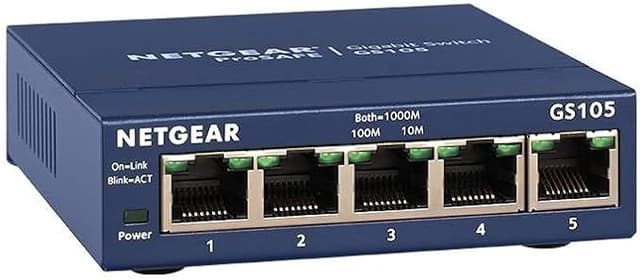
Take your home or office network to the next level with the Netgear ProSafe 5-port Gigabit Switch. This essential networking accessory lets you expand your high-speed network in an instant, delivering rapid file transfers and lag-free streaming across multiple devices. Simply plug it in and connect up to five wired devices for speeds up to 10 times faster than standard Ethernet. With its sturdy, compact design and plug-and-play setup, the Netgear switch offers hassle-free performance right out of the box. Auto-negotiation on each port detects device connections, while auto-mdi/mdix eliminates the need for crossover cables. Prioritize bandwidth-hungry applications like video conferencing with optimized traffic handling. Robust QoS automatically recognizes voice and video streams, ensuring glitch-free calls and stutter-free streaming. With energy-efficient operation and silent fanless cooling, this versatile gigabit switch integrates seamlessly into any home or office. Take your wired connections to the cutting edge with the easy, affordable network expansion of the Netgear ProSafe 5-port Gigabit Switch. The manufacturer's part number for this product is GS105. Get yours today for a faster, more reliable network.
Take your home or office network to the next level with the Netgear ProSafe 5-port Gigabit Switch. This essential networking accessory lets you expand your high-speed network in an instant, delivering rapid file transfers and lag-free streaming across multiple devices. Simply plug it in and connect up to five wired devices for speeds up to 10 times faster than standard Ethernet. With its sturdy, compact design and plug-and-play setup, the Netgear switch offers hassle-free performance right out of the box. Auto-negotiation on each port detects device connections, while auto-mdi/mdix eliminates the need for crossover cables. Prioritize bandwidth-hungry applications like video conferencing with optimized traffic handling. Robust QoS automatically recognizes voice and video streams, ensuring glitch-free calls and stutter-free streaming. With energy-efficient operation and silent fanless cooling, this versatile gigabit switch integrates seamlessly into any home or office. Take your wired connections to the cutting edge with the easy, affordable network expansion of the Netgear ProSafe 5-port Gigabit Switch. The manufacturer's part number for this product is GS105. Get yours today for a faster, more reliable network.
in 48 offers
last seen 26 Oct 2026
The lowest price we last saw for Netgear GS105 ProSafe 5-Port Gigabit Switch was $29.00 at PCByte AU, compared across 34 retailers (last seen 26 Oct 2026). Prices may have changed since.
The all-time low we recorded was $8.87 on 30 May 2026.
Prices last updated 26 Oct 2026.
Netgear GS105 ProSafe 5-Port Gigabit Switch
Take your home or office network to the next level with the Netgear ProSafe 5-port Gigabit Switch. This essential networking accessory lets you expand your high-speed network in an instant, delivering rapid file transfers and lag-free streaming across multiple devices. Simply plug it in and connect up to five wired devices for speeds up to 10 times faster than standard Ethernet. With its sturdy, compact design and plug-and-play setup, the Netgear switch offers hassle-free performance right out of the box. Auto-negotiation on each port detects device connections, while auto-mdi/mdix eliminates the need for crossover cables. Prioritize bandwidth-hungry applications like video conferencing with optimized traffic handling. Robust QoS automatically recognizes voice and video streams, ensuring glitch-free calls and stutter-free streaming. With energy-efficient operation and silent fanless cooling, this versatile gigabit switch integrates seamlessly into any home or office. Take your wired connections to the cutting edge with the easy, affordable network expansion of the Netgear ProSafe 5-port Gigabit Switch. The manufacturer's part number for this product is GS105. Get yours today for a faster, more reliable network.
Take your home or office network to the next level with the Netgear ProSafe 5-port Gigabit Switch. This essential networking accessory lets you expand your high-speed network in an instant, delivering rapid file transfers and lag-free streaming across multiple devices. Simply plug it in and connect up to five wired devices for speeds up to 10 times faster than standard Ethernet. With its sturdy, compact design and plug-and-play setup, the Netgear switch offers hassle-free performance right out of the box. Auto-negotiation on each port detects device connections, while auto-mdi/mdix eliminates the need for crossover cables. Prioritize bandwidth-hungry applications like video conferencing with optimized traffic handling. Robust QoS automatically recognizes voice and video streams, ensuring glitch-free calls and stutter-free streaming. With energy-efficient operation and silent fanless cooling, this versatile gigabit switch integrates seamlessly into any home or office. Take your wired connections to the cutting edge with the easy, affordable network expansion of the Netgear ProSafe 5-port Gigabit Switch. The manufacturer's part number for this product is GS105. Get yours today for a faster, more reliable network.
Last updated at 26/10/2026 08:08:21
Netgear 5-Port Gigabit Ethernet Unmanaged Switch (GS105AU)
NETGEAR GS105 Prosafe 5 Port 10/100/1000 Gigabit Switch
Delivery $11.99
Netgear 5 Port Gigabit Ethernet Unmanaged Switch GS105AU - Switches
Delivery $13
NETGEAR GS105AU ProSafe GS105 5-port Gigabit Desktop Switch
Delivery $13
NETGEAR GS105AU ProSafe GS105 5-port Gigabit Desktop Switch
Delivery $13
Netgear 5-Port Gigabit Ethernet Unmanaged Switch (GS105AU)
Delivery $14
Netgear 5-Port Gigabit Ethernet Unmanaged Switch (GS105AU)
Delivery between 29 Oct – 2 Nov $10
Netgear 5-port Gigabit Ethernet Unmanaged Switch (gs105au)
Delivery $10
Affiliate Disclosure: We may receive a small commission for purchases made through this link at no extra cost to you. This helps support our site. Thank you!
Netgear GS105 5 Port Gigabit switch - Switches
Delivery $13.50
Netgear ProSafe GS105 5 Port Gigabit Ehternet Switch - GS105
Delivery between 28 Oct – 2 Nov $14.50
originally posted on bestbuy.com
I had the older 10/100 baseT Ethernet model and updated to the 100/1000 baseT model. This is simply like a power strip for Ethernet connections. One goes to the wall or router and the remaining four can be used for devices to share an Ethernet channel and use the Ethernet Modem connected to the WLAN on the router. Remember the connect speed is still the slowest point in the chain so you won't see 1000 baseT speed if a 100 baseT Ethernet device is in the chain. That point understood, this is a no brainer update to REMOVE those slower devices in your Network as we see faster and faster devices like routers and Internet modems and even wi-fi populate your network. There is no difference in installation with the older model, simply remove and replace and you're done. ... MoreI had the older 10/100 baseT Ethernet model and updated to the 100/1000 baseT model. This is simply like a power strip for Ethernet connections. One goes to the wall or router and the remaining four can be used for devices to share an Ethernet channel and use the Ethernet Modem connected to the WLAN on the router. Remember the connect speed is still the slowest point in the chain so you won't see 1000 baseT speed if a 100 baseT Ethernet device is in the chain. That point understood, this is a no brainer update to REMOVE those slower devices in your Network as we see faster and faster devices like routers and Internet modems and even wi-fi populate your network. There is no difference in installation with the older model, simply remove and replace and you're done. Where the extra speed is detected, it will auto negotiate that speed for you.
originally posted on bestbuy.com
For a small home network. Inexpensive. Works for what it is. I have two. Both used at a workstation on my home network. Network, a Laserjet, Apple TV, MacBook Air, MacBook Pro all on one Ethernet port. Only downside is can’t configure central switch port for each item. I don’t need that.
originally posted on netgear.com
I had high expectations from my previous experiences with Netgear products, but this did nothing to tarnish that reputation. I plugged in the incoming feed from my fiber jack in my networking closet and can now connect my routers and other devices to my ethernet ports all around the house. The lights operate as described with left and right leds lighting when there is a connection and flashing for data transmission. I have gigabit internet and through my networking testing it appears to achieve the gigabit speeds that it claims. Overall, this is an excellent switch that I would definitely recommend to anyone in the market for this type of networking appliance.
| General | |
| Device Type | Switch - 5 ports |
| Enclosure Type | Desktop |
| Subtype | Gigabit Ethernet |
| Ports | 5 x 10/100/1000 |
Netgear 5-Port Gigabit Ethernet Unmanaged Switch (GS105AU)
NETGEAR GS105 Prosafe 5 Port 10/100/1000 Gigabit Switch
Delivery $11.99
Netgear 5 Port Gigabit Ethernet Unmanaged Switch GS105AU - Switches
Delivery $13
NETGEAR GS105AU ProSafe GS105 5-port Gigabit Desktop Switch
Delivery $13
NETGEAR GS105AU ProSafe GS105 5-port Gigabit Desktop Switch
Delivery $13
I had the older 10/100 baseT Ethernet model and updated to the 100/1000 baseT model. This is simply like a power strip for Ethernet connections. One goes to the wall or router and the remaining four can be used for devices to share an Ethernet channel and use the Ethernet Modem connected to the WLAN on the router. Remember the connect speed is still the slowest point in the chain so you won't see 1000 baseT speed if a 100 baseT Ethernet device is in the chain. That point understood, this is a no brainer update to REMOVE those slower devices in your Network as we see faster and faster devices like routers and Internet modems and even wi-fi populate your network. There is no difference in installation with the older model, simply remove and replace and you're done. ... MoreI had the older 10/100 baseT Ethernet model and updated to the 100/1000 baseT model. This is simply like a power strip for Ethernet connections. One goes to the wall or router and the remaining four can be used for devices to share an Ethernet channel and use the Ethernet Modem connected to the WLAN on the router. Remember the connect speed is still the slowest point in the chain so you won't see 1000 baseT speed if a 100 baseT Ethernet device is in the chain. That point understood, this is a no brainer update to REMOVE those slower devices in your Network as we see faster and faster devices like routers and Internet modems and even wi-fi populate your network. There is no difference in installation with the older model, simply remove and replace and you're done. Where the extra speed is detected, it will auto negotiate that speed for you.
For a small home network. Inexpensive. Works for what it is. I have two. Both used at a workstation on my home network. Network, a Laserjet, Apple TV, MacBook Air, MacBook Pro all on one Ethernet port. Only downside is can’t configure central switch port for each item. I don’t need that.
I had high expectations from my previous experiences with Netgear products, but this did nothing to tarnish that reputation. I plugged in the incoming feed from my fiber jack in my networking closet and can now connect my routers and other devices to my ethernet ports all around the house. The lights operate as described with left and right leds lighting when there is a connection and flashing for data transmission. I have gigabit internet and through my networking testing it appears to achieve the gigabit speeds that it claims. Overall, this is an excellent switch that I would definitely recommend to anyone in the market for this type of networking appliance.
Installed this as the central switch for the whole house in the basement. Replaced 2 cat-5 with cat-6 cables and this works great. The product is very well built. It has been pretty efficient in directly and managing traffic. Auto-senses gigabit connections (color of light changes). Overall very satisfied with the product.
This was easy plug and play switch to install. Plug a Cat 6 ethernet cable into the input port and 2 for the output ports. It detected my devises automatically and adjusted it to my network speed automatically. Comes with a limited life-time warranty. As a metwork adminostrator I would higjly recomend this switch to anybody. Bought online and picked up at Best Buy in a hour.
This was perfect for my situation, I had 2 devices and 1 cable running through my apartment to my room. Anytime I wanted to switch devices I'd switch the cable to get the fastest internet speed, but with this no more. I got this plugged it in and thats it. Both devices instantly had around speeds pushing 900mbps download speed (which for my location and internet provider is superb). Can't speak for if you fill the other ports what that will do to your speeds but from what I have noticed it should work just fine.
This 5 port switch does exactly what it's meant to do and setup is extremely simple, just plug and play. I purchased one for my living room and ended up getting a second for my loft. My living room has an ethernet equipped TV, Apple TV 4K, console and security camera; not wanting to sacrifice speed or stability with Wi-Fi connections, I used this switch to have a wired connection for each device. The connections have been fast and stable for all devices connected. The wired connection allows me to stream high data rate 4K HDR content with no lag or buffering. My loft has another TV, console and a Network Attached Storage device and the connections have also been great. I'm able to access the network hard drive from my PCs with ease and transfer files back and forth ... MoreThis 5 port switch does exactly what it's meant to do and setup is extremely simple, just plug and play. I purchased one for my living room and ended up getting a second for my loft. My living room has an ethernet equipped TV, Apple TV 4K, console and security camera; not wanting to sacrifice speed or stability with Wi-Fi connections, I used this switch to have a wired connection for each device. The connections have been fast and stable for all devices connected. The wired connection allows me to stream high data rate 4K HDR content with no lag or buffering. My loft has another TV, console and a Network Attached Storage device and the connections have also been great. I'm able to access the network hard drive from my PCs with ease and transfer files back and forth quickly. If I ever need more ethernet connections, I'd but another switch without hesitation.
Plug and play, nothing to configure. Solid construction. I suppose it is worth a few extra bucks over the cheap plastic ones (this one has a metal case), it will probably run forever. Only downside is that the power port is on the back and the ethernet ports are on the front, but it's not a deal breaker. Also note that there is no way to turn off the flashing lights. Indicators show speed 10/100/1000 for each port.
When I got my new Cox Panoramic WiFi modem, I knew immediately that I needed a gigabit switch. They only put two ethernet ports on the thing as opposed to the five that were on the one we 'upgraded' from. I also knew where to look first to get one: Best Buy! When I got there, they had a couple different ones, but the clear choice for me was the good ole Netgear brand one. Netgear has been making some of the best internet gadgets pretty much ever since home internet was a thing. I was glad to find when I opened the box, that they still make them with metal cases and metal frames around the ethernet ports just like they always have. The price was nice for it too. Less than the other brand they had on the shelf, and I hadn't even heard of it before. Hooking it up was ... MoreWhen I got my new Cox Panoramic WiFi modem, I knew immediately that I needed a gigabit switch. They only put two ethernet ports on the thing as opposed to the five that were on the one we 'upgraded' from. I also knew where to look first to get one: Best Buy! When I got there, they had a couple different ones, but the clear choice for me was the good ole Netgear brand one. Netgear has been making some of the best internet gadgets pretty much ever since home internet was a thing. I was glad to find when I opened the box, that they still make them with metal cases and metal frames around the ethernet ports just like they always have. The price was nice for it too. Less than the other brand they had on the shelf, and I hadn't even heard of it before. Hooking it up was very easy. I just plugged a CAT 6 ethernet cable into one of the ports on the switch and the other end into one of the two ethernet ports on the modem. I then plugged in the ethernet cords from mine and my wife's desktop PCs, and the cord that goes to the ethernet switch in the living room (we use wifi as little as possible since wired is still more reliable). I turned our modem back on and viola! Everything worked exactly as it ought to without having to reconfigure anything. That's the great thing about a switch, it sends and receives signals from every device hooked up to it without any fuss on the user's part. I've not doubt that this switch will last as long or longer than the Netgear switch that I already have in the living room and I've been using it for 20 years.
Worked as expected and reduced the bottle neck on my home network nicely. Keep in mind that this works as a fanout of a home network router. So, I took the ethernet output port of my cable modem and placed it in one of the ports on this switch. I then placed the rest of my wired ports in the remaining ports of the switch. The cable modem's internal router handled the DHCP duties and managed the network both with in my wireless domain and this wired domain. it was real easy. No network experience required. Just connect one port to your modem/router and the rest to your PCs, printers, TVs or whatever you want to connect via a ethernet cable.
| General | |
| Device Type | Switch - 5 ports |
| Enclosure Type | Desktop |
| Subtype | Gigabit Ethernet |
| Ports | 5 x 10/100/1000 |