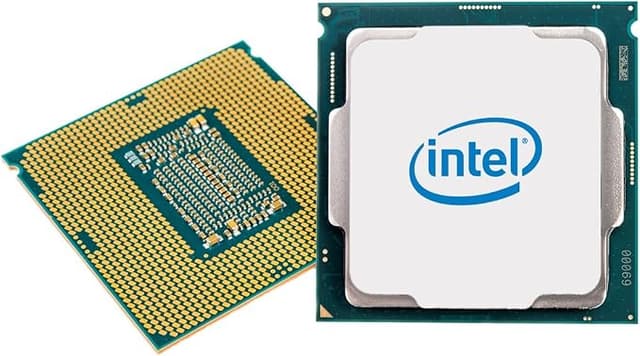
Intel Core i7-8700 Desktop Processor
i7-8700 Processor
i7-8700 Processor
i7-8700 Processor
i7-8700 Processor
in 5 offers
The lowest price for Intel Core i7-8700 Desktop Processor right now is $98.98 at eBay.com.au, compared across 2 retailers.
The all-time low was $24.25 on 10 May 2026 — today's price is 308% above the lowest ever. It has been notably cheaper before — worth setting a price alert.
Prices last updated 10 Sept 2026.
Last updated at 10/09/2026 00:12:14
Intel Core i7-8700 Processor (3.2 GHz, 6 Cores, LGA 1151) - SR3QS
Affiliate Disclosure: We may receive a small commission for purchases made through this link at no extra cost to you. This helps support our site. Thank you!
Intel 8th Gen Core I7-8700 Sr3qs 3.20ghz (turbo 4.60ghz) 6-core 12m
Delivery $27.91
Affiliate Disclosure: We may receive a small commission for purchases made through this link at no extra cost to you. This helps support our site. Thank you!
Genuine Intel Core I7-8700 Cpu 3.20ghz 12mb L3 Cache Socket 1151
Free delivery
Affiliate Disclosure: We may receive a small commission for purchases made through this link at no extra cost to you. This helps support our site. Thank you!
Intel Core I7-8700 8th Gen 3.2 Ghz 12mb Cache Cpu Processor Tested
Free delivery
Affiliate Disclosure: We may receive a small commission for purchases made through this link at no extra cost to you. This helps support our site. Thank you!
Intel BX80684I78700 Core i7 i7-8700 Hexa-core (6 Core) 3.20 GHz Processor - Retail Pack
30-day returns
originally posted on walmart.com
Excellent product, best price. It arrived when specified after ordering and I am now using it in my newly built system. I'm sure that a later generation system would perform faster, but for my uses, I doubt that I would notice the difference. It's blazingly fast in comparison to my other recent systems. The thing that I recommend is to install a better fan than the included Intel fan. I didn't even try the one included. The third party fan keeps it much cooler and runs very quietly.
originally posted on neweggbusiness.com
I was a little thrown off by how small the pins were on the back (last processer I put in a computer was 10 years ago). This one is super easy to install. My son wanted to help so I let him install it, apply the thermal paste and attach the fan. He had no issues except getting slightly crazy with the thermal paste. After cleaning up the mess and powering on, I thought the fan was DOA but I had the fan plugged into the wrong plug on the motherboard. Once I fixed that, everything was smooth sailing. I haven't decided if I want to try overclocking it yet.
originally posted on newegg.com
+ I have noticed a bunch of reviews on just about all intel processors pointing to TDP as the measurement of power consumption. This is inherently wrong, TDP (thermal design power) refers to the heat dissipation from the processor, not power use. To measure power consumption, you can use "Intel Power Gadget", software written by a development team at Intel for windows, mac and surprisingly linux. The software was written specifically to measure real time power consumption on supported intel CPUs. Using Intel Power Gadget, I measured the idle power consumption at just 14 Watts, and under full load during a Handbrake transcoding it reached a peak of 111 Watts of power consumption. I side-graded from my 5820k, which is a great processor, i just got to a point where i ... More+ I have noticed a bunch of reviews on just about all intel processors pointing to TDP as the measurement of power consumption. This is inherently wrong, TDP (thermal design power) refers to the heat dissipation from the processor, not power use. To measure power consumption, you can use "Intel Power Gadget", software written by a development team at Intel for windows, mac and surprisingly linux. The software was written specifically to measure real time power consumption on supported intel CPUs. Using Intel Power Gadget, I measured the idle power consumption at just 14 Watts, and under full load during a Handbrake transcoding it reached a peak of 111 Watts of power consumption. I side-graded from my 5820k, which is a great processor, i just got to a point where i just wanted to set and forget, and not have to occasionally problem solve issues in the BIOS settings. It could have been the mobo i paired with, but i had enough tinkering and wanted to 'go back' to the mainstream. PUBG with all video settings set to ultra, in 1080p, is faster and smoother than it was with my 5820k. However; i should note i performed a complete windows 10 clean install, to a freshly formatted SSD, so some of my system settings may have been different. Initially I wanted the 'K' version, unfortunately the supply just wasn't ready, when these became available I managed to snag one. Overall this processor is very fast, handles everything I throw at it, with ease, and i'm completely satisfied with the performance and processing power. I paired with a Z370 Asrock Killer SLI/AC which has some nice features for a mid tier board, and a 16GB DDR4 3200 dual channel kit. Don't let the frequency of a processor sway you, the real power is in the architecture of the die.
| General | |
| Product Type | Processor |
| Processor | |
| Type / Form Factor | Intel Core i7 8700 (8th Gen) |
| Number of Cores | 6-core |
Intel Core i7-8700 Processor (3.2 GHz, 6 Cores, LGA 1151) - SR3QS
Affiliate Disclosure: We may receive a small commission for purchases made through this link at no extra cost to you. This helps support our site. Thank you!
Intel 8th Gen Core I7-8700 Sr3qs 3.20ghz (turbo 4.60ghz) 6-core 12m
Delivery $27.91
Affiliate Disclosure: We may receive a small commission for purchases made through this link at no extra cost to you. This helps support our site. Thank you!
Genuine Intel Core I7-8700 Cpu 3.20ghz 12mb L3 Cache Socket 1151
Free delivery
Affiliate Disclosure: We may receive a small commission for purchases made through this link at no extra cost to you. This helps support our site. Thank you!
Intel Core I7-8700 8th Gen 3.2 Ghz 12mb Cache Cpu Processor Tested
Free delivery
Affiliate Disclosure: We may receive a small commission for purchases made through this link at no extra cost to you. This helps support our site. Thank you!
Intel BX80684I78700 Core i7 i7-8700 Hexa-core (6 Core) 3.20 GHz Processor - Retail Pack
30-day returns
Excellent product, best price. It arrived when specified after ordering and I am now using it in my newly built system. I'm sure that a later generation system would perform faster, but for my uses, I doubt that I would notice the difference. It's blazingly fast in comparison to my other recent systems. The thing that I recommend is to install a better fan than the included Intel fan. I didn't even try the one included. The third party fan keeps it much cooler and runs very quietly.
I was a little thrown off by how small the pins were on the back (last processer I put in a computer was 10 years ago). This one is super easy to install. My son wanted to help so I let him install it, apply the thermal paste and attach the fan. He had no issues except getting slightly crazy with the thermal paste. After cleaning up the mess and powering on, I thought the fan was DOA but I had the fan plugged into the wrong plug on the motherboard. Once I fixed that, everything was smooth sailing. I haven't decided if I want to try overclocking it yet.
+ I have noticed a bunch of reviews on just about all intel processors pointing to TDP as the measurement of power consumption. This is inherently wrong, TDP (thermal design power) refers to the heat dissipation from the processor, not power use. To measure power consumption, you can use "Intel Power Gadget", software written by a development team at Intel for windows, mac and surprisingly linux. The software was written specifically to measure real time power consumption on supported intel CPUs. Using Intel Power Gadget, I measured the idle power consumption at just 14 Watts, and under full load during a Handbrake transcoding it reached a peak of 111 Watts of power consumption. I side-graded from my 5820k, which is a great processor, i just got to a point where i ... More+ I have noticed a bunch of reviews on just about all intel processors pointing to TDP as the measurement of power consumption. This is inherently wrong, TDP (thermal design power) refers to the heat dissipation from the processor, not power use. To measure power consumption, you can use "Intel Power Gadget", software written by a development team at Intel for windows, mac and surprisingly linux. The software was written specifically to measure real time power consumption on supported intel CPUs. Using Intel Power Gadget, I measured the idle power consumption at just 14 Watts, and under full load during a Handbrake transcoding it reached a peak of 111 Watts of power consumption. I side-graded from my 5820k, which is a great processor, i just got to a point where i just wanted to set and forget, and not have to occasionally problem solve issues in the BIOS settings. It could have been the mobo i paired with, but i had enough tinkering and wanted to 'go back' to the mainstream. PUBG with all video settings set to ultra, in 1080p, is faster and smoother than it was with my 5820k. However; i should note i performed a complete windows 10 clean install, to a freshly formatted SSD, so some of my system settings may have been different. Initially I wanted the 'K' version, unfortunately the supply just wasn't ready, when these became available I managed to snag one. Overall this processor is very fast, handles everything I throw at it, with ease, and i'm completely satisfied with the performance and processing power. I paired with a Z370 Asrock Killer SLI/AC which has some nice features for a mid tier board, and a 16GB DDR4 3200 dual channel kit. Don't let the frequency of a processor sway you, the real power is in the architecture of the die.
Needed intel for my Hackintosh / Windows machine. If I did not need the intel for the Hackintosh part of the build I was highly intrigued with the AMD 2700 offering. I was curious if I would notice a difference between the 3770 & 8700. Geekbench doubles the Multithread score and increases the Single core score by 50%. When graphic cards prices come back to earth I will upgrade my 1050. I really do not game much but I am starting to use Blender more and more. The extra cores help out with my VM projects. The processor is quieter, cooler and snappier than previous intel. Heat for the CPU is dissipated the through an evo 212 I had on hand. Its not a great time to build a computer as RAM is double the price and graphics cards are sliding in the right direction but I ... MoreNeeded intel for my Hackintosh / Windows machine. If I did not need the intel for the Hackintosh part of the build I was highly intrigued with the AMD 2700 offering. I was curious if I would notice a difference between the 3770 & 8700. Geekbench doubles the Multithread score and increases the Single core score by 50%. When graphic cards prices come back to earth I will upgrade my 1050. I really do not game much but I am starting to use Blender more and more. The extra cores help out with my VM projects. The processor is quieter, cooler and snappier than previous intel. Heat for the CPU is dissipated the through an evo 212 I had on hand. Its not a great time to build a computer as RAM is double the price and graphics cards are sliding in the right direction but I will not pay MSRP or over MSRP in my lifetime. In Summary I would easily buy this again if I were building to the same specs.
Get a Nexus NH-L9x65 cooler. It goes from silent to just barely audible with the CPU under full load. Huge improvement over the stock cooler and it will fit in most ITX cases including the Silverstone Raven series. Running a core or two at boost doesn't increase the noise level so it will be essentially silent in browsing & office work (Update 11/1/2017) After passing burn-in tests and using it for about a week - things started crashing. PassMark Memtest86 found memory errors even at JEDEC timings. I replaced the RAM, PSU - no change. All errors were isolated to a specific core and the other cores passed if tested individually. I used another i3-8100 CPU with the same motherboard & RAM and all tests pass. This is the first time in 20+ years of building PCs that I've ... MoreGet a Nexus NH-L9x65 cooler. It goes from silent to just barely audible with the CPU under full load. Huge improvement over the stock cooler and it will fit in most ITX cases including the Silverstone Raven series. Running a core or two at boost doesn't increase the noise level so it will be essentially silent in browsing & office work (Update 11/1/2017) After passing burn-in tests and using it for about a week - things started crashing. PassMark Memtest86 found memory errors even at JEDEC timings. I replaced the RAM, PSU - no change. All errors were isolated to a specific core and the other cores passed if tested individually. I used another i3-8100 CPU with the same motherboard & RAM and all tests pass. This is the first time in 20+ years of building PCs that I've had a CPU fail. I RMA'd it and am now stuck with a credit waiting on this to come back in stock so I can get a replacement.
Easy plug and play. Stays very cool. Thermaltake 3.0 on it. Never gets above 38C and its been installed for roughly six months. Raw Alpha games such as Star Citizen is resource intensive are no problem. ( while testing Star Citizen I sometimes run google CHROME; Hulu, windows option menus, sometimes SLOBS and maybe a twitch stream or two. ) I also changed PhysX from GPU to CPU on top of it. CPU runs at 50% to 89% of its resources and stays about 40C.
This CPU is a bit 'different'. With stock power throttlling set at the advertised 65W TDP, it is a bit disappointing. It throttles at about 3.3Ghz across all the cores, and the single core turbo boost at 4.6Ghz is limited to *1 second*. BUT it's capable of running all cores at 4.3Ghz with enough cooling. Getting this CPU to perform at 100% actually requires supply and cooling for ~125W TDP! With a Cryorig H7 and a CPU exhaust chassis fan this tame little 65W CPU becomes a 4.3-4.6Ghz 6 core monster! A great buy, but one egg off for the useless cooler and rather unclear specs.
Pros: fastCons: heatsink and fan included, but I couldn't find that detail on any website. would have been very useful to know ahead of time. also the cpu has thermal paste on it. this is not mentioned anywhere. it is critical that you know this ahead of time. i simply can't understand why these 2 crucial pieces are information aren't documented.
I would not recommend using stock cooler. The temperatures can reach 85 while gaming, and if you use all 6 cores it can easily reach 100. I thought at first that I didn't placed cooler correctly but then saw similar temps on other forums. I manually set voltage in BIOS for CPU (VCore) for 1.23v and processor now using less watt now without limiting the performance. I also bought Cryorig h7 cooler and temperatures under Prime95 test were around 83 Celsius. Used ASROCK Pro4 motherboard for this build. Overall great processor just make sure to cool it down.
i7-8700k and i7-8700 finally bring 6 hyper-threaded Intel cores to mainstream. 4 vs 6 cores is a pretty big difference that will become more and more evident as time goes on. Similarly, I would recommend hyper-thread enabled i7 series for anyone that cares about their CPU performance. As for which CPUs to get, go with an i7-8700 if you don't intend to run your CPU overclocked; if you want bragging rights or don't mind the loudness of an overclocked i7-8700k, get the k edition. My system CPU: Intel i7-8700 with Cryorig H7 cooler RAM: ADATA 2 x 8 GB 2666 MHz Motherboard: ASRock Z370 Pro4 GPU: Nvidia GTX 760 SSD: Samsung 850 EVO 500 GB PSU: Seasonic FOCUS Plus 650w
| General | |
| Product Type | Processor |
| Processor | |
| Type / Form Factor | Intel Core i7 8700 (8th Gen) |
| Number of Cores | 6-core |

