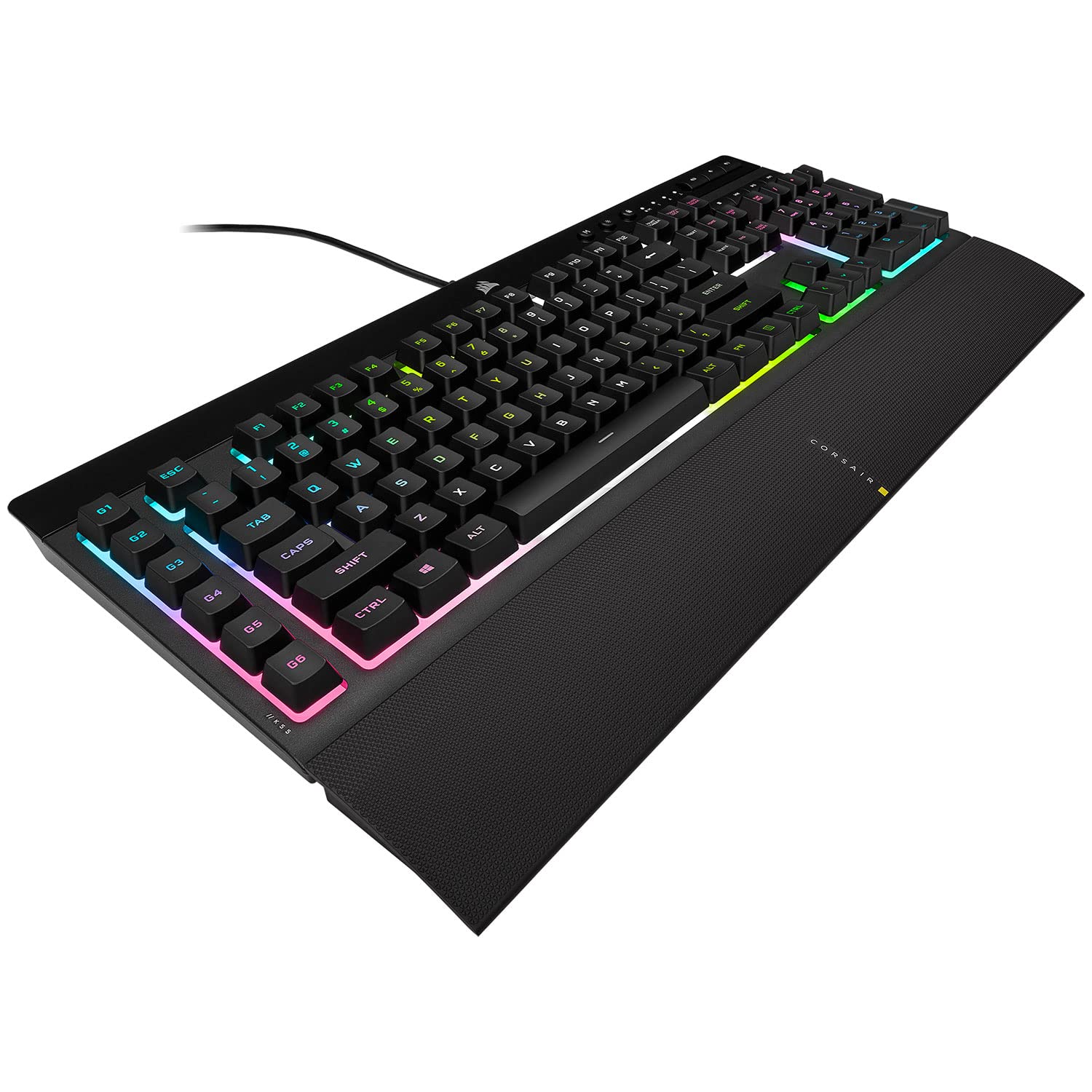
Corsair K55 RGB Pro Gaming Keyboard
The keyboard is the main input peripheral used by all computers. The keyboard allows for user input and interaction with the computer. Much like many typewriters the keyboard has all the letters of the alphabet, numbers 0 – 9 and additional special operational keys, e.g. for adjusting the volume or going to your inbox directly. There are three different connection types: – USB is the most modern. You can recognize it by the rectangular connector. – PS/2 connectors are round. This type of connection is fairly commonly used by PC’s. – Bluetooth is another modern (wireless) connection method.
The keyboard is the main input peripheral used by all computers. The keyboard allows for user input and interaction with the computer. Much like many typewriters the keyboard has all the letters of the alphabet, numbers 0 – 9 and additional special operational keys, e.g. for adjusting the volume or going to your inbox directly. There are three different connection types: – USB is the most modern. You can recognize it by the rectangular connector. – PS/2 connectors are round. This type of connection is fairly commonly used by PC’s. – Bluetooth is another modern (wireless) connection method.
The keyboard is the main input peripheral used by all computers. The keyboard allows for user input and interaction with the computer. Much like many typewriters the keyboard has all the letters of the alphabet, numbers 0 – 9 and additional special operational keys, e.g. for adjusting the volume or going to your inbox directly. There are three different connection types: – USB is the most modern. You can recognize it by the rectangular connector. – PS/2 connectors are round. This type of connection is fairly commonly used by PC’s. – Bluetooth is another modern (wireless) connection method.
The keyboard is the main input peripheral used by all computers. The keyboard allows for user input and interaction with the computer. Much like many typewriters the keyboard has all the letters of the alphabet, numbers 0 – 9 and additional special operational keys, e.g. for adjusting the volume or going to your inbox directly. There are three different connection types: – USB is the most modern. You can recognize it by the rectangular connector. – PS/2 connectors are round. This type of connection is fairly commonly used by PC’s. – Bluetooth is another modern (wireless) connection method.
in 9 offers
The lowest price for Corsair K55 RGB Pro Gaming Keyboard right now is $25.00 at CeX, compared across 7 retailers.
The all-time low was $15.90 on 30 Sept 2024 — today's price is 57% above the lowest ever. It has been notably cheaper before — worth setting a price alert.
Prices last updated 5 Oct 2026.
Last updated at 05/10/2026 23:10:26
Corsair K55 RGB Pro Wired Gaming Keyboard, B
Delivery $4
Nice Corsair K55 Rgb Wired Gaming Keyboard - Black / Tested Works
Delivery $73.25
Affiliate Disclosure: We may receive a small commission for purchases made through this link at no extra cost to you. This helps support our site. Thank you!
Corsair K55 RGB PRO Membrane Wired Gaming Keyboard – IP42 Dust and Spill-Resistant, 6 Macro Keys w/ Elgato Integration, iCUE Compatible – Black
Delivery $116
Corsair K55 RGB PRO Membrane Wired Gaming Keyboard Black
Delivery between 12–15 Oct $29
Corsair K55 RGB PRO Membrane Wired Gaming Keyboard QWERTY US Layout, IP42 Dust and Spill-Resistant 6 Macro Keys with Elgato Integration iCUE Compat
Free delivery between 14–20 Oct
Corsair K55 Rgb Pro Gaming Keyboard Black
Delivery $42.49
K55 RGB PRO Membrane Wired Gaming Keyboard QWERTY US Layout, IP42 Dust and Spill-Resistant 6 Macro Keys with Elgato Integration iCUE Compatible PC
Free delivery between 14–20 Oct
originally posted on bestbuy.com
I bought this as a cheap backlit keyboard for my gaming laptop, I needed the dedicated macro keys to use for hunting pokemon on a fan made game. (it makes the character walk back and forth for me. ) Great keyboard for the price. PROS: Amazing features for the price! Backlit keys Good travel and palpable keystrokes Wrist rest Cons: The software is a little wonky and hard to get use to, but once you learn it its fine. The keys are backlit but only in zones not per key, this is not really a con seeing on how this is less than $50 you cant expect to get these features at this price point. Overall for the price you would be hard pressed to find a better keyboard, I have a razer cynosa chroma(similar price) on my back up gaming rig and this keyboard is much better and ... MoreI bought this as a cheap backlit keyboard for my gaming laptop, I needed the dedicated macro keys to use for hunting pokemon on a fan made game. (it makes the character walk back and forth for me. ) Great keyboard for the price. PROS: Amazing features for the price! Backlit keys Good travel and palpable keystrokes Wrist rest Cons: The software is a little wonky and hard to get use to, but once you learn it its fine. The keys are backlit but only in zones not per key, this is not really a con seeing on how this is less than $50 you cant expect to get these features at this price point. Overall for the price you would be hard pressed to find a better keyboard, I have a razer cynosa chroma(similar price) on my back up gaming rig and this keyboard is much better and included the dedicated macro keys. Great beginner gaming keyboard, but if you are looking for a long lasting keyboard I would suggest looking into the higher end lines of keyboards, from corsair or others with cherry switches or similar. For example I use a Razer Blackwidow Chroma on my main rig and have used it for about 4 years, gaming at least 8+ hours a week at a minimum and its still functions great with no noticeable key wear. Has per key RGB and if a switch were to ever die I can replace it. But sometimes you dont need, all of these features or just dont have the money to spend and thats where these budget boards come in!
originally posted on bestbuy.com
Currently only had the keyboard for about 1 week of actual use but I am totally happy thus far. Really do love the dedicated section for audio control which allows for play/pause, rewind, etc. It even worked with those controls when I plugged it into my TV! I got this specific keyboard because of those audio controls and the built in Elgato software which I will need since I do most of my gaming through console. The RGB lighting is nice and has a "brightness" button to control how bright it is or even turn it off completely. The wrist rest has a mesh-like pattern but it is still slippery so I find my wrists slowly sliding down as a type but that not a deal breaker for me since you can remove it if you'd like. I like that the keys aren't too light. They provide just ... MoreCurrently only had the keyboard for about 1 week of actual use but I am totally happy thus far. Really do love the dedicated section for audio control which allows for play/pause, rewind, etc. It even worked with those controls when I plugged it into my TV! I got this specific keyboard because of those audio controls and the built in Elgato software which I will need since I do most of my gaming through console. The RGB lighting is nice and has a "brightness" button to control how bright it is or even turn it off completely. The wrist rest has a mesh-like pattern but it is still slippery so I find my wrists slowly sliding down as a type but that not a deal breaker for me since you can remove it if you'd like. I like that the keys aren't too light. They provide just the right amount of resistance which help prevent accidental typos. Only reason this isn't 5 stars is because, as mentioned, I've only been using it for a week so I don't know what long-term wear is like on it. Great purchase for a great price and I am very happy with it!
originally posted on bestbuy.com
If you like membrane keyboars, this is a perfectly fine beast. I use this keyboard for my secdondary rig (in the photo, it's the keyboard on the left, towards the back a bit)... I'm not a gamer, but I create a ton of multimedia, so the macro function buttons are an incredible time saver, and I keep the lighting in a diferent mode than my primary machine's so I don't accidentally mix 'em up. It's not a hefty keyboard, and it's not the most top of the line, but it's really good. It's like the best office keyboard you could ask for with a few extra tools (and RGB of course). I imagine this is more on the entry level for a gaming keyboard, but for an office/dev membrane keyboard, it's pretty next level. The cat is alive.
| General | |
| Device Type | Keyboard |
| Backlit | RGB / 16.8 million colours |
| Interface | USB |
| Input Device |
Corsair K55 RGB Pro Wired Gaming Keyboard, B
Delivery $4
Nice Corsair K55 Rgb Wired Gaming Keyboard - Black / Tested Works
Delivery $73.25
Affiliate Disclosure: We may receive a small commission for purchases made through this link at no extra cost to you. This helps support our site. Thank you!
Corsair K55 RGB PRO Membrane Wired Gaming Keyboard – IP42 Dust and Spill-Resistant, 6 Macro Keys w/ Elgato Integration, iCUE Compatible – Black
Delivery $116
Corsair K55 RGB PRO Membrane Wired Gaming Keyboard Black
Delivery between 12–15 Oct $29
Corsair K55 RGB PRO Membrane Wired Gaming Keyboard QWERTY US Layout, IP42 Dust and Spill-Resistant 6 Macro Keys with Elgato Integration iCUE Compat
Free delivery between 14–20 Oct
I bought this as a cheap backlit keyboard for my gaming laptop, I needed the dedicated macro keys to use for hunting pokemon on a fan made game. (it makes the character walk back and forth for me. ) Great keyboard for the price. PROS: Amazing features for the price! Backlit keys Good travel and palpable keystrokes Wrist rest Cons: The software is a little wonky and hard to get use to, but once you learn it its fine. The keys are backlit but only in zones not per key, this is not really a con seeing on how this is less than $50 you cant expect to get these features at this price point. Overall for the price you would be hard pressed to find a better keyboard, I have a razer cynosa chroma(similar price) on my back up gaming rig and this keyboard is much better and ... MoreI bought this as a cheap backlit keyboard for my gaming laptop, I needed the dedicated macro keys to use for hunting pokemon on a fan made game. (it makes the character walk back and forth for me. ) Great keyboard for the price. PROS: Amazing features for the price! Backlit keys Good travel and palpable keystrokes Wrist rest Cons: The software is a little wonky and hard to get use to, but once you learn it its fine. The keys are backlit but only in zones not per key, this is not really a con seeing on how this is less than $50 you cant expect to get these features at this price point. Overall for the price you would be hard pressed to find a better keyboard, I have a razer cynosa chroma(similar price) on my back up gaming rig and this keyboard is much better and included the dedicated macro keys. Great beginner gaming keyboard, but if you are looking for a long lasting keyboard I would suggest looking into the higher end lines of keyboards, from corsair or others with cherry switches or similar. For example I use a Razer Blackwidow Chroma on my main rig and have used it for about 4 years, gaming at least 8+ hours a week at a minimum and its still functions great with no noticeable key wear. Has per key RGB and if a switch were to ever die I can replace it. But sometimes you dont need, all of these features or just dont have the money to spend and thats where these budget boards come in!
Currently only had the keyboard for about 1 week of actual use but I am totally happy thus far. Really do love the dedicated section for audio control which allows for play/pause, rewind, etc. It even worked with those controls when I plugged it into my TV! I got this specific keyboard because of those audio controls and the built in Elgato software which I will need since I do most of my gaming through console. The RGB lighting is nice and has a "brightness" button to control how bright it is or even turn it off completely. The wrist rest has a mesh-like pattern but it is still slippery so I find my wrists slowly sliding down as a type but that not a deal breaker for me since you can remove it if you'd like. I like that the keys aren't too light. They provide just ... MoreCurrently only had the keyboard for about 1 week of actual use but I am totally happy thus far. Really do love the dedicated section for audio control which allows for play/pause, rewind, etc. It even worked with those controls when I plugged it into my TV! I got this specific keyboard because of those audio controls and the built in Elgato software which I will need since I do most of my gaming through console. The RGB lighting is nice and has a "brightness" button to control how bright it is or even turn it off completely. The wrist rest has a mesh-like pattern but it is still slippery so I find my wrists slowly sliding down as a type but that not a deal breaker for me since you can remove it if you'd like. I like that the keys aren't too light. They provide just the right amount of resistance which help prevent accidental typos. Only reason this isn't 5 stars is because, as mentioned, I've only been using it for a week so I don't know what long-term wear is like on it. Great purchase for a great price and I am very happy with it!
If you like membrane keyboars, this is a perfectly fine beast. I use this keyboard for my secdondary rig (in the photo, it's the keyboard on the left, towards the back a bit)... I'm not a gamer, but I create a ton of multimedia, so the macro function buttons are an incredible time saver, and I keep the lighting in a diferent mode than my primary machine's so I don't accidentally mix 'em up. It's not a hefty keyboard, and it's not the most top of the line, but it's really good. It's like the best office keyboard you could ask for with a few extra tools (and RGB of course). I imagine this is more on the entry level for a gaming keyboard, but for an office/dev membrane keyboard, it's pretty next level. The cat is alive.
Nice key feel, I like typing on it. Wish it had lighting control over individual keys, unfortunately only does zones. iCue software is a bit confusing and not very intuitive; definitely takes some time to learn to use. Still trying to figure out how to use the G1-G5 keys for gaming purposes. Overall, a nice membrane keyboard, but I don't think I'd purchase again or recommend to others. I liked my previous HyperX keyboard better (wish the RGB lighting hadn't started going wonky).
As a keyboard it works fine. The keys aren't terribly loud, but not the quietest either. The layout is fairly convenient, but the bottom side is a bit over 1cm thick which is a bit hefty. The "iCUE" software to control the "RGB" (required) is nearly 1GB. Let's let that sink in. The KB has no internal memory, so it can't remember what settings are set. iCUE *must* start to restore settings to your preferences, meaning you have to leave that gig of bloat on your SSD and loaded, consuming RAM. How is the lighting? It's pathetic. You get 3 zones of colour, and by default it's set to "random bright crap when you type" I think it's called. Wait, the short title is "Epilepsy". There's no interface with other software/games, no "day/night" setting, and the only non-garish ... MoreAs a keyboard it works fine. The keys aren't terribly loud, but not the quietest either. The layout is fairly convenient, but the bottom side is a bit over 1cm thick which is a bit hefty. The "iCUE" software to control the "RGB" (required) is nearly 1GB. Let's let that sink in. The KB has no internal memory, so it can't remember what settings are set. iCUE *must* start to restore settings to your preferences, meaning you have to leave that gig of bloat on your SSD and loaded, consuming RAM. How is the lighting? It's pathetic. You get 3 zones of colour, and by default it's set to "random bright crap when you type" I think it's called. Wait, the short title is "Epilepsy". There's no interface with other software/games, no "day/night" setting, and the only non-garish mode is "static". This was a $20 keyboard that they added $5 worth of Heely Bling lights in and badged as a "Gamer Keyboard". You'd get the same effect by hitting the Dollarama first for some cheesy blinkenlights from the disposable toys section and wedging them between the keys of a $20 Belkin keyboard. I know, that sounds ridiculous, right? You wouldn't pay extra to make your keyboard obnoxious to use or even have in the same room as you, right? Right, this is exactly why I can't give it more than 1 star. The main differentiating feature actually makes this keyboard LESS desirable. You have to install their software and run it on startup to literally make it a *passable* keyboard. TLDR; No. Don't waste your money on this.
We recently purchased a Corsair Vengeance i7300 for our daughter when we discovered her 8 yr old PC was beginning to fail. As I set up the Corsair PC to take to her in a couple of weeks, I was using an old keyboard and mouse to get things going and it was time for something new. I checked and most keyboards of this type are expensive and seemed to be similar to this one. I was pleasantly surprised when I took it out of the box and set it up for her PC. It does almost everything the high end keyboards do except control lighting for individual keys, unless you really want wireless and more options. You can do regions, colors, color cycles and program the 6 G keys on the left side for for different functions or keys. I set it up for 6 different shortcuts while playing ... MoreWe recently purchased a Corsair Vengeance i7300 for our daughter when we discovered her 8 yr old PC was beginning to fail. As I set up the Corsair PC to take to her in a couple of weeks, I was using an old keyboard and mouse to get things going and it was time for something new. I checked and most keyboards of this type are expensive and seemed to be similar to this one. I was pleasantly surprised when I took it out of the box and set it up for her PC. It does almost everything the high end keyboards do except control lighting for individual keys, unless you really want wireless and more options. You can do regions, colors, color cycles and program the 6 G keys on the left side for for different functions or keys. I set it up for 6 different shortcuts while playing Witcher 3. It is well built, the USB connector has an ample length wire to reach the PC and the colors are very nice. Keys have a nice feel and the size is perfect.
I guess I should start this off by saying I'm not really a serious gamer. I play occasionally when I have some free time and find it a good way to spend some quality time with my son as well. I was replacing my ASUS ROG gaming machine with a Dell Alienware machine and decided that this time I didn't want to go with the stock keyboard that was almost identical to the one that came with my previous desktop computer. So I picked up this one as it seemed it would work well for my purposes. While I don't really care so much about the RGB lighting on the keyboard it is a nice touch and makes my setup look good. I like the flexibility in that I can program different lighting modes. I also like having the extra bank of keys to the left that I can assign various functions ... MoreI guess I should start this off by saying I'm not really a serious gamer. I play occasionally when I have some free time and find it a good way to spend some quality time with my son as well. I was replacing my ASUS ROG gaming machine with a Dell Alienware machine and decided that this time I didn't want to go with the stock keyboard that was almost identical to the one that came with my previous desktop computer. So I picked up this one as it seemed it would work well for my purposes. While I don't really care so much about the RGB lighting on the keyboard it is a nice touch and makes my setup look good. I like the flexibility in that I can program different lighting modes. I also like having the extra bank of keys to the left that I can assign various functions too either in game or in my normal working process. It took me a while to get used to there being extra keys there but once I did I've really liked it. Also, the media control keys are very convenient and something that I prefer to have on every keyboard I own. This keyboard seems tougher than the previous one I owned and once I got used to it I'm able to reach even faster typing speeds than I did with the old one (95 - 100 wpm vs 90 wpm). It has worked great for the few games I've played with it. The keys have a nice tactile feel when gaming that just works well for me.The palm rest is a nice added touch, though I don't know if I will continue to use it yet. Overall I think this keyboard was a great balance between price and quality and it seems like it will hold up well for the life of this PC and beyond.
Needed a keyboard to replace my steelseries keyboard as my steelseries would be used at work and this gave me an excuse to get a new one as I wanted to keep it all uniform with my mouse and headset being Corsair. It’s an awesome keyboard and keys feel great. However Corsair says this keyboard is supported with their iCue software. I cannot get this keyboard to work at all with their iCue software. My mouse shows up but the keyboard does not. I have tried updating the firmware and even back dating. I’ve reset the keyboard 4 times, updated windows multiple times as well. Even tried forcing other tasks. It will not work with their iCue software. Thankfully they have short cut keys to still change the RGB lighting but why advertise software that “says” it works but ... MoreNeeded a keyboard to replace my steelseries keyboard as my steelseries would be used at work and this gave me an excuse to get a new one as I wanted to keep it all uniform with my mouse and headset being Corsair. It’s an awesome keyboard and keys feel great. However Corsair says this keyboard is supported with their iCue software. I cannot get this keyboard to work at all with their iCue software. My mouse shows up but the keyboard does not. I have tried updating the firmware and even back dating. I’ve reset the keyboard 4 times, updated windows multiple times as well. Even tried forcing other tasks. It will not work with their iCue software. Thankfully they have short cut keys to still change the RGB lighting but why advertise software that “says” it works but doesn’t. I am not the only person with these issues either, I googled this and so many others are having the same issue. A shame as this is a pretty good keyboard to use for the cost but the software for it at this point is non existent.
I've tried mechanical keyboards, I owned 2 Corsair mechanical keyboards, they were fine. One was nominally defective and decided to return, and the 2nd I decided was great but more than I needed and above what I wanted to originally intend to spend. But the K55 RGB Pro, wow! I am pleasantly surprised that this keyboard, especially not being mechanical feels as good as it does. Honestly, I don't really miss the mechanical keyboards. This does the trick, and for the price I think it delivers. The keyboard lighting is zoned, so if you're really into customizing I'd say go with another keyboard. Works great with iCUE software, and for my needs and gameplay and considering the price as mentioned prior, it's nearly perfect.
First off, this keyboard does what it is described as doing. It is a full keyboard with extra programmable buttons and programmable key back lighting. What I learned is that as a touch typist most of the time, adding a row of buttons on the left messed up my feel for key location when typing. I also learned I need programmability that is full macro editing. Something I can try out parts and cut and paste them together to make the function I really want on that button. The editing for this keyboard is too primitive for my needs. It would be nice to be able to compute a value for timing between keys so I could try out different mixes, without manually editing every value for another test. This may be just the keyboard for you, it depends on what you are looking for ... MoreFirst off, this keyboard does what it is described as doing. It is a full keyboard with extra programmable buttons and programmable key back lighting. What I learned is that as a touch typist most of the time, adding a row of buttons on the left messed up my feel for key location when typing. I also learned I need programmability that is full macro editing. Something I can try out parts and cut and paste them together to make the function I really want on that button. The editing for this keyboard is too primitive for my needs. It would be nice to be able to compute a value for timing between keys so I could try out different mixes, without manually editing every value for another test. This may be just the keyboard for you, it depends on what you are looking for and if that is what you really need. For me I learned a lot from this keyboard. It is not what I need but may have been what I needed to try.
| General | |
| Device Type | Keyboard |
| Backlit | RGB / 16.8 million colours |
| Interface | USB |
| Input Device |