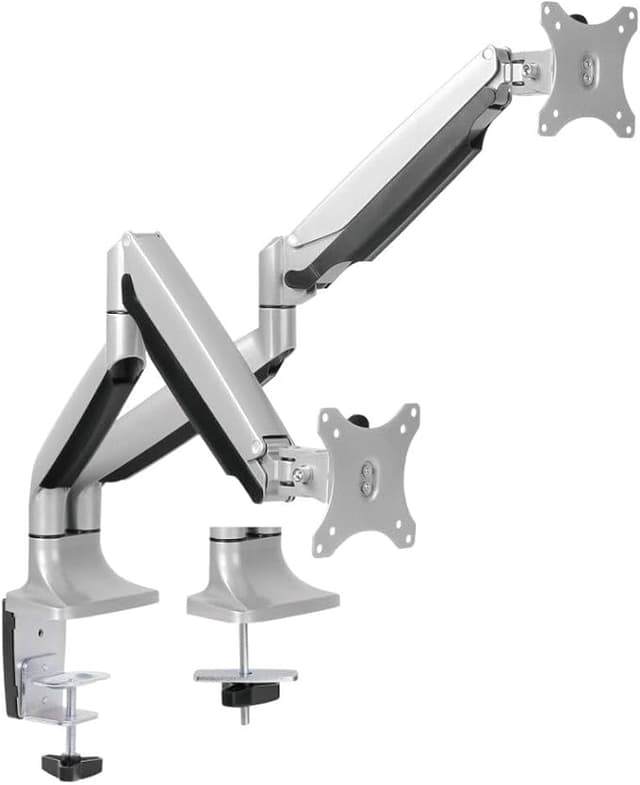
The LDT10-C024 is constructed with elegant die casting aluminum and innovative counterbalance technology. It can efficiently frees up space on your desk and easily move your LCD monitor into the best ergonomic position. Highly adjustable arm moves up, down, forward and back with just a touch. With maximum weight capacity of 9kg/19.8lbs for each bracket, this desk mount features 180° monitor rotation, -90°~ +90° tilt, 180° swivel and vertical distance height adjustments. The desk arm is designed with cable management to provide neat desk space. Removable VESA panel makes installation more easily. The is ideal for offices, homes, public area, industrial settings, production line and many more.
The LDT10-C024 is constructed with elegant die casting aluminum and innovative counterbalance technology. It can efficiently frees up space on your desk and easily move your LCD monitor into the best ergonomic position. Highly adjustable arm moves up, down, forward and back with just a touch. With maximum weight capacity of 9kg/19.8lbs for each bracket, this desk mount features 180° monitor rotation, -90°~ +90° tilt, 180° swivel and vertical distance height adjustments. The desk arm is designed with cable management to provide neat desk space. Removable VESA panel makes installation more easily. The is ideal for offices, homes, public area, industrial settings, production line and many more.
in 53 offers
last seen 30 Oct 2026
The lowest price we last saw for Brateck Dual Monitor Aluminum Interactive Counterbalance Monitor Arm was $102.30 at eBay.com.au, compared across 27 retailers (last seen 30 Oct 2026). Prices may have changed since.
The all-time low we recorded was $39.00 on 16 June 2024.
Prices last updated 30 Oct 2026.
Brateck Dual Monitor Aluminum Interactive Counterbalance Monitor Arm
The LDT10-C024 is constructed with elegant die casting aluminum and innovative counterbalance technology. It can efficiently frees up space on your desk and easily move your LCD monitor into the best ergonomic position. Highly adjustable arm moves up, down, forward and back with just a touch. With maximum weight capacity of 9kg/19.8lbs for each bracket, this desk mount features 180° monitor rotation, -90°~ +90° tilt, 180° swivel and vertical distance height adjustments. The desk arm is designed with cable management to provide neat desk space. Removable VESA panel makes installation more easily. The is ideal for offices, homes, public area, industrial settings, production line and many more.
The LDT10-C024 is constructed with elegant die casting aluminum and innovative counterbalance technology. It can efficiently frees up space on your desk and easily move your LCD monitor into the best ergonomic position. Highly adjustable arm moves up, down, forward and back with just a touch. With maximum weight capacity of 9kg/19.8lbs for each bracket, this desk mount features 180° monitor rotation, -90°~ +90° tilt, 180° swivel and vertical distance height adjustments. The desk arm is designed with cable management to provide neat desk space. Removable VESA panel makes installation more easily. The is ideal for offices, homes, public area, industrial settings, production line and many more.
Last updated at 30/10/2026 20:43:10
Bracom Ldt10-c024 13"-32" Aluminum Interactive Counterbalance Dual
Delivery $11
Affiliate Disclosure: We may receive a small commission for purchases made through this link at no extra cost to you. This helps support our site. Thank you!
Brateck Dual Monitor Aluminum Interactive Counterbalance Monitor Arm For 13''-32'' LCD Monitors
Delivery between 3–12 Nov $29.46
Brateck BT-LDT10-C024 Dual Aluminium Interactive Counterbalanced Monitor Arm - fits most 13''-32'' LCD Monitors
Delivery between 4–9 Nov $23.20
Brateck Aluminum Counterbalanced Dual Monitor Arm LDT10 C024 - Monitor Accessories
Delivery $26.39
Brateck Aluminum Counterbalanced Dual Monitor Arm LDT10 C024 - Monitor Accessories
Delivery $25
Bracom LDT10-C024 13"-32" Aluminum Interactive Counterbalance Dual Monitor Arm. -90 +90 tilt, -90 +90 swivel, -90 +90 rotate. Max VESA 100x100. Max
Delivery between 4–9 Nov $9
Bracom LDT10-C024 13"-32" Aluminum Interactive Counterbalance Dual Monitor Arm.
Delivery $10
Brateck Counterbalance 13"-32" Dual Monitor Arm - Metallic Grey
Delivery between Tue – Fri $21
BRATECK 13"-23" Dual Aluminum Interactive Counterbalance Monitor Arm - Black and Silver
Delivery $13.25
Brateck LDT10-C024 Dual Monitor Arm
Delivery $25
originally posted on pbtech.co.nz
This handles my two wide screen monitors fine each 61cm wide. They feel solid and the cable hiding works nicely. It's got an adjustment so you can adjust it to match the weight of your monitors and from there they are easy to move up and down. Looks quite good. Being very fussy like another reviewer I was surprised to find this did not have actual an aluminium finish as it appears in the photos - the actual finish is a darker metallic grey than the photos, and the colour of the various parts is not 100% consistent, but close enough. For the price I think these are good value.
originally posted on officeworks.com.au
I have had this display stand for about 4 months now and it is fantastic. I have two 32 inch Viewsonic monitors (4.3kg each) and it supports them with no problems. I would like the monitors to be a little higher on the highest setting but apart from that ts awesome. I think the people that have issues have not read the instructions properly. There is a allen bolt in the middle of the support arm that adjusts the monitors up and down (tightens the internal spring). It easily supports 4.3 kilos for sure.
originally posted on pbtech.co.nz
Bought this bracket about 2 weeks ago as an upgrade from a T-bar type bracket because I needed more space under my monitors and hands down this was the best purchase ever. Product is neat, sturdy and love the included cable management. Assembly was easy but one thing the picture instructions doesn't make clear is the purpose of the + and - on each arm. Turn the nut to + to increase the force needed to balance your monitor. The heavier the monitor, the more tightening you'll need. Thankfully someone else previously made a similar review comment and was able to fix my uneven arms after assembly. Definitely recommend this if you need your monitors to be raised a good 30+ cms off your desk.
| Maximum Load | 9 kg per screen |
| Depth | 125 mm |
| Height | 670 mm |
| Width | 125 mm |
| Length | 1100 mm |
Bracom Ldt10-c024 13"-32" Aluminum Interactive Counterbalance Dual
Delivery $11
Affiliate Disclosure: We may receive a small commission for purchases made through this link at no extra cost to you. This helps support our site. Thank you!
Brateck Dual Monitor Aluminum Interactive Counterbalance Monitor Arm For 13''-32'' LCD Monitors
Delivery between 3–12 Nov $29.46
Brateck BT-LDT10-C024 Dual Aluminium Interactive Counterbalanced Monitor Arm - fits most 13''-32'' LCD Monitors
Delivery between 4–9 Nov $23.20
Brateck Aluminum Counterbalanced Dual Monitor Arm LDT10 C024 - Monitor Accessories
Delivery $26.39
Brateck Aluminum Counterbalanced Dual Monitor Arm LDT10 C024 - Monitor Accessories
Delivery $25
This handles my two wide screen monitors fine each 61cm wide. They feel solid and the cable hiding works nicely. It's got an adjustment so you can adjust it to match the weight of your monitors and from there they are easy to move up and down. Looks quite good. Being very fussy like another reviewer I was surprised to find this did not have actual an aluminium finish as it appears in the photos - the actual finish is a darker metallic grey than the photos, and the colour of the various parts is not 100% consistent, but close enough. For the price I think these are good value.
I have had this display stand for about 4 months now and it is fantastic. I have two 32 inch Viewsonic monitors (4.3kg each) and it supports them with no problems. I would like the monitors to be a little higher on the highest setting but apart from that ts awesome. I think the people that have issues have not read the instructions properly. There is a allen bolt in the middle of the support arm that adjusts the monitors up and down (tightens the internal spring). It easily supports 4.3 kilos for sure.
Bought this bracket about 2 weeks ago as an upgrade from a T-bar type bracket because I needed more space under my monitors and hands down this was the best purchase ever. Product is neat, sturdy and love the included cable management. Assembly was easy but one thing the picture instructions doesn't make clear is the purpose of the + and - on each arm. Turn the nut to + to increase the force needed to balance your monitor. The heavier the monitor, the more tightening you'll need. Thankfully someone else previously made a similar review comment and was able to fix my uneven arms after assembly. Definitely recommend this if you need your monitors to be raised a good 30+ cms off your desk.
Now I have used it for a month. I have two 27’’ philips monitor, also installed tower bracket, keyboard drawer, and under desk wiring system. Works no issues. You have to adjust the screws, otherwise the arms cannot hold. It’s not perfect with some scratches, but does a fantastic job at its price. Now my deskspace is totally free. It’s incredibly cheap compared to other big brands product and they look same to me although I know there must be slight difference. But for a normal user, who would adjust monitors up and down every day? As if I care about how smooth the movement is. Several things to be careful: 1. I would say it can’t hold 30” as it advertised.27-28 probably Max. Older monitors are heavier than newer ones. 2. Your hdmi and power cables better to be 2m ... MoreNow I have used it for a month. I have two 27’’ philips monitor, also installed tower bracket, keyboard drawer, and under desk wiring system. Works no issues. You have to adjust the screws, otherwise the arms cannot hold. It’s not perfect with some scratches, but does a fantastic job at its price. Now my deskspace is totally free. It’s incredibly cheap compared to other big brands product and they look same to me although I know there must be slight difference. But for a normal user, who would adjust monitors up and down every day? As if I care about how smooth the movement is. Several things to be careful: 1. I would say it can’t hold 30” as it advertised.27-28 probably Max. Older monitors are heavier than newer ones. 2. Your hdmi and power cables better to be 2m long or longer. 3. In order for it to move freely, there must be a 20cm space behind the desk. See the design of the arms carefully.
What an appalling set of instructions for this item! Nary a piece of text anywhere and the most enigmatic pictures which were not easy to understand.... Don't get me wrong - this is a well-made, strong, monitor stand. But have any of these companies EVER tried to unpack and set up such items with the supplied "instructions". A single A5 sheet of textual notes on setup would make such a difference in the end-user experience. One only has to look at the review comments to realise that the manufacturer is being slagged-off and the items returned to Officeworks as faulty (when it is obvious that it is a result of not having sensible instructions to explain how to tighten the stand so the arms do not fall). I must admit, I was at the point of repacking the goods back ... MoreWhat an appalling set of instructions for this item! Nary a piece of text anywhere and the most enigmatic pictures which were not easy to understand.... Don't get me wrong - this is a well-made, strong, monitor stand. But have any of these companies EVER tried to unpack and set up such items with the supplied "instructions". A single A5 sheet of textual notes on setup would make such a difference in the end-user experience. One only has to look at the review comments to realise that the manufacturer is being slagged-off and the items returned to Officeworks as faulty (when it is obvious that it is a result of not having sensible instructions to explain how to tighten the stand so the arms do not fall). I must admit, I was at the point of repacking the goods back into the pack and returning them to OW for credit... But I felt there must be something I could do to make it all work properly. So I started first tightening and then untightening one of the allen key bolts (even though it did not seem to be related to the raise-lower function). And I was worried that by trying a non-intuitive action that the springs might suddenly "let go" and I'd be in all sorts of trouble. But I kept going. Turning the bolt clockwise didn't seem to help, but after many anti-clockwise rotations, I realised that the arm was beginning to stay up longer. So that's the answer people. Turn the bottom allen key of the three anticlockwise until the monitor stays up. I've arrowed the bolt that does the job in the attached photo. Brateck, get your act into gear and supply better doco for your gear! It'll save you $$$ in reputational loss.
We purchased this product to free up space on the desk taken up by the original monitors supplied stands as well as to have the ability to move the monitors up/down forward/back. After researching various monitor arms we decided to go with the Bratech brand due to family & friends recommendations and we're so glad we listened. The arms are strong and sturdy and was easy to setup due to previous knowledge of installing similar products for clients. The only small issue we have (and it is minor) was the instruction manual was not well written and the plastic cable trays under the arms are a little flimsy considering the price you pay. But reality is, once setup you really don't need to fiddle with them and you don't see them (unless your desk is out in the open). ... MoreWe purchased this product to free up space on the desk taken up by the original monitors supplied stands as well as to have the ability to move the monitors up/down forward/back. After researching various monitor arms we decided to go with the Bratech brand due to family & friends recommendations and we're so glad we listened. The arms are strong and sturdy and was easy to setup due to previous knowledge of installing similar products for clients. The only small issue we have (and it is minor) was the instruction manual was not well written and the plastic cable trays under the arms are a little flimsy considering the price you pay. But reality is, once setup you really don't need to fiddle with them and you don't see them (unless your desk is out in the open). Overall we're extremely happy with the quality and have supplied a few snaps to help give future buyers a glimpse of what it looks like once all setup.
Had this for a couple of years now and honestly does a great job. There's a "BUT" coming. I have two 27" monitors side by side and the pros are: - Monitors fit together well and are very manoeuvrable (individually) - Arms are strong and look tidy - Spring tension CAN be adjusted (despite other reviews), though people seem to have difficulty with it BUT (the cons): - with my monitors side by side, the arms take up A LOT of desk depth - to not hit the wall and to be as far back on the desk as possible, they take up 400mm. (I have played with different variations, none of which allow a neat side by side fit - other than centred) - can be a bit fiddly with setup, but if you have a brain you can sort it out - just bad design if you want to offset the mount between the ... MoreHad this for a couple of years now and honestly does a great job. There's a "BUT" coming. I have two 27" monitors side by side and the pros are: - Monitors fit together well and are very manoeuvrable (individually) - Arms are strong and look tidy - Spring tension CAN be adjusted (despite other reviews), though people seem to have difficulty with it BUT (the cons): - with my monitors side by side, the arms take up A LOT of desk depth - to not hit the wall and to be as far back on the desk as possible, they take up 400mm. (I have played with different variations, none of which allow a neat side by side fit - other than centred) - can be a bit fiddly with setup, but if you have a brain you can sort it out - just bad design if you want to offset the mount between the two monitors (top arms are longer than bottom arms, so offset is difficult) - I think this product is too expensive for what it is All-in-all, good product but just lacks a low-profile kind of feature.
Purchased 3 sets of these in February. All except one arm holds the monitor up. The arm drops down and the monitor sits on my desk. There isn't any function to tighten this or fix it. It has only lasted 3 months. All monitors are the same weight. Clearly this is a faulty arm. How do I get a replacement?
This setup can hold maybe a mobile phone. My smallest monitor (2,5Kg) was too too much for it. Went straight down. The specs say 9KG. I don't think so. Somebody in this thread says that whomever complained about that didn't know how to tighten the arm screw. Based on that I bought it not believing other reviews complaining about the weight specs. DO NOT BE FOOLED LIKE I WAS. There is no adjustment for the springs. My 2kg monitor was much too much. VERY GOOD if you want to use it to watch two mobile phones at the same time. I RETURNED IT.
I bought this monitor arm yesterday and it was delivered today. I was hopeful it would hold both my main gaming display and side monitor as it states a weight limit of 9kg per arm. This is false. My gaming monitor is the ASUS ROG SWIFT PG279QE and weighs just 3.7kg (less than half the weight limit) and the spring will not hold it up. The monitor just falls down to the desk. There is also no way to tighten the spring for different weights, only ways to tighten and loosen the other adjustments. Absolute waste of money and a false product description. Will be returning it for a full refund tomorrow.
| Maximum Load | 9 kg per screen |
| Depth | 125 mm |
| Height | 670 mm |
| Width | 125 mm |
| Length | 1100 mm |

