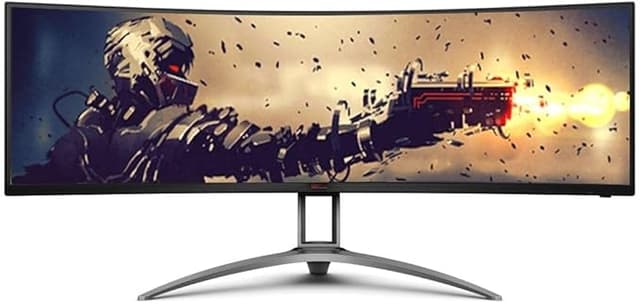
Double the in-game immersion with the curved AG493UCX2: thanks to the vast screen space of 49 (32:9) and a stunning Dual-QHD 5k resolution, you face a razor-sharp image whichever way you look. A gushing refresh rate of 165Hz and FreeSync Premium Pro ensure the smoothest images for even more realism.
Double the in-game immersion with the curved AG493UCX2: thanks to the vast screen space of 49 (32:9) and a stunning Dual-QHD 5k resolution, you face a razor-sharp image whichever way you look. A gushing refresh rate of 165Hz and FreeSync Premium Pro ensure the smoothest images for even more realism.
in 23 offers
last seen 23 Oct 2026
The lowest price we last saw for [AG493UCX2] AGON 49" 5K Gaming Monitor, Curved 1800R, 5120x1440 DQHD, 32:9,Adaptive Sync was $1,199.00 at digiDirect Australia, compared across 17 retailers (last seen 23 Oct 2026). Prices may have changed since.
The all-time low we recorded was $749.00 on 2 May 2026.
Prices last updated 23 Oct 2026.
[AG493UCX2] AGON 49" 5K Gaming Monitor, Curved 1800R, 5120x1440 DQHD, 32:9,Adaptive Sync
Double the in-game immersion with the curved AG493UCX2: thanks to the vast screen space of 49 (32:9) and a stunning Dual-QHD 5k resolution, you face a razor-sharp image whichever way you look. A gushing refresh rate of 165Hz and FreeSync Premium Pro ensure the smoothest images for even more realism.
Double the in-game immersion with the curved AG493UCX2: thanks to the vast screen space of 49 (32:9) and a stunning Dual-QHD 5k resolution, you face a razor-sharp image whichever way you look. A gushing refresh rate of 165Hz and FreeSync Premium Pro ensure the smoothest images for even more realism.
Last updated at 23/10/2026 09:33:02
AOC AGON AC493UCX2 49 Inch Curved VA Gaming Monitor 5K 165Hz 1ms DisplayHDR 400
Delivery between 28–30 Oct $8.95
AOC AG493UCX2 49inc Curved 1800R DQHD 6973985230530
Aoc Agon Ag493ucx2 49in Dqhd Curved Va Gaming Monitor – 360hz – 1ms –
Free delivery
Affiliate Disclosure: We may receive a small commission for purchases made through this link at no extra cost to you. This helps support our site. Thank you!
Monitors & Projectors 31.5" and Above AOC Monitor 49" Curved 1800R, 5120X1440 DQHD, 32:9
Free delivery between 26–30 Oct
AOC AG493UCX2 49" Curved 1800R 5120X1440 DQHD, 32:9 Adaptive Sync HDR 400 1ms 165Hz Gaming Monitor
90-day returns
AOC Agon AG493UCX2 48.8inch Curved 165Hz 5K Ultrawide VA Gaming Monitor
14-day returns
AOC 49' Curved 1800R, 5120X1440 DQHD, 32:9, Adaptive Sync, HDR 400,1ms, 165Hz ,3x HDMI,1x DP,USB-C , Speaker, HAS, KVM ultra wide monitor
Free delivery
AOC 49" Curved 1800R 5120X1440 DQHD 32:9 Adaptive Sync HDR 400 1ms 165
AG493UCX2 Aoc 49" Curved 1800R, 5120X1440 Dqhd, 32:9, Adaptive Sync, Hdr 400,1ms, 165Hz ,3x HDMI,1x Dp,usb-c , Speaker, Has, Kvm Ultra Wide Monitor
Delivery between 28–30 Oct $35
AOC 49' Curved 1800R, 5120X1440 DQHD, 32:9, Adaptive Sync, HDR 400,1ms, 165Hz ,3x HDMI,1x DP,USB-C , Speaker, HAS, KVM ultra wide monitor
Delivery $108
originally posted on microcenter.com
I bought this several months ago for a work project. I love the screen and amount of space to have multiple windows open and all are still large enough to see and work in. One of the reasons I bought the screen was so I could do Picture by Picture (PBP) with two different computers. Unfortunately, this works, but not to a workable level. No matter the settings that I put in, one of the computers screen is a narrow band and will not fill half of the screen as the other computer does. I have inquired several times at Micro Center, and each time I am assured they can address it, but no further response after my visit. I have learned to work around this issue as it does allow one keyboard and one mouse to operate both computers when that input is selected. If the screen ... MoreI bought this several months ago for a work project. I love the screen and amount of space to have multiple windows open and all are still large enough to see and work in. One of the reasons I bought the screen was so I could do Picture by Picture (PBP) with two different computers. Unfortunately, this works, but not to a workable level. No matter the settings that I put in, one of the computers screen is a narrow band and will not fill half of the screen as the other computer does. I have inquired several times at Micro Center, and each time I am assured they can address it, but no further response after my visit. I have learned to work around this issue as it does allow one keyboard and one mouse to operate both computers when that input is selected. If the screen worked as advertised, it would be an excellent rating.
originally posted on bestbuy.com
Using this product with a macbook air via usb-c....takes forever for it to pickup the signal. Even pushing the source button on the monitor does nothing as it takes forever to respond. God forbid you walk away for a while & the laptop goes to sleep....you will spend the next hour, trying to get the monitor to pickup the signal again, even though the laptop shows the monitor as the main display. Returning for another product.
originally posted on pccasegear.com
This thing is a beast, I had been on the edge for a long time at which 49inch monitor to get. At this price point and performance, I found this fit the budget and performance I wanted. Sure it isn't 240hz like the Samsung Neo G9. However, I was easily able to reach 165hz on a custom resolution in Nvidia, feel butter smooth. I am using this with 2080, and able to play many games, from CSGO to Assassin's creed, and more buttery smooth on high settings. Having this much screen real estate is also fantastic for RTS or turn-based games. I also found to my surprise that although not specified for it I didn't need to shell out for an Ergotron HX to hold this monitor. My Omnipro monitor was able to hold the weight and angles fines with the ability to adjust, I highly ... MoreThis thing is a beast, I had been on the edge for a long time at which 49inch monitor to get. At this price point and performance, I found this fit the budget and performance I wanted. Sure it isn't 240hz like the Samsung Neo G9. However, I was easily able to reach 165hz on a custom resolution in Nvidia, feel butter smooth. I am using this with 2080, and able to play many games, from CSGO to Assassin's creed, and more buttery smooth on high settings. Having this much screen real estate is also fantastic for RTS or turn-based games. I also found to my surprise that although not specified for it I didn't need to shell out for an Ergotron HX to hold this monitor. My Omnipro monitor was able to hold the weight and angles fines with the ability to adjust, I highly recommend this monitor through my extended use for both gaming and even office work and viewing content. Just take into consideration that unless you are multitasking or the movie is not shot at the superwide resolution, you will have black bars. Also props to PCCG, it was packed well with extra gummies, shipped the next day and I had no damage from the express courier or when inspecting the panel. I hope this helps reassure those on the fence about this as I was with limited youtube reviews for this model.
| Brand | AOC |
| Display Type | LED Backlit |
| With Speakers | Yes |
| Connector Type | HDMI, DisplayPort, USB-C |
| HD Format | 5K |
AOC AGON AC493UCX2 49 Inch Curved VA Gaming Monitor 5K 165Hz 1ms DisplayHDR 400
Delivery between 28–30 Oct $8.95
AOC AG493UCX2 49inc Curved 1800R DQHD 6973985230530
Aoc Agon Ag493ucx2 49in Dqhd Curved Va Gaming Monitor – 360hz – 1ms –
Free delivery
Affiliate Disclosure: We may receive a small commission for purchases made through this link at no extra cost to you. This helps support our site. Thank you!
Monitors & Projectors 31.5" and Above AOC Monitor 49" Curved 1800R, 5120X1440 DQHD, 32:9
Free delivery between 26–30 Oct
AOC AG493UCX2 49" Curved 1800R 5120X1440 DQHD, 32:9 Adaptive Sync HDR 400 1ms 165Hz Gaming Monitor
90-day returns
I bought this several months ago for a work project. I love the screen and amount of space to have multiple windows open and all are still large enough to see and work in. One of the reasons I bought the screen was so I could do Picture by Picture (PBP) with two different computers. Unfortunately, this works, but not to a workable level. No matter the settings that I put in, one of the computers screen is a narrow band and will not fill half of the screen as the other computer does. I have inquired several times at Micro Center, and each time I am assured they can address it, but no further response after my visit. I have learned to work around this issue as it does allow one keyboard and one mouse to operate both computers when that input is selected. If the screen ... MoreI bought this several months ago for a work project. I love the screen and amount of space to have multiple windows open and all are still large enough to see and work in. One of the reasons I bought the screen was so I could do Picture by Picture (PBP) with two different computers. Unfortunately, this works, but not to a workable level. No matter the settings that I put in, one of the computers screen is a narrow band and will not fill half of the screen as the other computer does. I have inquired several times at Micro Center, and each time I am assured they can address it, but no further response after my visit. I have learned to work around this issue as it does allow one keyboard and one mouse to operate both computers when that input is selected. If the screen worked as advertised, it would be an excellent rating.
Using this product with a macbook air via usb-c....takes forever for it to pickup the signal. Even pushing the source button on the monitor does nothing as it takes forever to respond. God forbid you walk away for a while & the laptop goes to sleep....you will spend the next hour, trying to get the monitor to pickup the signal again, even though the laptop shows the monitor as the main display. Returning for another product.
This thing is a beast, I had been on the edge for a long time at which 49inch monitor to get. At this price point and performance, I found this fit the budget and performance I wanted. Sure it isn't 240hz like the Samsung Neo G9. However, I was easily able to reach 165hz on a custom resolution in Nvidia, feel butter smooth. I am using this with 2080, and able to play many games, from CSGO to Assassin's creed, and more buttery smooth on high settings. Having this much screen real estate is also fantastic for RTS or turn-based games. I also found to my surprise that although not specified for it I didn't need to shell out for an Ergotron HX to hold this monitor. My Omnipro monitor was able to hold the weight and angles fines with the ability to adjust, I highly ... MoreThis thing is a beast, I had been on the edge for a long time at which 49inch monitor to get. At this price point and performance, I found this fit the budget and performance I wanted. Sure it isn't 240hz like the Samsung Neo G9. However, I was easily able to reach 165hz on a custom resolution in Nvidia, feel butter smooth. I am using this with 2080, and able to play many games, from CSGO to Assassin's creed, and more buttery smooth on high settings. Having this much screen real estate is also fantastic for RTS or turn-based games. I also found to my surprise that although not specified for it I didn't need to shell out for an Ergotron HX to hold this monitor. My Omnipro monitor was able to hold the weight and angles fines with the ability to adjust, I highly recommend this monitor through my extended use for both gaming and even office work and viewing content. Just take into consideration that unless you are multitasking or the movie is not shot at the superwide resolution, you will have black bars. Also props to PCCG, it was packed well with extra gummies, shipped the next day and I had no damage from the express courier or when inspecting the panel. I hope this helps reassure those on the fence about this as I was with limited youtube reviews for this model.
I use this monitor for plan checks (structural design), and so far it has been working great! I typically need three windows open at a time. 49" is the way to go. I have tried single 43" 4k res, two 32" 4k res and two 24" FHD. In my experience, the 1440 pixels on vertical and 5120 on horizontal provides satisfying realstate for pdf/excel files aside with horizontally oriented design software. 2x32" is a cheaper option, but you can't get 2xvertical + 1x horizontal area there. At 43" 4k, texts are blurry and wouldn't be a snappy experience.I highly recommend Microsoft FancyZones for zoning the desktop. I have one big window at the center and one at the left. Then two smaller zones at the right for emails and Teams.Here are some features that I really like about this ... MoreI use this monitor for plan checks (structural design), and so far it has been working great! I typically need three windows open at a time. 49" is the way to go. I have tried single 43" 4k res, two 32" 4k res and two 24" FHD. In my experience, the 1440 pixels on vertical and 5120 on horizontal provides satisfying realstate for pdf/excel files aside with horizontally oriented design software. 2x32" is a cheaper option, but you can't get 2xvertical + 1x horizontal area there. At 43" 4k, texts are blurry and wouldn't be a snappy experience.I highly recommend Microsoft FancyZones for zoning the desktop. I have one big window at the center and one at the left. Then two smaller zones at the right for emails and Teams.Here are some features that I really like about this monitor:The texts are clearIt comes with built-in speakers, which is great for a minimalistic desk areaIt has a USB C fast charging port that you can charge your laptop or your phone. So, another desk cleaning feature!Here are some questions you might have like me, before purchasing:Is the 1800 radius curve enough? I haven't used the 1000 radius, which happens to be curvier, but in my daily experience with 1800, I would say it is absolutely fine. Also, If you work more than 8 hours a day staring at the monitor, actually it is not a bad thing to sometimes contract your eye muscles for farther items on the screen.It is heavy, wide, and the base takes up space. So, be prepared.If you are shopping for cables, keep in mind that 5120x1440 for many laptops is only supported through a USB C dp port. (check with the manufacturer's website) So, you need a display port from the monitor end and a DisplayPort or USB C (dp) from the laptop end.My suggestions for future updates:The navigation for the setting menu is confusing. I need to utilize lots of brain cells to decide how to move left right enter exit. It can be much simpler!A built-in webcam would be a great addition!These monitors are very expensive. I hope they become cheaper soon.
When I decided to upgrade to a widescreen monitor, I did a lot of research and landed on this one for various reasons. While I am not a gamer and don't use it for gaming, it has been an excellent monitor. It has great graphics/images. I thought my other monitor had crisp images but after moving images between the monitors it was clear this monitor is much better. It has been a great upgrade and I've been very happy it. Also being able to switch between inputs is incredibly easy and it was very easy to set up. I would highly recommend this monitor to anyone considering it.
Got this in place of my 32” 4k monitor. I didn’t want to get another 4k monitor. This works great for my 3D modeling workflow. As for games though, I’ve had to get mods for a couple of games because they don’t natively support the 5120x1440 resolution. For games it isn’t the best but with some tweaking it works really well. So don’t expect to get this and just plug and play all your games with no issues. Some you might but not all. So look up any ultra wide monitor issues for games you want to play before buying like I should have haha. It goes edge to edge on my desk which is nice. I’m not going to make it a 4/5stars because it does what I want. Not it’s fault game developers didn’t optimize for ultra wide aspects. Small % of gamers for that anyways.
I've been very pleased with this monitor. Use it with an M1 MBP, works great. Charge and display through a single cable.Note that you can't do display, charging and USB-3 from a single cable. You're limited to USB-2. I connect a second cable to a USB-3 hub for my peripherals. Still works really well though, clean desk.
This a a great monitor for gaming and for editing. The visual real estate take a minute to get used tom but when you do it's worth it. If you size the windows right, it's like having the monitors in one. If you are connecting to a mac, like the Mac Studio, purchase a USB-C to Display Port 1.4 to get the 5/K resolution. The mac display will always look better because of the glass, but this is nothing to look down on. Excuse the mess in my office, lol.
Great build quality, comes in solid packaging, easy to assemble. I had to returnsince Monitor had several issues, three of them reported to seller are :1. Scaling issue, with Windows and apps to large and unreadable.2. Screen flickering frequently, content unreadable.3. Powering on behavior inconsistent, sometimes hard reboot fixed it, and sometimes hard reboot needed some time.
At first I was worried that a monitor such as this would be overkill, but it turns out to be absolutely worth the cost. It's a bit on the pricy end but it's made my productivity workflow much better, and for gaming it's gorgeous but you'll want a 30xx nvidia card to run it at minimum. I'd also recommend some sort of mount as the stand is good but a bit bulky. Probably the last monitor I'll need for a while.
| Brand | AOC |
| Display Type | LED Backlit |
| With Speakers | Yes |
| Connector Type | HDMI, DisplayPort, USB-C |
| HD Format | 5K |

